







Question: Enter a nested function using INDEX and MATCH to display the title from the Art column (in cell C3) and the release date (in cell
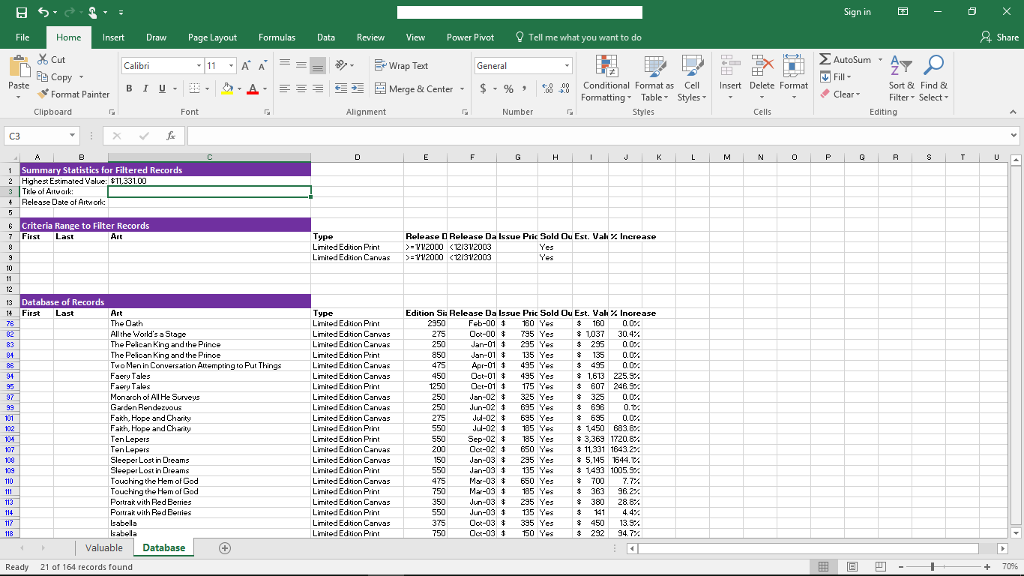
Enter a nested function using INDEX and MATCH to display the title from the Art column (in cell C3) and the release date (in cell C4) for highest estimated valued filtered artwork.
H 5 Tell me what you want to do Home Insert Draw Page Layout Formulas Data Review View Power Pivot dx cut Calibri Et Wrap Text General Co Paste Conditional Format as Cel Format Painter Formatting Table Clipboard Fon Alignment Number Summary Statistics for Filtered Records 2 Highest Esti ed Value $11.331.00 Rel Date Artwork: Criteria Range to Filter Record Release D Release Daksue Pric Sold Ou Est. vak x Increase Databa of R First Last Type Sia Relea Dals Pric Sold Ou Est. ValX Limited Prin 2950 Feb-00 180 Ye All the World Stage ted Edi 275 Oct-00 10 30 The Pol Limited 250 295 Y ing d th ted Edi 850 Jan 01 Attempting Put T Limited 475 495 Y Faery Tale ed Edi 450 Olot-01 435 Limited Prin 1250 175 Y ted Edi 250 2 325 Limited 250 -02 3 695 Y 698 ted Edi 275 u-02 685 695 Hope and Chi Limited Prin 550 u-02 3 135 Y 3 1450 Ba3, Be. Leper ted Edi 550 Sep 02 3363 7208A Leper Limited 200 Oct-02 3 650 Ye 6432 per Lost in ed Edi 3 235 5,115 1644 103 inD Limited Prin 550 -03 3 135 Y 3 1493 005, hing the ted Edi 475 3 650 700 hing the God Limited Prin 750 Mar-03 3 135 Y Portra th Red Ber ted Edi 350 3 235 Red Limited Prin 550 -03 3 135 Y Isabel ted Edi 375 Oct-03 385 kabel Limited Ed Prin Oct-03 3 150 Ye Valuable Database Ready 21 of 164 ound nsert Delete Format Sign in 2 Autosu Sort & Find Clear lter Select Editing share
Step by Step Solution
There are 3 Steps involved in it

Get step-by-step solutions from verified subject matter experts
 Study Help