







Question: ER to relational mapping ============== Q2 how to compares two dates and returns the difference in apex?! using booking table you have 3 tables call
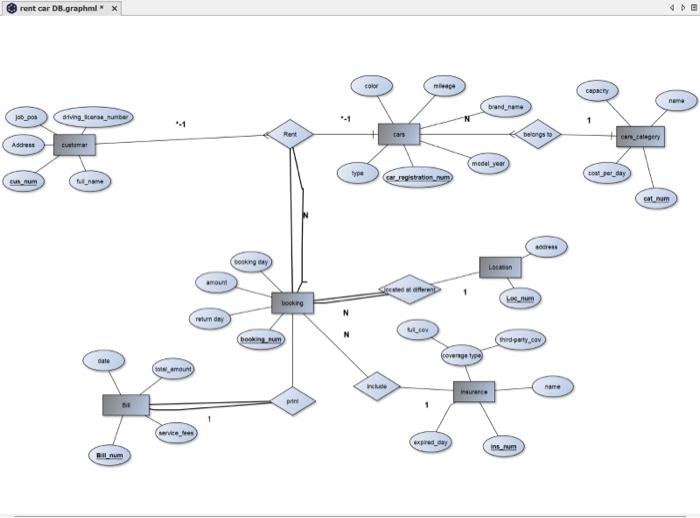
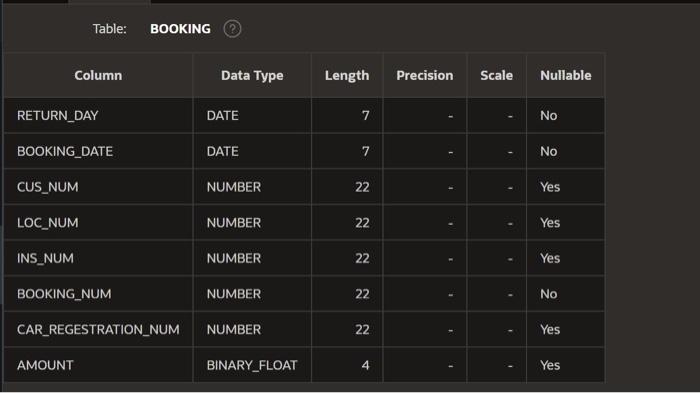
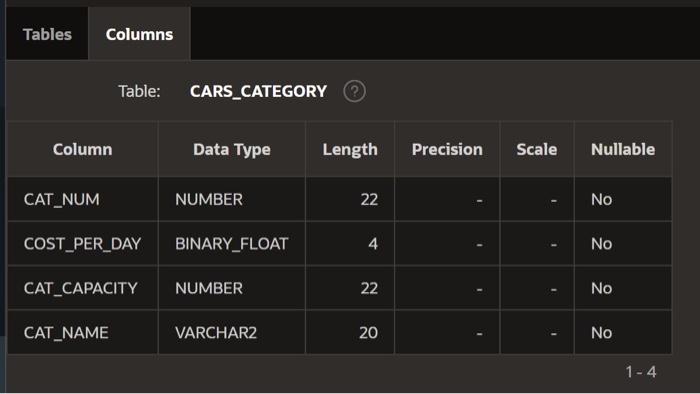
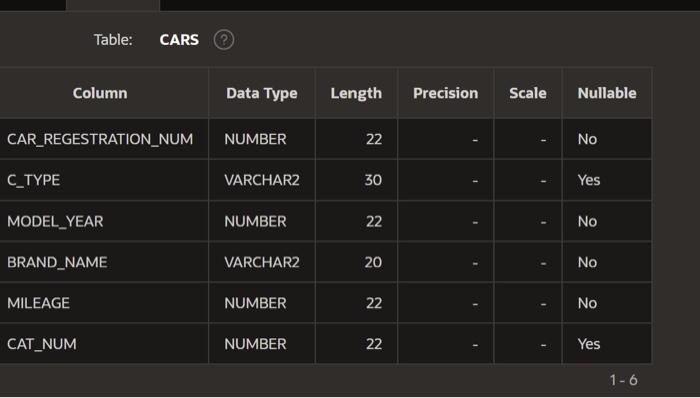
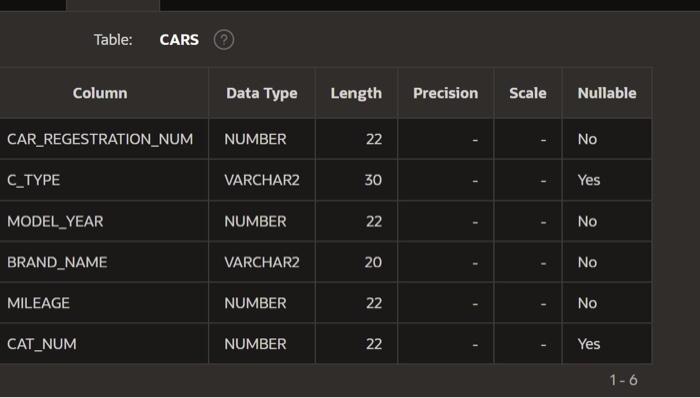
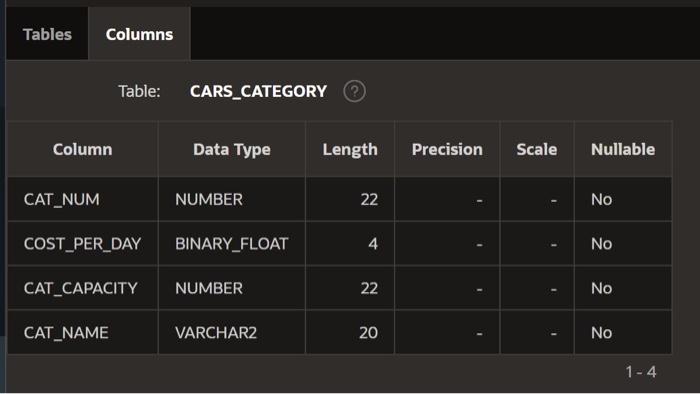
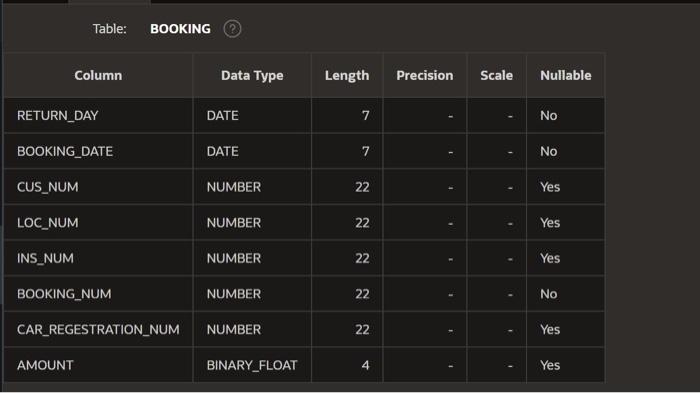
Table: CARS (?) \begin{tabular}{|l|l|l|l|l|l|} \hline \multicolumn{1}{|c|}{ Column } & Data Type & Length & Precision & Scale & Nullable \\ \hline CAR_REGESTRATION_NUM & NUMBER & 22 & & & No \\ \hline C_TYPE & VARCHAR2 & 30 & & & Yes \\ \hline MODEL_YEAR & NUMBER & 22 & & & No \\ \hline BRAND_NAME & VARCHAR2 & 20 & & & No \\ \hline MILEAGE & NUMBER & 22 & & & No \\ \hline CAT_NUM & NUMBER & 22 & & & Yes \\ \hline \end{tabular} Table: CARS (?) \begin{tabular}{|l|l|l|l|l|l|} \hline \multicolumn{1}{|c|}{ Column } & Data Type & Length & Precision & Scale & Nullable \\ \hline CAR_REGESTRATION_NUM & NUMBER & 22 & & & No \\ \hline C_TYPE & VARCHAR2 & 30 & & & Yes \\ \hline MODEL_YEAR & NUMBER & 22 & & & No \\ \hline BRAND_NAME & VARCHAR2 & 20 & & & No \\ \hline MILEAGE & NUMBER & 22 & & & No \\ \hline CAT_NUM & NUMBER & 22 & & & Yes \\ \hline \end{tabular} Table: CARS (?) \begin{tabular}{|l|l|l|l|l|l|} \hline \multicolumn{1}{|c|}{ Column } & Data Type & Length & Precision & Scale & Nullable \\ \hline CAR_REGESTRATION_NUM & NUMBER & 22 & & & No \\ \hline C_TYPE & VARCHAR2 & 30 & & & Yes \\ \hline MODEL_YEAR & NUMBER & 22 & & & No \\ \hline BRAND_NAME & VARCHAR2 & 20 & & & No \\ \hline MILEAGE & NUMBER & 22 & & & No \\ \hline CAT_NUM & NUMBER & 22 & & & Yes \\ \hline \end{tabular} Table: CARS (?) \begin{tabular}{|l|l|l|l|l|l|} \hline \multicolumn{1}{|c|}{ Column } & Data Type & Length & Precision & Scale & Nullable \\ \hline CAR_REGESTRATION_NUM & NUMBER & 22 & & & No \\ \hline C_TYPE & VARCHAR2 & 30 & & & Yes \\ \hline MODEL_YEAR & NUMBER & 22 & & & No \\ \hline BRAND_NAME & VARCHAR2 & 20 & & & No \\ \hline MILEAGE & NUMBER & 22 & & & No \\ \hline CAT_NUM & NUMBER & 22 & & & Yes \\ \hline \end{tabular}
Step by Step Solution
There are 3 Steps involved in it

Get step-by-step solutions from verified subject matter experts
 Study Help