







Question: Error with server for java gui program, unsure if this is the right direction? Those are the directions, here is the code I have.. Compiles,
Error with server for java gui program, unsure if this is the right direction?
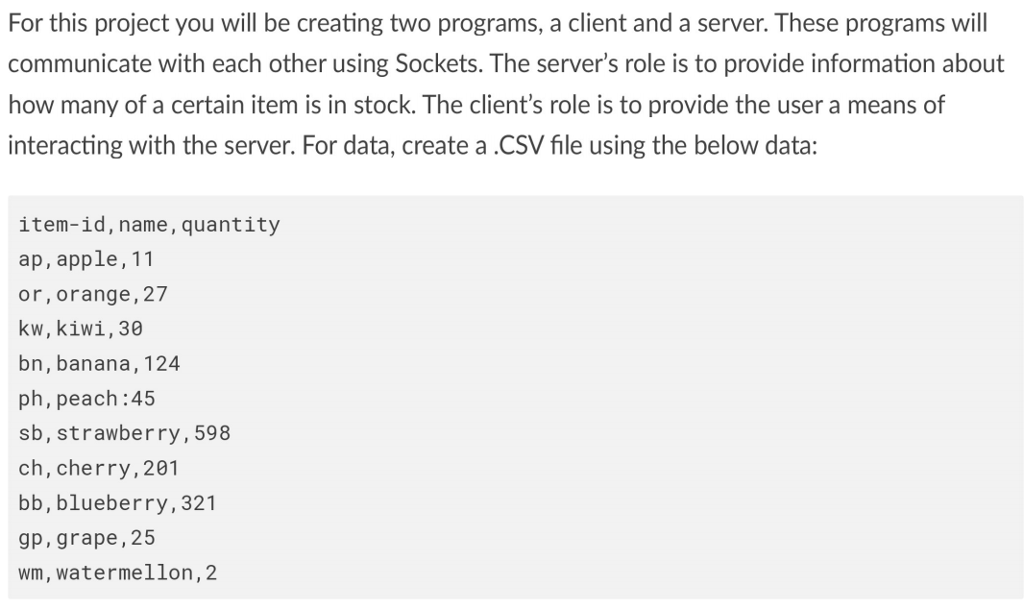
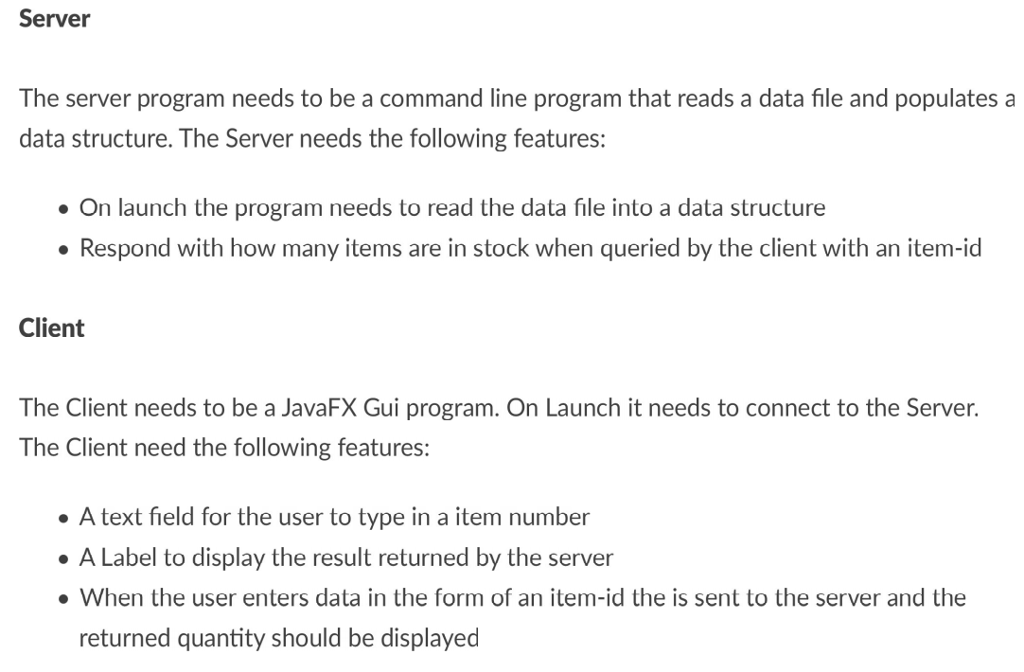
Those are the directions, here is the code I have.. Compiles, doesn't run.
Also unsure of how to add the .CSV file
**GUI Code***
import javafx.scene.Scene;
import javafx.scene.control.Button;
import java.io.DataInputStream;
import java.io.DataOutputStream;
import java.io.IOException;
import java.io.InputStream;
import java.io.OutputStream;
import java.net.Socket;
import java.util.logging.Level;
import java.util.logging.Logger;
import javafx.application.Application;
import javafx.scene.control.Label;
import javafx.scene.control.TextField;
import javafx.stage.Stage;
import javafx.event.ActionEvent;
import javafx.scene.layout.GridPane;
public class GUIClient extends Application {
@Override
public void start(Stage primaryStage) throws Exception {
primaryStage.setTitle("Stock Query Program");
TextField input = new TextField();
Label output = new Label("");
Button button = new Button("Get Qty");
button.setOnAction((ActionEvent t) ->{
String stockId = input.getText();
String stockData = Client.connect(stockId);
output.setText(stockData);
});
// creat a layout to fit the elements
GridPane layout = new GridPane();
// add the elements to the layout
layout.add(input, 0, 0, 1, 1);
layout.add(button, 1, 0, 1, 1);
layout.add(output, 0, 1, 2, 1);
layout.setHgap(10);
layout.setVgap(10);
// create a scene with the layout
Scene scene = new Scene(layout, 250, 100);
primaryStage.setScene(scene);
primaryStage.show();
}
public static void main(String... args) {
launch(args);
}
}
class Client {
public static final String SERVER_NAME = "localhost";
public static final int PORT_NUMBER = 10043;
public static String connect(String stockId) {
System.out.println("Connecting to " + SERVER_NAME+ " on port " + PORT_NUMBER);
try (Socket client = new Socket(SERVER_NAME, PORT_NUMBER)) { // create a socket
System.out.println("Just connected to "+ client.getRemoteSocketAddress());
OutputStream outToServer = client.getOutputStream();
DataOutputStream out = new DataOutputStream(outToServer);
out.writeUTF(stockId); // send the file name to the server
InputStream inFromServer = client.getInputStream();
DataInputStream in =new DataInputStream(inFromServer);
String stockInfo = in.readUTF(); // read the file contents from the server
return stockInfo;
} catch (IOException ex) {
Logger.getLogger(Client.class.getName()).log(Level.SEVERE, null, ex);
return "Error While Contacting the Server";
}
}
}
***SERVER code***
import java.io.DataInputStream;
import java.io.DataOutputStream;
import java.io.File;
import java.io.FileNotFoundException;
import java.io.IOException;
import java.net.ServerSocket;
import java.net.Socket;
import java.net.SocketTimeoutException;
import java.util.HashMap;
import java.util.Scanner;
public class Server extends Thread {
private final ServerSocket serverSocket;
private final HashMap
// Constructor for the Server Class
public Server(int port) throws IOException {
serverSocket = new ServerSocket(port);
serverSocket.setSoTimeout(100000);
stock = new HashMap();
}
// Run method
@Override
public void run() {
while(true) {
System.out.println("Waiting for client on port "+serverSocket.getLocalPort() + "...");
try (Socket server = serverSocket.accept()) { // accept the connection request, when client sends a request
System.out.println("Just connected to "+server.getRemoteSocketAddress());
DataInputStream in = new DataInputStream(server.getInputStream());
String stockId = in.readUTF(); // read the information sent by the client
System.out.println("Stock Id: "+stockId);
Item item = null;
if(stock.containsKey(stockId)) { // get the Item object if the stock id exists in the map
item = stock.get(stockId);
}
DataOutputStream out = new DataOutputStream(server.getOutputStream());
System.out.println("Sending the reply to the Client...");
// send the contents of the file to the client
if(item == null) {
out.writeUTF("Item with given id does not exist");
} else {
out.writeUTF(item.toString());
}
} catch(SocketTimeoutException s) {
System.out.println("Socket timed out!");
} catch(IOException e) {}
}
}
/**
* Method to read the contents of given file
* @param file
* @throws FileNotFoundException
*/
private void readStocks(String file) throws FileNotFoundException {
Scanner in = new Scanner(new File(file));
in.useDelimiter("[, ]");
while(in.hasNext()){
Item item = new Item(in.next(), in.next(), in.nextInt());
stock.put(item.getId(), item);
}
}
public static void main(String [] args) {
int port = Client.PORT_NUMBER;
try {
Server t = new Server(port);
t.readStocks("stock.txt");
t.start();
} catch(IOException e) {}
}
}
class Item {
private final String id;
private final String name;
private final int qty;
public Item(String id, String name, int qty) {
this.id = id;
this.name = name;
this.qty = qty;
}
public String getId() {
return id;
}
public String getName() {
return name;
}
public int getQty() {
return qty;
}
@Override
public String toString() {
return "Id : " + id + ", Name : " + name + ", Quantity : " + qty;
}
}
For this project you will be creating two programs, a client and a server. These programs will communicate with each other using Sockets. The server's role is to provide information about how many of a certain item is in stock. The client's role is to provide the user a means of interacting with the server. For data, create a.CSV file using the below data: item-id, name, quantity ap, apple,11 or,orange, 27 kw, kiwi,30 bn, banana, 124 ph, peach:45 sb, strawberry,598 ch, cherry, 201 bb, blueberry, 321 9p, grape,25 wm, watermellon, 2
Step by Step Solution
There are 3 Steps involved in it

Get step-by-step solutions from verified subject matter experts
 Study Help