







Question: ex 4: html and css/ please write a new code Open your text editor create a new file and name it Lec_Ex4_2.html create a new
ex 4: html and css/ please write a new code
Open your text editor create a new file and name it Lec_Ex4_2.html create a new file and name it style_2.css Type the 8 lines in the html(basic html structure). Add this line to the head section of html:
Write these lines in the body of the html:
Your name
Style it in the CSS: #title{ background-color:blue;} #container1 {background-color:red;}
If we dont specify the width of the div element, it will take up the full width available. We can specify the width and height of the div using percentages or pixels. Percentages are flexible (changes according to the screen size), and pixels are fixed. Add the following property to both divs: Width:80%; This is comparing to the full screen
In order to make the divs centered, you need to add the following property: Margin:auto; Its different if we want to make the text centered: Text-align:center; We want to make divsseparated from each other To separate the two divs, add the following property to the container: margin-top:10px;
For the title div: Padding:2%; For the container div: Height: 400px; Height can also be made with percentages, but pixels are preferred.
Your code must have 3 divs : title, container1 and container2 (the one inside the red div). Container2 must be inside container1. All the divs must be centered, colorful, and not fill up the full space that is given to them.
It should looks like this:
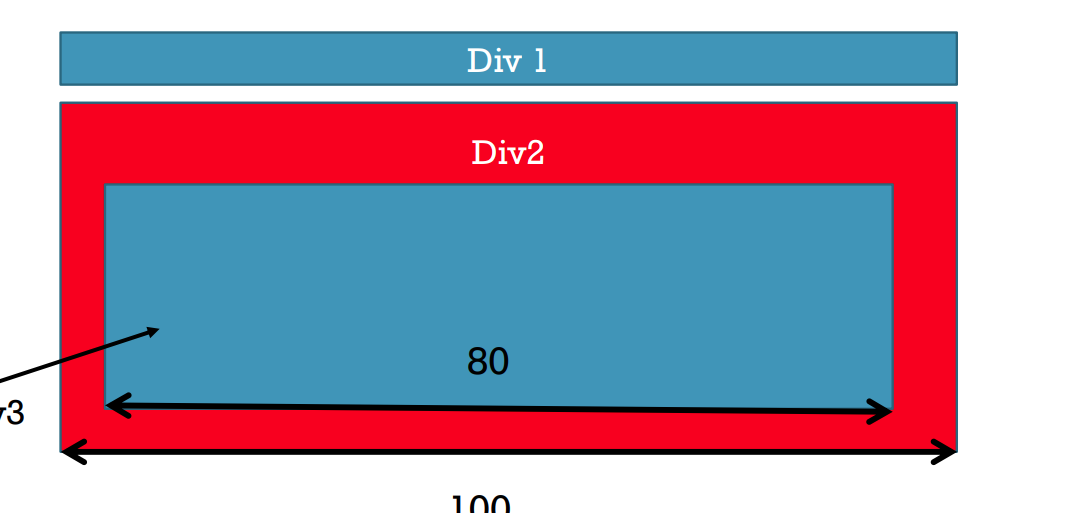
Div 1 Div2 80
Step by Step Solution
There are 3 Steps involved in it

Get step-by-step solutions from verified subject matter experts
 Study Help