







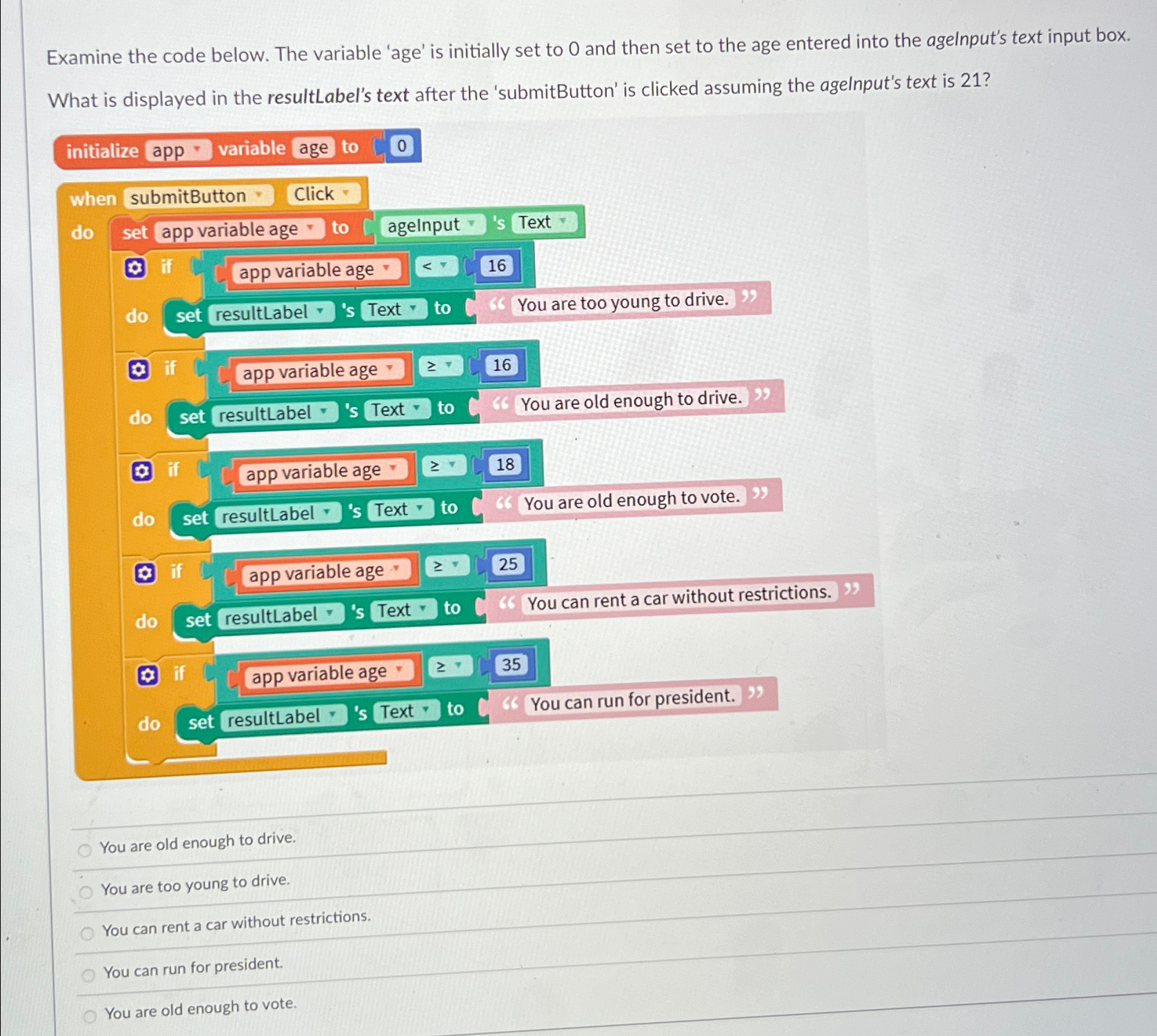
Question: Examine the code below. The variable 'age' is initially set to 0 and then set to the age entered into the agelnput's text input box.
Examine the code below. The variable 'age' is initially set to and then set to the age entered into the agelnput's text input box.
What is displayed in the resultLabel's text after the 'submitButton' is clicked assuming the agelnput's text is
initialize app variable age to
when submitButton Click
do
app variable age
do set resultLabel grad s Text grad to You are old enough to drive.
do set resultLabel grad s Text grad to You are old enough to vote.
app variable age
do set resultLabel grad s Text grad to You can rent a car without restrictions.
You are old enough to drive.
You are too young to drive.
You can rent a car without restrictions.
You can run for president.
You are old enough to vote.
Step by Step Solution
There are 3 Steps involved in it
1 Expert Approved Answer
Step: 1 Unlock

Question Has Been Solved by an Expert!
Get step-by-step solutions from verified subject matter experts
Step: 2 Unlock
Step: 3 Unlock
 Study Help