





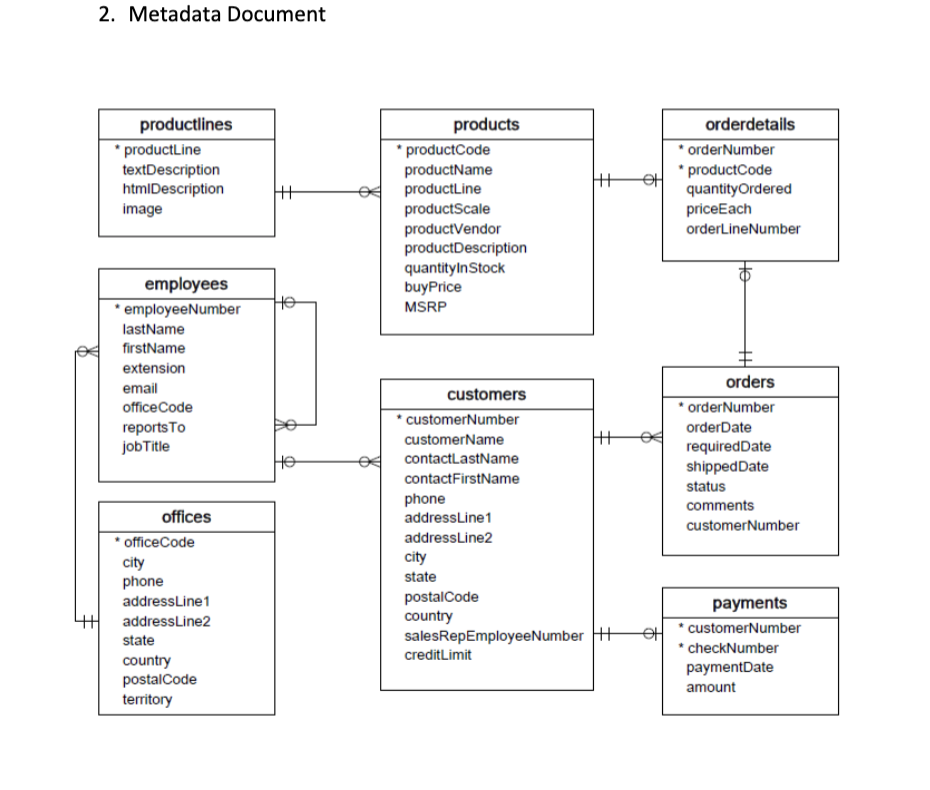
Question: Examine the ER Diagram below. Create the following documents from the Diagram Below. 1. Relational Schema Document 2. Metadata Document Extra Credit Assignment - Metadata
Examine the ER Diagram below. Create theExamine the ER Diagram below. Create the

Examine the ER Diagram below. Create the following documents from the Diagram Below. 1. Relational Schema Document 2. Metadata Document Extra Credit Assignment - Metadata for Practice Database.pdf Each Table Description should list the following 1. Attributes Names 2. Attribute Description 3. Attribute Datatypes 4. Primary Keys 5. Foreign Keys 6. Null Values Allowed You can run a Describe Table Statement on each of the tables in the database to determine this information if you are not sure. Upload the Following Documents 1. Relational Schema Document in a Word or PDF format 2. Metadata Document in an Excel, Word, or PDF format 2. Metadata Document productlines *productLine textDescription htmlDescription image employees * employeeNumber lastName firstName extension email office Code reports To job Title * officeCode city phone addressLine1 addressLine2 state country postalCode territory offices He products *productCode productName productLine productScale productVendor product Description quantityInStock buyPrice MSRP |++ customers * customerNumber customerName contactLastName contactFirstName phone addressLine1 addressLine2 city state postal Code country salesRepEmployeeNumber H creditLimit |H OH orderdetails * orderNumber * product Code quantityOrdered priceEach orderLineNumber orders * orderNumber orderDate requiredDate shippedDate status comments customerNumber payments customerNumber * checkNumber paymentDate amount

Step by Step Solution

There are 3 Steps involved in it

1 Expert Approved Answer
Step: 1 Unlock blur-text-image

Question Has Been Solved by an Expert!

Get step-by-step solutions from verified subject matter experts

Step: 2 Unlock
Step: 3 Unlock

Students Have Also Explored These Related General Management Questions!