



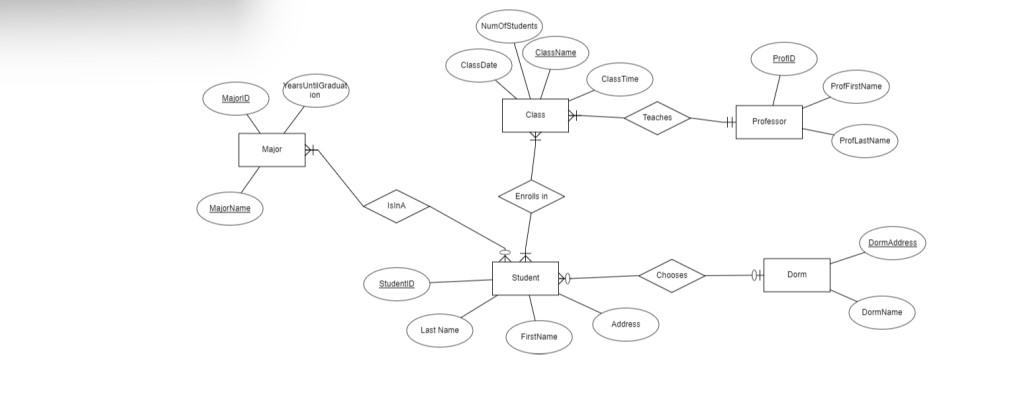
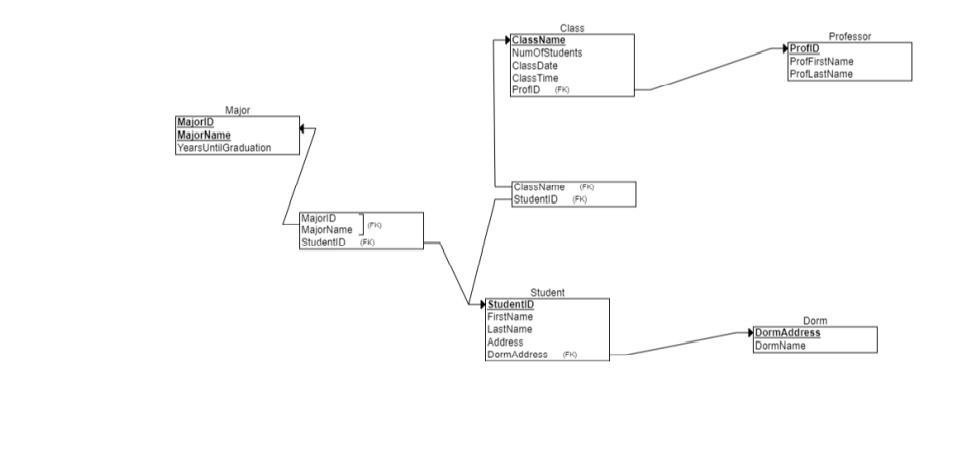
Question: Examine the Relational Schema that was created during the Phase I of the project. Based on that schema, create a set of tables for an
Examine the Relational Schema that was created during the Phase I of the project.
Based on that schema, create a set of tables for an MS Access database. Name the database and its tables appropriately. Make sure to specify primary keys for all tables. Make sure all referential integrity constraints are enforced.
Create all the necessary relationships between the tables.
Populate the tables with initial data (no less than two no more than ten records per table).
Create at least three queries for this database.
Create at least three forms for this database. (You can base your forms on tables, queries, or both).
Create at least three reports for this database. (You can base your reports on tables, queries, or both).
Create a Navigation Form that will present the forms and reports created in previous steps to novice users of your application. Create an AutoExec macro, which invokes the Navigation Form you created in Step 7 (simply create a macro named AutoExec which opens the main Navigation Form and maximizes the form this macro will automatically execute as soon as your Access file is open).
Step by Step Solution
There are 3 Steps involved in it

Get step-by-step solutions from verified subject matter experts