







Question: Example Program, classes and objects : #include using namespace std; class Complex { public : double x; // real part double y; // imaginary part
Example Program, classes and objects : #include
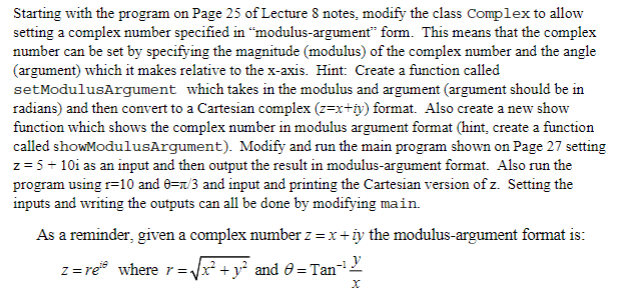
double Complex::real(Complex Z) { return Z.x; } double Complex::imag(Complex Z) { return Z.y; } int main() { Complex z1, z2; z1.set(1.5, 2.3); // z1 = 1.5 + 2.3 i z2.set(2.0, 3.0); // z2 = 2.0 + 3.0 i cout Starting with the program on Page 25 of Lecture 8 notes, modify the class Complex to allow setting a complex number specified in "modulus-argument" form. This means that the complex number can be set by specifying the magnitude (modulus) of the complex number and the angle (argument) which it makes relative to the x-axis. Hint: Create a function called setModulusArgument which takes in the modulus and argument (argument should be in radians) and then convert to a Cartesian complex (z=x+iy) format. Also create a new show function which shows the complex number in modulus argument format (hint, create a function called showModulusArgument). Modify and run the main program shown on Page 27 setting z=5+10i as an input and then output the result in modulus-argument format. Also run the program using r=10 and =/3 and input and printing the Cartesian version of z. Setting the inputs and writing the outputs can all be done by modifying main. As a reminder, given a complex number z=x+iy the modulus-argument format is: z=rei where r=x2+y2 and =Tan1xy
Step by Step Solution
There are 3 Steps involved in it

Get step-by-step solutions from verified subject matter experts
 Study Help