







Question: example program: def detectShush(frame, location, ROI, cascade): mouths = cascade.detectMultiScale(ROI, 1.15, 3, 0, (20, 20)) for (mx, my, mw, mh) in mouths: mx += location[0]
example program:
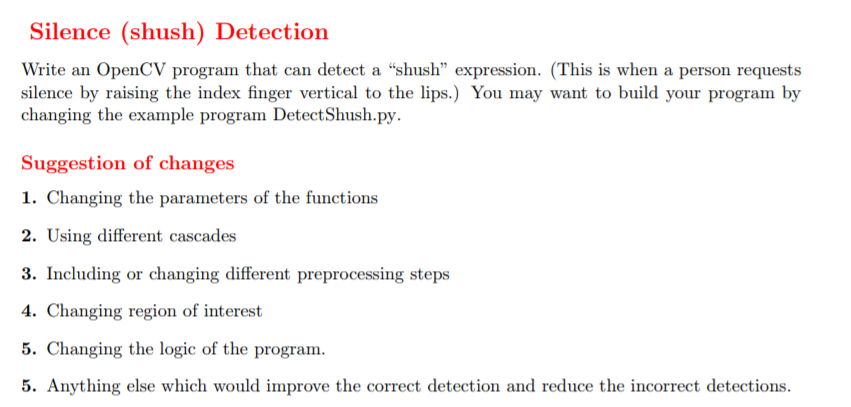
def detectShush(frame, location, ROI, cascade): mouths = cascade.detectMultiScale(ROI, 1.15, 3, 0, (20, 20)) for (mx, my, mw, mh) in mouths: mx += location[0] my += location[1] cv2.rectangle(frame, (mx, my), (mx+mw, my+mh), (0, 0, 255), 2) return len(mouths) == 0 def detect(frame, faceCascade, mouthsCascade): gray_frame = cv2.cvtColor(frame, cv2.COLOR_BGR2GRAY) # gray_frame = cv2.equalizeHist(gray_frame) # gray_frame = cv2.medianBlur(gray_frame, 5) faces = faceCascade.detectMultiScale( gray_frame, 1.15, 4, 0|cv2.CASCADE_SCALE_IMAGE, (40, 40)) detected = 0 for (x, y, w, h) in faces: # ROI for mouth x1 = x h2 = int(h/2) y1 = y + h2 mouthROI = gray_frame[y1:y1+h2, x1:x1+w] if detectShush(frame, (x1, y1), mouthROI, mouthsCascade): detected += 1 cv2.rectangle(frame, (x, y), (x+w, y+h), (255, 0, 0), 2) else: cv2.rectangle(frame, (x, y), (x+w, y+h), (0, 255, 0), 2) return detected def run_on_folder(cascade1, cascade2, folder): if(folder[-1] != "/"): folder = folder + "/" files = [join(folder,f) for f in listdir(folder) if isfile(join(folder,f))] windowName = None totalCnt = 0 for f in files: img = cv2.imread(f) if type(img) is np.ndarray: lCnt = detect(img, cascade1, cascade2) totalCnt += lCnt if windowName != None: cv2.destroyWindow(windowName) windowName = f cv2.namedWindow(windowName, cv2.WINDOW_AUTOSIZE) cv2.imshow(windowName, img) cv2.waitKey(0) return totalCnt def runonVideo(face_cascade, eyes_cascade): videocapture = cv2.VideoCapture(0) if not videocapture.isOpened(): print("Can't open default video camera!") exit() windowName = "Live Video" showframe = True while(showframe): ret, frame = videocapture.read() if not ret: print("Can't capture frame") break detect(frame, face_cascade, eyes_cascade) cv2.imshow(windowName, frame) if cv2.waitKey(30) >= 0: showframe = False videocapture.release() cv2.destroyAllWindows() if __name__ == "__main__": # check command line arguments: nothing or a folderpath if len(sys.argv) != 1 and len(sys.argv) != 2: print(sys.argv[0] + ": got " + len(sys.argv) - 1 + "arguments. Expecting 0 or 1:[image-folder]") exit() # load pretrained cascades face_cascade = cv2.CascadeClassifier(cv2.data.haarcascades + 'haarcascade_frontalface_default.xml') mouth_cascade = cv2.CascadeClassifier('Mouth.xml') if(len(sys.argv) == 2): # one argument folderName = sys.argv[1] detections = run_on_folder(face_cascade, mouth_cascade, folderName) print("Total of ", detections, "detections") else: # no arguments runonVideo(face_cascade, mouth_cascade) Silence (shush) Detection Write an OpenCV program that can detect a "shush" expression. (This is when a person requests silence by raising the index finger vertical to the lips.) You may want to build your program by changing the example program DetectShush.py. Suggestion of changes 1. Changing the parameters of the functions 2. Using different cascades 3. Including or changing different preprocessing steps 4. Changing region of interest 5. Changing the logic of the program 5. Anything else which would improve the correct detection and reduce the incorrect detections. Silence (shush) Detection Write an OpenCV program that can detect a "shush" expression. (This is when a person requests silence by raising the index finger vertical to the lips.) You may want to build your program by changing the example program DetectShush.py. Suggestion of changes 1. Changing the parameters of the functions 2. Using different cascades 3. Including or changing different preprocessing steps 4. Changing region of interest 5. Changing the logic of the program 5. Anything else which would improve the correct detection and reduce the incorrect detections
Step by Step Solution
There are 3 Steps involved in it

Get step-by-step solutions from verified subject matter experts
 Study Help