


Question: Excel Assignment (submitted with the rest of homework assignment): For this exercise, you will build a bond pricing model to calculate the prices of three
Excel Assignment (submitted with the rest of
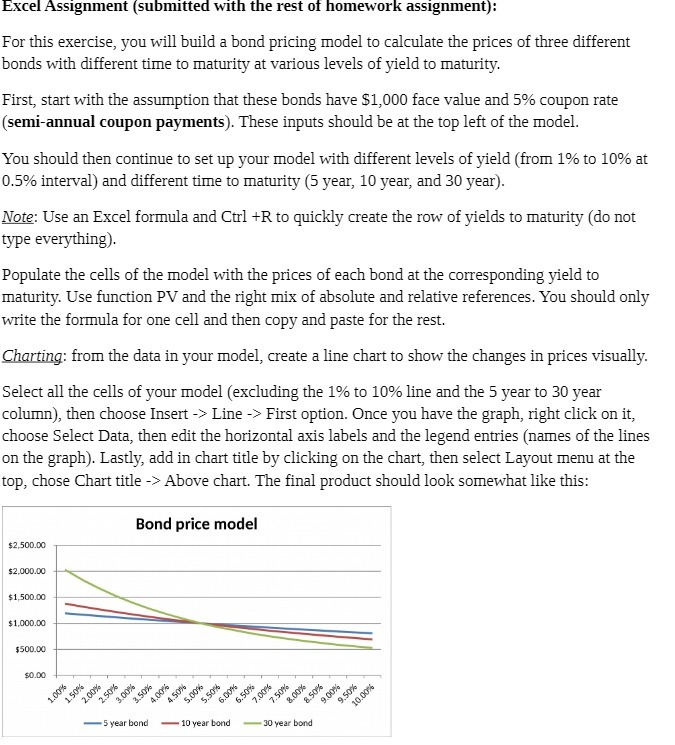
Excel Assignment (submitted with the rest of homework assignment): For this exercise, you will build a bond pricing model to calculate the prices of three different bonds with different time to maturity at various levels of yield to maturity. First, start with the assumption that these bonds have $1,000 face value and 5% coupon rate (semi-annual coupon payments). These inputs should be at the top left of the model. You should then continue to set up your model with different levels of yield (from 1% to 10% at 0.5% interval) and different time to maturity (5 year, 10 year, and 30 year). Note: Use an Excel formula and Curl +R to quickly create the row of yields to maturity (do not type everything). Populate the cells of the model with the prices of each bond at the corresponding yield to maturity. Use function PV and the right mix of absolute and relative references. You should only write the formula for one cell and then copy and paste for the rest. Charting: from the data in your model, create a line chart to show the changes in prices visually. Select all the cells of your model (excluding the 1% to 10% line and the 5 year to 30 year column), then choose Insert -> Line -> First option. Once you have the graph, right click on it, choose Select Data, then edit the horizontal axis labels and the legend entries (names of the lines on the graph). Lastly, add in chart title by clicking on the chart, then select Layout menu at the top, chose Chart title -> Above chart. The final product should look somewhat like this: Bond price model $2.500.00 $2.000.00 $1,500.00 $1,000.00 $500.00 .00%% 1.50% 2.00%% 2.50% 3.00%% 3.50%% 100% .50%% 5.00 5.50 6.00% 6.50%% 7.00% 7.50% 8.00% 9.00% 9.50% 10.00% 5 year bond 10 year bond 30 year bond

Step by Step Solution

There are 3 Steps involved in it

1 Expert Approved Answer
Step: 1 Unlock blur-text-image

Question Has Been Solved by an Expert!

Get step-by-step solutions from verified subject matter experts

Step: 2 Unlock
Step: 3 Unlock

Students Have Also Explored These Related Accounting Questions!