







Question: Excel Homework #1 1. Create any logical function by using one of the following logical operators: AND, OR, NOT. 2. Create any IF function
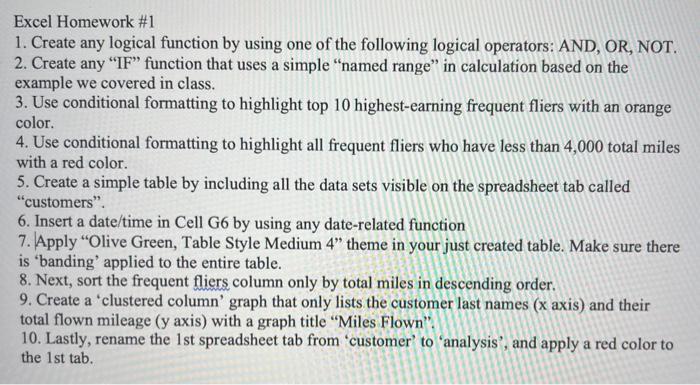
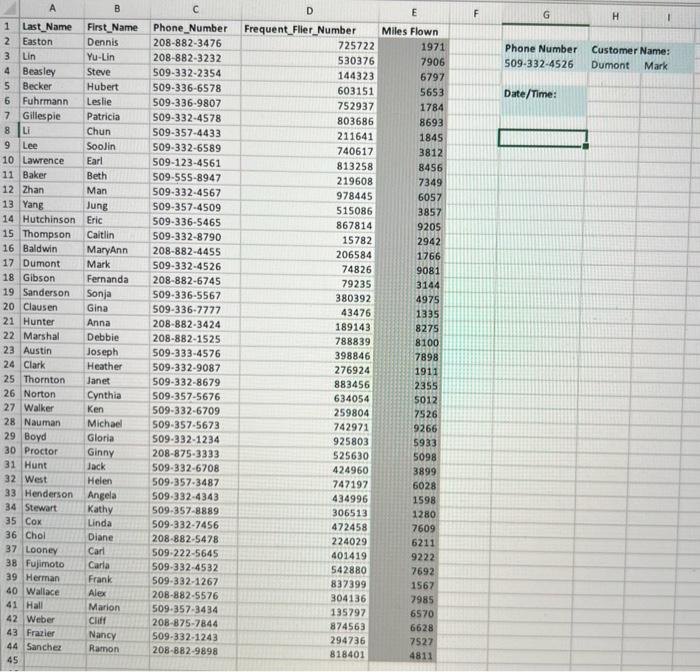
Excel Homework #1 1. Create any logical function by using one of the following logical operators: AND, OR, NOT. 2. Create any "IF" function that uses a simple "named range" in calculation based on the example we covered in class. 3. Use conditional formatting to highlight top 10 highest-earning frequent fliers with an orange color. 4. Use conditional formatting to highlight all frequent fliers who have less than 4,000 total miles with a red color. 5. Create a simple table by including all the data sets visible on the spreadsheet tab called "customers". 6. Insert a date/time in Cell G6 by using any date-related function 7. Apply "Olive Green, Table Style Medium 4" theme in your just created table. Make sure there is 'banding' applied to the entire table. 8. Next, sort the frequent fliers column only by total miles in descending order. 9. Create a 'clustered column' graph that only lists the customer last names (x axis) and their total flown mileage (y axis) with a graph title "Miles Flown". 10. Lastly, rename the 1st spreadsheet tab from 'customer' to 'analysis', and apply a red color to the 1st tab. 1 Last Name First Name 2 Easton Dennis 3 Lin Yu-Lin 4 Beasley Steve 5 Becker Hubert 6 Fuhrmann Leslie 7 Gillespie Patricia Chun 8 Li 9 Lee Soolin Earl Beth Man 10 Lawrence 11 Baker 12 Zhan 13 Yang 14 Hutchinson 15 Thompson 16 Baldwin 17 Dumont 18 Gibson 19 Sanderson 20 Clausen 21 Hunter 22 Marshal 23 Austin 24 Clark 25 Thornton 26 Norton 27 Walker 34 Stewart 35 Cox Jung Eric Caitlin 28 Nauman 29 Boyd 30 Proctor 31 Hunt 32 West 33 Henderson Angela Kathy Linda 36 Chol 37 Looney 38 Fujimoto 39 Herman 40 Wallace 41 Hall 42 Weber 43 Frazier 44 Sanchez 45 MaryAnn Mark Fernanda Sonja Gina Anna Debbie Joseph Heather Janet Cynthia Ken Michael Gloria Ginny Jack Helen Diane Carl Carla Frank Alex Marion Cliff Nancy Ramon Phone Number Frequent Flier_Number 208-882-3476 208-882-3232 509-332-2354 509-336-6578 509-336-9807 509-332-4578 509-357-4433 509-332-6589 509-123-4561 509-555-8947 509-332-4567 509-357-4509 509-336-5465 509-332-8790 208-882-4455 509-332-4526 208-882-6745 509-336-5567 509-336-7777 208-882-3424 208-882-1525 509-333-4576 509-332-9087 509-332-8679 509-357-5676 509-332-6709 509-357-5673 509-332-1234 208-875-3333 509-332-6708 509-357-3487 509-332-4343 509-357-8889 D 509-332-7456 208-882-5478 509-222-5645 509-332-4532 509-332-1267 208-882-5576 509-357-3434 208-875-7844 509-332-1243 208-882-9898 725722 530376 144323 603151 752937 803686 211641 740617 813258 219608 978445 515086 867814 15782 206584 74826 79235 380392 43476 189143 788839 398846 276924 883456 634054 259804 742971 925803 525630 424960 747197 434996 306513 472458 224029 401419 542880 837399 304136 135797 874563 294736 818401 E Miles Flown 1971 7906 6797 5653 1784 8693 1845 3812 8456 7349 6057 3857 9205 2942 1766 9081 3144 4975 1335 8275 8100 7898 1911 2355 5012 7526 9266 5933 5098 3899 6028 1598 1280 7609 6211 9222 7692 1567 7985 6570 6628 7527 4811 F G Phone Number 509-332-4526 Date/Time: H 1 Customer Name: Dumont Mark
Step by Step Solution
There are 3 Steps involved in it

Get step-by-step solutions from verified subject matter experts
 Study Help