







Question: Excel. I need clear steps on how to do this. Thank you. Q4a (1 point): Calculate the total expenditure for each year in cells B14:G14
Excel. I need clear steps on how to do this. Thank you. 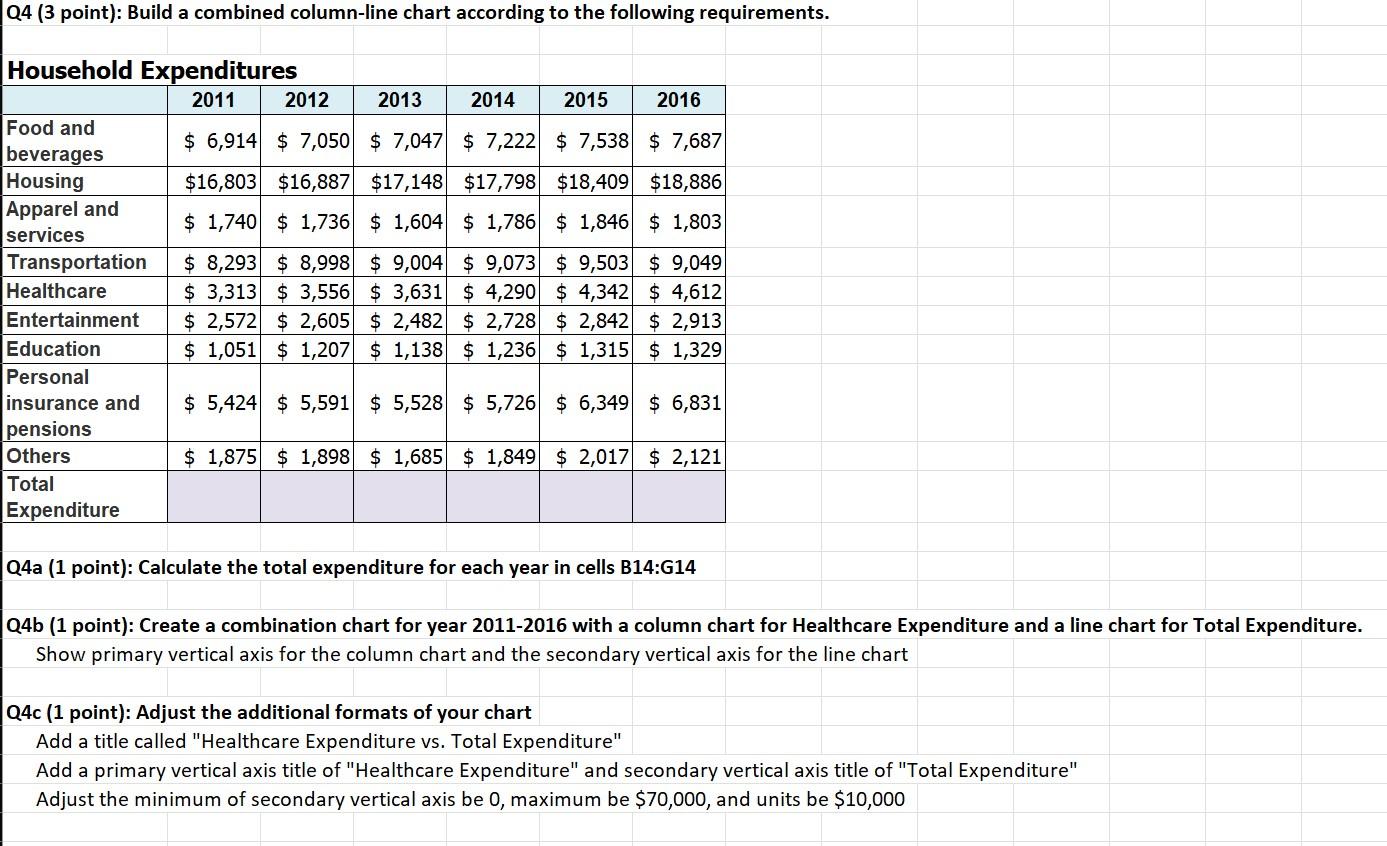
Q4a (1 point): Calculate the total expenditure for each year in cells B14:G14 Q4b (1 point): Create a combination chart for year 2011-2016 with a column chart for Healthcare Expenditure and a line chart for Total Expenditure. Show primary vertical axis for the column chart and the secondary vertical axis for the line chart Q4c (1 point): Adjust the additional formats of your chart Add a title called "Healthcare Expenditure vs. Total Expenditure" Add a primary vertical axis title of "Healthcare Expenditure" and secondary vertical axis title of "Total Expenditure" Adjust the minimum of secondary vertical axis be 0 , maximum be $70,000, and units be $10,000
Step by Step Solution
There are 3 Steps involved in it

Get step-by-step solutions from verified subject matter experts
 Study Help