







Question: EXCEL MASTER IT! PROBLEM Using Excel to find the marginal tax rate can be accomplished using the Vlookup function. However, calculating the total tax bill
EXCEL MASTER IT! PROBLEM
Using Excel to find the marginal tax rate can be accomplished using the Vlookup function. However, calculating the total tax bill is a little more difficult. Below is shown a copy of the IRS tax table for an individual for 2019 (the income thresholds are indexed to inflation and change through time):
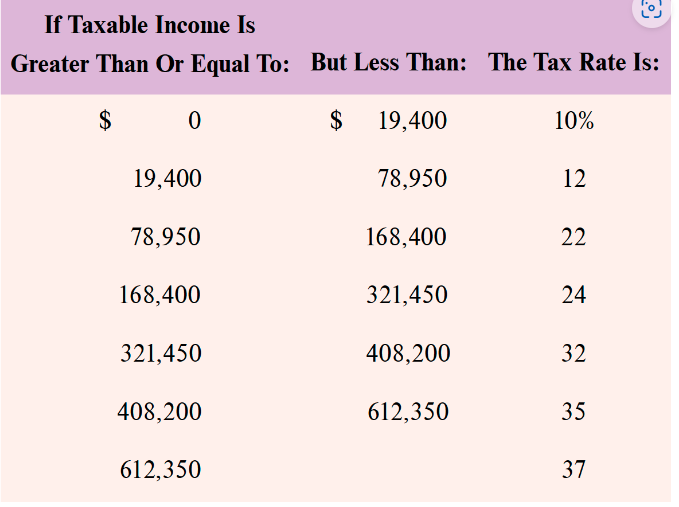
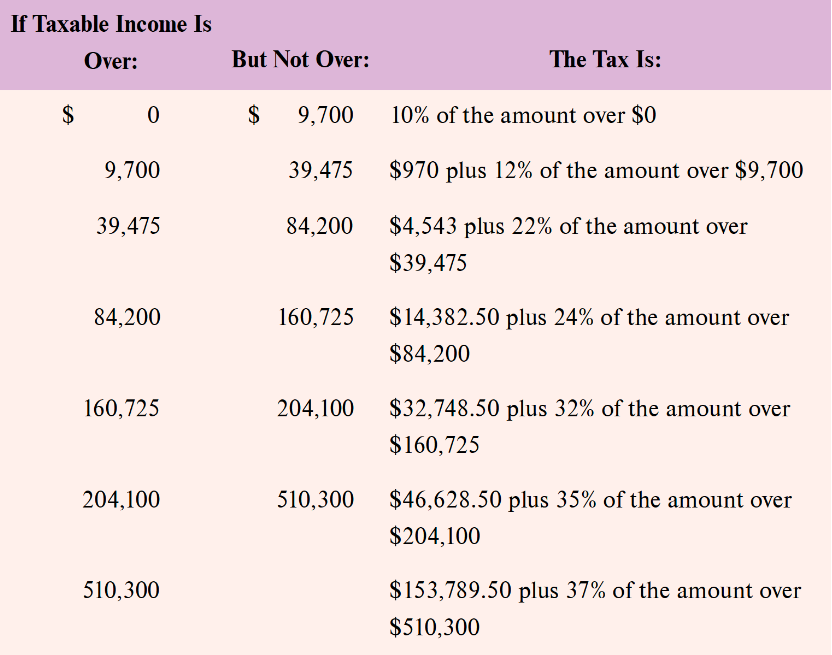
i=_ 1 0 If Taxable Income Is Greater Than Or Equal To: But Less Than: The Tax Rate Is: $ 0 $ 19,400 10% 19,400 78,950 b 78,950 168,400 22 168,400 321,450 24 321,450 408,200 32 408,200 612,350 35 612,350 3 If Taxable Income Is Over: But Not Over: The Tax Is: $ 0 $ 9,700 10% of the amount over $0 9.700 39.475 $970 plus 12% of the amount over $9,700 39.475 84,200 $4.543 plus 22% of the amount over $39.475 84,200 160,725 $14,382.50 plus 24% of the amount over $84,200 160,725 204,100 $32,748.50 plus 32% of the amount over $160,725 204,100 510,300 $46,628.50 plus 35% of the amount over $204,100 510,300 $153,789.50 plus 37% of the amount over $510,300
Step by Step Solution
There are 3 Steps involved in it

Get step-by-step solutions from verified subject matter experts
 Study Help