







Question: Excel Pivot Table *Please show all work! Apply subtotals that give the total amount for each category. Copy the worksheet and rename the copied worksheet
Excel Pivot Table
*Please show all work!
Apply subtotals that give the total amount for each category. Copy the worksheet and rename the copied worksheet Q1.Return to the Expenditures worksheet and remove all subtotals.
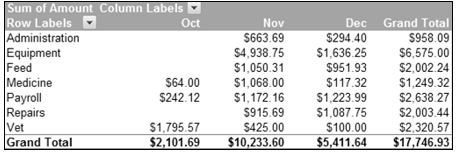
Create a PivotTable that summarizes expenditures (Amount) by Category and month. Place the PivotTable in a new worksheet and name the worksheet PivotTable #1.
Apply the Pivot Style Medium 14 style to the PivotTable and format the numbers as currency with 2 decimal places. Right align the month column headings. Your PivotTable should look like the image below.
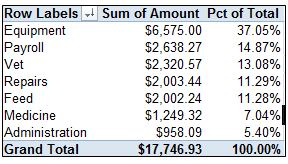
 Create the PivotTable shown below in a new worksheet. Name the worksheet PivotTable #2. (Hint: The Amount field should appear in the values section twice. Check the Show values as tab in the Value Field Setting dialog box to calculate the percent of column total.)
Format the numbers as shown and rename column headings as shown. Sort the Amount column in descending order.
Expenditures Sheet
| Description | Date Paid | Check # | Category | Amount | Outstanding |
| ABC Commercial Printers | 11/5/2010 | 10210 | Administration | $ 86.60 | No |
| ABC Feed & Seed | 12/30/2010 | 10246 | Feed | $ 525.56 | Yes |
| Crawl Feed Supply | 11/5/2010 | 10212 | Feed | $ 325.95 | No |
| Crawl Feed Supply | 11/8/2010 | 10214 | Feed | $ 724.36 | No |
| Crawl Feed Supply | 12/20/2010 | 10238 | Feed | $ 226.28 | No |
| Crawl Feed Supply | 12/21/2010 | 10240 | Feed | $ 200.09 | No |
| Dr. Schuler | 11/5/2010 | 10211 | Vet | $ 25.00 | No |
| Dr. Schuler | 12/15/2010 | 10234 | Vet | $ 100.00 | No |
| Dr. Smith | 11/5/2010 | 10209 | Medicine | $ 865.69 | No |
| Dr. Smith | 10/22/2010 | 10200 | Vet | $ 795.57 | No |
| Ellen Desert | 12/28/2010 | 10242 | Payroll | $ 31.00 | Yes |
| Fred Kaplan | 12/2/2010 | 10227 | Payroll | $ 100.00 | No |
| Fuller Farm Equipment | 12/30/2010 | 10245 | Equipment | $ 386.25 | Yes |
| Home Fixit | 12/20/2010 | 10239 | Repairs | $ 425.35 | Yes |
| Home Fixit | 12/30/2010 | 10249 | Repairs | $ 207.45 | Yes |
| Horace Olim | 12/10/2010 | 10231 | Payroll | $ 899.00 | No |
| Jack's Repair | 11/26/2010 | 10224 | Repairs | $ 915.69 | No |
| Jack's Repair | 12/28/2010 | 10243 | Repairs | $ 124.95 | No |
| Jack's Repair | 12/30/2010 | 10247 | Repairs | $ 330.00 | Yes |
| Jose Gordon | 10/26/2010 | 10202 | Payroll | $ 75.00 | No |
| Jose Gordon | 12/10/2010 | 10236 | Payroll | $ 15.49 | No |
| Jose Gordon | 12/29/2010 | 10244 | Payroll | $ 48.50 | No |
| L. Schuyler | 11/20/2010 | 10222 | Medicine | $ 105.02 | No |
| Lloyd Dropkin | 10/26/2010 | 10203 | Payroll | $ 119.43 | No |
| Louisiana Power & Light | 11/16/2010 | 10217 | Administration | $ 44.08 | No |
| Martins Vetinary Center | 12/19/2010 | 10235 | Medicine | $ 117.32 | No |
| Martins Vetinary Center | 10/26/2010 | 10204 | Vet | $ 1,000.00 | No |
| Martins Vetinary Center | 11/19/2010 | 10221 | Vet | $ 400.00 | No |
| NO Power & Light | 11/5/2010 | 10208 | Administration | $ 64.94 | No |
| NO Power & Light | 11/8/2010 | 10213 | Administration | $ 23.40 | No |
| NO Power & Light | 12/20/2010 | 10237 | Administration | $ 49.63 | No |
| Office Warehouse | 11/5/2010 | 10206 | Administration | $ 10.67 | No |
| Office Warehouse | 11/16/2010 | 10216 | Administration | $ 250.00 | No |
| Office Warehouse | 12/7/2010 | 10230 | Administration | $ 44.95 | No |
| Office Warehouse | 12/10/2010 | 10233 | Administration | $ 14.57 | No |
| Perl Drugs | 11/21/2010 | 10223 | Medicine | $ 50.05 | No |
| Perl Drugs | 10/20/2010 | 10199 | Medicine | $ 64.00 | No |
| Perl Drugs | 11/19/2010 | 10219 | Medicine | $ 47.24 | No |
| Phone South | 12/10/2010 | 10232 | Administration | $ 67.25 | No |
| Postmaster | 12/6/2010 | 10228 | Administration | $ 68.00 | No |
| Richard Cummins, CPA | 11/19/2010 | 10218 | Administration | $ 175.00 | No |
| Riley Tractor Center | 11/8/2010 | 10215 | Equipment | $ 4,938.75 | No |
| Riley Tractor Center | 12/30/2010 | 10248 | Equipment | $ 1,250.00 | Yes |
| Robert Eldin | 10/31/2010 | 10205 | Payroll | $ 25.69 | No |
| Robert Eldin | 11/5/2010 | 10207 | Payroll | $ 122.16 | No |
| Robert Eldin | 11/27/2010 | 10225 | Payroll | $ 550.00 | No |
| Rodney Hammer | 10/22/2010 | 10201 | Payroll | $ 22.00 | No |
| Rodney Hammer | 12/3/2010 | 10228 | Payroll | $ 130.00 | No |
| Ruth Menigore | 11/29/2010 | 10226 | Payroll | $ 500.00 | No |
| Sandy McGuire | 12/21/2010 | 10241 | Administration | $ 50.00 | No |
| The Highpower Report | 11/19/2010 | 10220 | Administration | $ 9.00 | No |
Step by Step Solution
There are 3 Steps involved in it

Get step-by-step solutions from verified subject matter experts
 Study Help