







Question: Excel Problems- please use excel to help solve the each step of the following question. thank you You have decided to refinance your mortgage. You
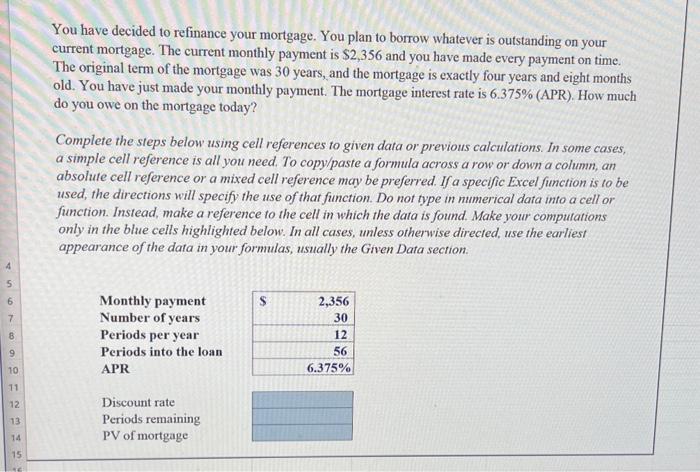


You have decided to refinance your mortgage. You plan to borrow whatever is outstanding on your current mortgage. The current monthly payment is $2,356 and you have made every payment on time. The original term of the mortgage was 30 years, and the mortgage is exactly four years and eight months old. You have just made your monthly payment. The mortgage interest rate is 6.375% (APR). How much do you owe on the mortgage today? Complete the steps below using cell references to given data or previous calculations. In some cases, a simple cell reference is all you need. To copy/paste a formula across a row or down a column, an absolute cell reference or a mixed cell reference may be preferred. If a specific Excel function is to be used, the directions will specify the use of that fimction. Do not type in numerical data into a cell or function. Instead, make a reference to the cell in which the data is found. Make your computations only in the blue cells highlighted below. In all cases, unless otherwise directed, use the earliest appearance of the data in your formulas, ussally the Given Data section. absolute cell reference or a mixed cell reference may be preferred. If a specific Excel function is to be used, the directions will specify the use of that function. Do not type in numerical data into a cell or function. Instead, make a reference to the cell in which the data is found. Make your computations only in the blue cells highlighted below. In all cases, unless otherwise directed, use the earliest appearance of the data in your formulas, usually the Given Data section. Requirements 1 In cell D12, by using cell references, calculate the discount rate ( 1 pt.). 2 In cell D13, by using cell references, calculate the number of periods remaining on the loan (1 pt.). 3 In cell D14, by using cell references, calculate the amount that you owe on the mortgage ( 1pt ). Step Instructions Points Possible 1 Complete the steps below using cell references to given data or previous calculations. In some cases, a simple cell reference is all you need. To copy/paste a formula across a row or down a column, an absolute cell reference or a mixed cell reference may be preferred. If a specific Excel function is to be used, the directions will specify the use of that function. Do not type in numerical data into a cell or function. Instead, make a reference to the cell in which the data is found. Make your computations only in the blue cells highlighted below. In all cases, unless otherwise directed, use the earliest appearance of the data in your formulas, usually the Given Data section. Start Excel. Downioad and open the workbook named: Berk_DeMarzo_Harford_Problem_5-20_Start. In cell D12, by using cell references, calculate the discount rate. 2 In cell D13, by using cell references, calculate the number of periods remaining on the loan. 1 3 In cell D14, by using cell references, calculate the amount that you owe on the mortgage. 1 4 Save the workbook. Close the workbook and then exit Excel. Submit the workbook as directed. 0 You have decided to refinance your mortgage. You plan to borrow whatever is outstanding on your current mortgage. The current monthly payment is $2,356 and you have made every payment on time. The original term of the mortgage was 30 years, and the mortgage is exactly four years and eight months old. You have just made your monthly payment. The mortgage interest rate is 6.375% (APR). How much do you owe on the mortgage today? Complete the steps below using cell references to given data or previous calculations. In some cases, a simple cell reference is all you need. To copy/paste a formula across a row or down a cohmm, an absolute cell reference or a mixed cell reference may be preferred. If a specific Excel function is to be used, the directions will specify the use of that function. Do not type in numerical data into a cell or function. Instead, make a reference to the cell in which the data is found. Make your computations only in the blue cells highlighted below. In all cases, umless otherwise directed, use the earliest appearance of the data in your formulas, usually the Given Data
Step by Step Solution
There are 3 Steps involved in it

Get step-by-step solutions from verified subject matter experts
 Study Help