







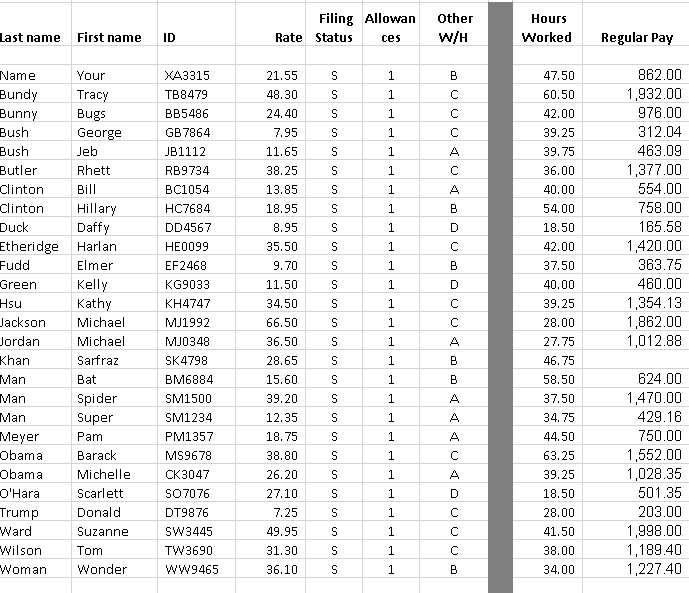
Question: EXCEL PROJECT, ALSO NEED FORMULAS FOR EACH COLUMN Filing Allowan Rate Status ces Other W/H Hours Worked Last name First name ID Regular Pay 21.55
 EXCEL PROJECT, ALSO NEED FORMULAS FOR EACH COLUMN
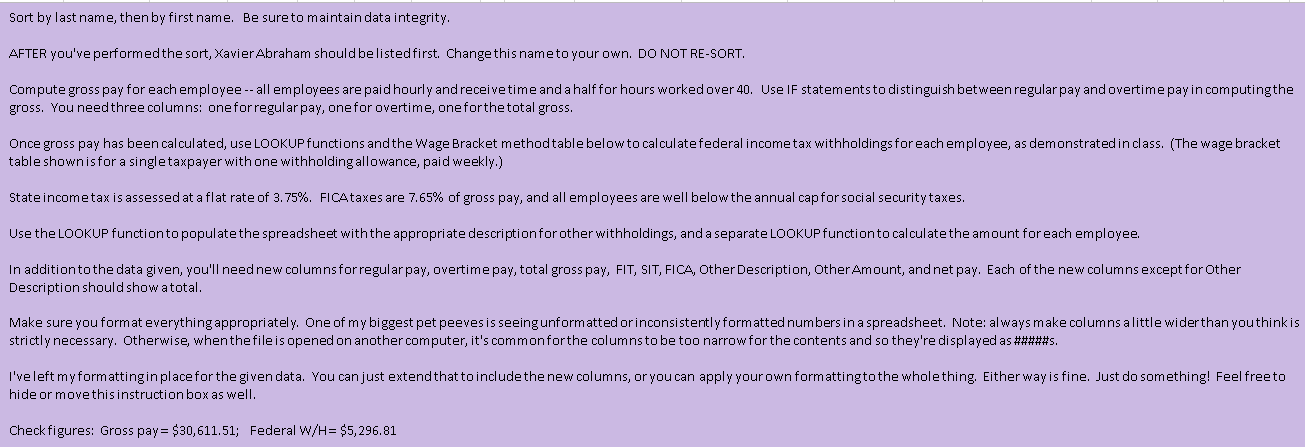
Filing Allowan Rate Status ces Other W/H Hours Worked Last name First name ID Regular Pay 21.55 S 1 XA3315 TB8479 S 1 C 47.50 60.50 42.00 39.25 S 1 UUU 1 C 48.30 24.40 7.95 11.65 38.25 13.85 18.95 S S 1 A S 1 C 39.75 36.00 40.00 54.00 1 A B 1 S S S S 8.95 862.00 1,932.00 976.00 312.04 463.09 1,377.00 554.00 758.00 165.58 1,420.00 363.75 460.00 1,354.13 1,862.00 1,012.88 1 D 18.50 OU 1 35.50 9.70 S 1 B 11.50 S 1 D S Name Your Bundy Tracy Bunny Bugs Bush George Bush Jeb Butler Rhett Clinton Bill Clinton Hillary Duck Daffy Etheridge Harlan Fudd Elmer Green Kelly Hsu Kathy Jackson Michael Jordan Michael Khan Sarfraz Man Bat Man Spider Man Super Meyer Pam Obama Barack Obama Michelle O'Hara Scarlett Trump Donald Ward Suzanne Wilson Tom Woman Wonder 1 C C BB5486 GB 7864 JB1112 RB9734 BC1054 HC7684 DD 4567 HE0099 EF2468 KG9033 KH4747 MJ1992 MJ0348 SK4798 BM6884 SM1500 SM1234 PM1357 MS9678 CK3047 SO7076 DT9876 SW3445 TW3690 WW9465 1 S S 42.00 37.50 40.00 39.25 28.00 27.75 46.75 58.50 37.50 34.75 1 A S 1 34.50 66.50 36.50 28.65 15.60 39.20 12.35 18.75 B 1 B S S 1 A S 1 A S 1 A 38.80 S 1 C 44.50 63.25 39.25 26.20 S 1 A 624.00 1,470.00 429.16 750.00 1,552.00 1,028.35 501.35 203.00 1,998.00 1,189.40 1,227.40 27.10 S 1 D C 18.50 28.00 1 7.25 49.95 31.30 S S 1 OOO C 41.50 S 1 C 38.00 PP 36.10 S 1 34.00 Sort by last name, then by first name. Be sure to maintain data integrity. AFTER you've performed the sort, Xavier Abraham should be listed first. Change this name to your own. DO NOT RE-SORT. Compute gross pay for each employee -- all employees are paid hourly and receive time and a half for hours worked over 40. Use IF statements to distinguish between regular pay and overtime pay in computingthe gross. You need three columns: one for regular pay, one for overtime, one forthe total gross. Once gross pay has been calculated, use LOOKUP functions and the Wage Bracket method table below to calculate federal income tax withholdings for each employee, as demonstrated in class. (The wage bracket table shown is for a single taxpayer with one withholding allowance, paid weekly.) State incometax is assessed at a flat rate of 3.75%. FICAtaxes are 7.65% of gross pay, and all employees are well below the annual capfor social security taxes. Use the LOOKUP function to populatethe spreadsheet with the appropriate description for other withholdings, and a separate LOOKUP function to calculate the amount foreach employee. In addition to the data given, you'll need new columns for regular pay, overtime pay, total gross pay, FIT, SIT, FICA, Other Description, Other Amount, and net pay. Each of the new columns except for Other Description should show atotal. Make sure you format everything appropriately. One of my biggest pet peeves is seeing unformatted or inconsistently formatted numbers in a spreadsheet. Note: always make columns alittle wider than you thinkis strictly necessary. Otherwise, when the file is opened on another computer, it's commonforthe columns to be too narrow for the contents and so they're displayed as #####s. I've left myformattingin place for the given data. You can just extend that to include the new columns, or you can apply your own formattingto the whole thing. Either way is fine. Just do something! Feel free to hide or move this instruction box as well. Check figures: Gross pay = $30,611.51; Federal W/H= $5, 296.81 Filing Allowan Rate Status ces Other W/H Hours Worked Last name First name ID Regular Pay 21.55 S 1 XA3315 TB8479 S 1 C 47.50 60.50 42.00 39.25 S 1 UUU 1 C 48.30 24.40 7.95 11.65 38.25 13.85 18.95 S S 1 A S 1 C 39.75 36.00 40.00 54.00 1 A B 1 S S S S 8.95 862.00 1,932.00 976.00 312.04 463.09 1,377.00 554.00 758.00 165.58 1,420.00 363.75 460.00 1,354.13 1,862.00 1,012.88 1 D 18.50 OU 1 35.50 9.70 S 1 B 11.50 S 1 D S Name Your Bundy Tracy Bunny Bugs Bush George Bush Jeb Butler Rhett Clinton Bill Clinton Hillary Duck Daffy Etheridge Harlan Fudd Elmer Green Kelly Hsu Kathy Jackson Michael Jordan Michael Khan Sarfraz Man Bat Man Spider Man Super Meyer Pam Obama Barack Obama Michelle O'Hara Scarlett Trump Donald Ward Suzanne Wilson Tom Woman Wonder 1 C C BB5486 GB 7864 JB1112 RB9734 BC1054 HC7684 DD 4567 HE0099 EF2468 KG9033 KH4747 MJ1992 MJ0348 SK4798 BM6884 SM1500 SM1234 PM1357 MS9678 CK3047 SO7076 DT9876 SW3445 TW3690 WW9465 1 S S 42.00 37.50 40.00 39.25 28.00 27.75 46.75 58.50 37.50 34.75 1 A S 1 34.50 66.50 36.50 28.65 15.60 39.20 12.35 18.75 B 1 B S S 1 A S 1 A S 1 A 38.80 S 1 C 44.50 63.25 39.25 26.20 S 1 A 624.00 1,470.00 429.16 750.00 1,552.00 1,028.35 501.35 203.00 1,998.00 1,189.40 1,227.40 27.10 S 1 D C 18.50 28.00 1 7.25 49.95 31.30 S S 1 OOO C 41.50 S 1 C 38.00 PP 36.10 S 1 34.00 Sort by last name, then by first name. Be sure to maintain data integrity. AFTER you've performed the sort, Xavier Abraham should be listed first. Change this name to your own. DO NOT RE-SORT. Compute gross pay for each employee -- all employees are paid hourly and receive time and a half for hours worked over 40. Use IF statements to distinguish between regular pay and overtime pay in computingthe gross. You need three columns: one for regular pay, one for overtime, one forthe total gross. Once gross pay has been calculated, use LOOKUP functions and the Wage Bracket method table below to calculate federal income tax withholdings for each employee, as demonstrated in class. (The wage bracket table shown is for a single taxpayer with one withholding allowance, paid weekly.) State incometax is assessed at a flat rate of 3.75%. FICAtaxes are 7.65% of gross pay, and all employees are well below the annual capfor social security taxes. Use the LOOKUP function to populatethe spreadsheet with the appropriate description for other withholdings, and a separate LOOKUP function to calculate the amount foreach employee. In addition to the data given, you'll need new columns for regular pay, overtime pay, total gross pay, FIT, SIT, FICA, Other Description, Other Amount, and net pay. Each of the new columns except for Other Description should show atotal. Make sure you format everything appropriately. One of my biggest pet peeves is seeing unformatted or inconsistently formatted numbers in a spreadsheet. Note: always make columns alittle wider than you thinkis strictly necessary. Otherwise, when the file is opened on another computer, it's commonforthe columns to be too narrow for the contents and so they're displayed as #####s. I've left myformattingin place for the given data. You can just extend that to include the new columns, or you can apply your own formattingto the whole thing. Either way is fine. Just do something! Feel free to hide or move this instruction box as well. Check figures: Gross pay = $30,611.51; Federal W/H= $5, 296.81
Step by Step Solution
There are 3 Steps involved in it

Get step-by-step solutions from verified subject matter experts
 Study Help