







Question: excel project for Intergrated business.. what formula should i use to calculate the gross pay and what formula or calculation do i use to get

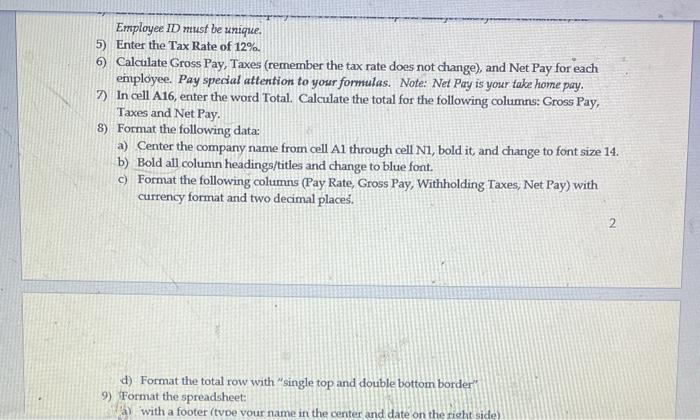
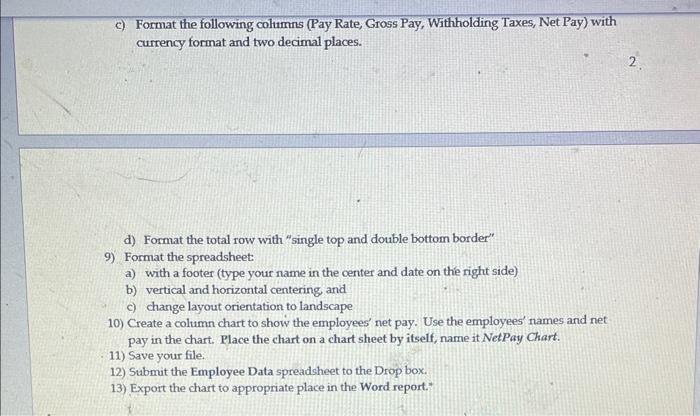
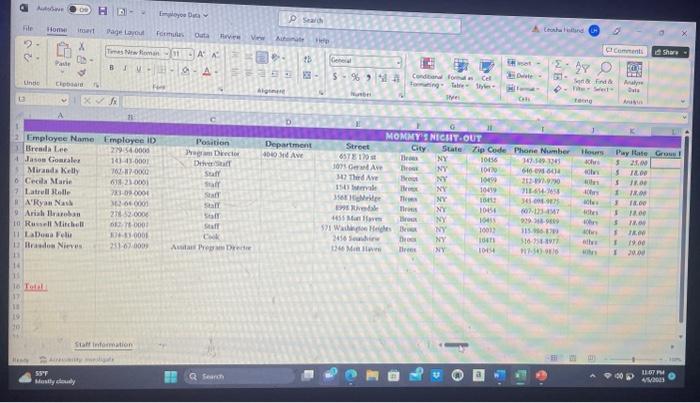
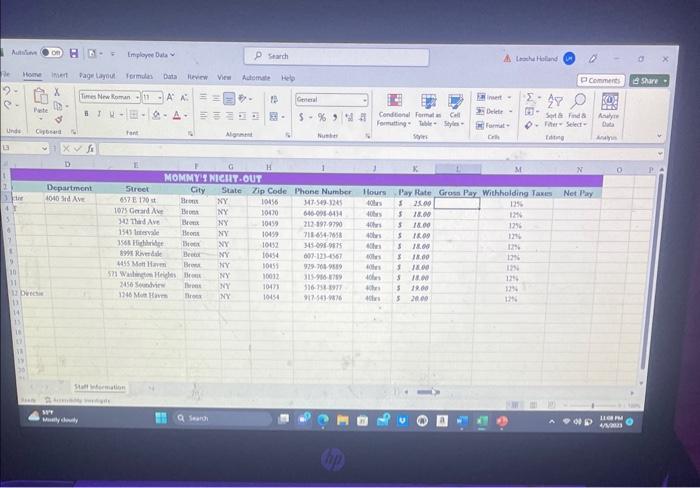
Part 2 - MS EXCEL Create a spreadsheet called Employee Data which contains the following: 1) Name the sheet. Staff Information. 2) Type the name of the company in cell A1. 3) Create columns for the following: a) Employee ID b) Employee Name c) Position d) Department e) Street f) City g) State h) Zip Code i) Phone Number j) Hours k) Pay Rate 1) Gross Pay m) Withholding Taxes n) Net Pay 4) Enter information for 10 employees. You can make up the data for each field. Remember, the Employee ID must be unique. Employee ID nust be unique. 5) Enter the Tax Rate of 12% 6) Calcalate Gross Pay, Taxes (remember the tax rate does not change), and Net Pay for each employee. Pay special attention to your formulas. Note: Net Pay is your take home pay. 7) In cell A16, enter the word Total. Calculate the total for the following columns: Gross Pay, Taxes and Net Pay. 8) Format the following data: a) Center the company name from cell Al through cell N1, bold it, and change to font size 14 . b) Bold all column headings/titles and change to blue font. c) Format the following columns (Pay Rate, Gross Pay, Withholding Taxes, Net Pay) with currency format and two decimal places. 2 d) Format the total row with "single top and double bottom border" 9) Format the spreadsheet: (a) with a footer (tvoe vour name in the center and date on the right side) c) Format the following columns (Pay Rate, Gross Pay, Withholding Taxes, Net Pay) with currency format and two decimal places. 2. d) Format the total row with "single top and double bottom border" 9) Format the spreadsheet: a) with a footer (type your name in the center and date on the right side) b) vertical and horizontal centering, and c) change layout orientation to landscape 10) Create a column chart to show the employees' net pay. Use the employees' names and net pay in the chart. Place the chart on a chart sheet by itself, name it NetPay Chart. 11) Save your file. 12) Submit the Employee Data spreadsheet to the Drop box. 13) Export the chart to appropriate place in the Word report." Part 2 - MS EXCEL Create a spreadsheet called Employee Data which contains the following: 1) Name the sheet. Staff Information. 2) Type the name of the company in cell A1. 3) Create columns for the following: a) Employee ID b) Employee Name c) Position d) Department e) Street f) City g) State h) Zip Code i) Phone Number j) Hours k) Pay Rate 1) Gross Pay m) Withholding Taxes n) Net Pay 4) Enter information for 10 employees. You can make up the data for each field. Remember, the Employee ID must be unique. Employee ID nust be unique. 5) Enter the Tax Rate of 12% 6) Calcalate Gross Pay, Taxes (remember the tax rate does not change), and Net Pay for each employee. Pay special attention to your formulas. Note: Net Pay is your take home pay. 7) In cell A16, enter the word Total. Calculate the total for the following columns: Gross Pay, Taxes and Net Pay. 8) Format the following data: a) Center the company name from cell Al through cell N1, bold it, and change to font size 14 . b) Bold all column headings/titles and change to blue font. c) Format the following columns (Pay Rate, Gross Pay, Withholding Taxes, Net Pay) with currency format and two decimal places. 2 d) Format the total row with "single top and double bottom border" 9) Format the spreadsheet: (a) with a footer (tvoe vour name in the center and date on the right side) c) Format the following columns (Pay Rate, Gross Pay, Withholding Taxes, Net Pay) with currency format and two decimal places. 2. d) Format the total row with "single top and double bottom border" 9) Format the spreadsheet: a) with a footer (type your name in the center and date on the right side) b) vertical and horizontal centering, and c) change layout orientation to landscape 10) Create a column chart to show the employees' net pay. Use the employees' names and net pay in the chart. Place the chart on a chart sheet by itself, name it NetPay Chart. 11) Save your file. 12) Submit the Employee Data spreadsheet to the Drop box. 13) Export the chart to appropriate place in the Word report
Step by Step Solution
There are 3 Steps involved in it

Get step-by-step solutions from verified subject matter experts
 Study Help