







Question: Excel Question Info Systems for Business: Performance Incentive Table (a) Add a new column to the Staff Salary Table to compute the Performance Incentive by
Excel Question Info Systems for Business:
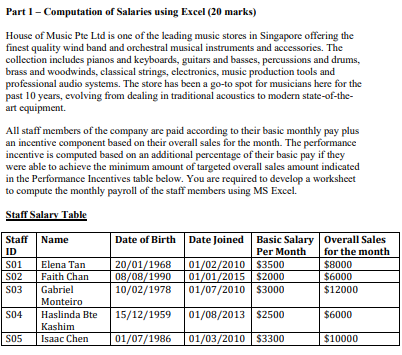
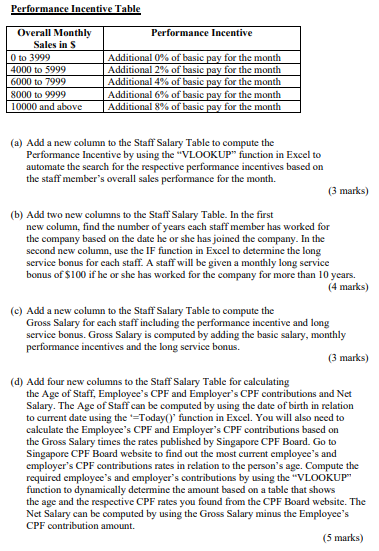
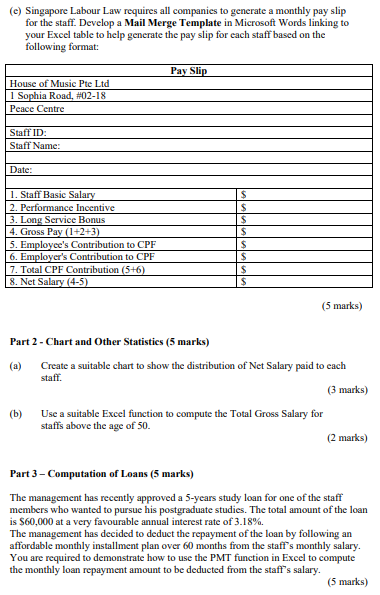
Performance Incentive Table (a) Add a new column to the Staff Salary Table to compute the Performance Incentive by using the "VLOOKUP" function in Excel to automate the search for the respective performance incentives based on the staff member's overall sales performance for the month. (3 marks) (b) Add two new columns to the Staff Salary Table. In the first new column, find the number of years each staff member has worked for the company based on the date he or she has joined the company. In the second new column, use the IF function in Excel to determine the long service bonus for each staff. A staff will be given a monthly long service bonus of $100 if he or she has worked for the company for more than 10 years. (4 marks) (c) Add a new column to the Staff Salary Table to compute the Gross Salary for each staff including the performance incentive and long service bonus. Gross Salary is computed by adding the basic salary, monthly performance incentives and the long service bonus. (3 marks) (d) Add four new columns to the Staff Salary Table for calculating the Age of Staff, Employee's CPF and Employer's CPF contributions and Net Salary. The Age of Staff can be computed by using the date of birth in relation to current date using the '=Today()' function in Excel. You will also need to calculate the Employee's CPF and Employer's CPF contributions based on the Gross Salary times the rates published by Singapore CPF Board. Go to Singapore CPF Board website to find out the most current employee's and employer's CPF contributions rates in relation to the person's age. Compute the required employee's and employer's contributions by using the "VLOOKUP" function to dynamically determine the amount based on a table that shows the age and the respective CPF rates you found from the CPF Board website. The Net Salary can be computed by using the Gross Salary minus the Employee's CPF contribution amount. (5 marks) (c) Singapore Labour Law requires all companies to generate a monthly pay slip for the staff. Develop a Mail Merge Template in Microsoft Words linking to your Excel table to help generate the pay slip for each staff based on the following format: \begin{tabular}{|l|l|} \hline \multicolumn{2}{|c|}{ Pay Slip } \\ \hline House of Music Pte Ltd \\ \hline 1 Sophia Road, \#02-18 \\ \hline Peace Centre \\ \hline & \\ \hline Staff ID: & \multicolumn{2}{|l}{} \\ \hline Staff Name: & \\ \hline & \\ \hline Date: & $ \\ \hline & $ \\ \hline 1. Staff Basic Salary & $ \\ \hline 2. Performance Incentive & $ \\ \hline 3. Long Service Bonus & $ \\ \hline 4. Gross Pay (1+2+3) & $ \\ \hline 5. Employee's Contribution to CPF & $ \\ \hline 6. Employer's Contribution to CPF & $ \\ \hline 7. Total CPF Contribution (5+6) & \\ \hline 8. Net Salary (4-5) & \\ \hline \end{tabular} (5 marks) Part 2 - Chart and Other Statistics (5 marks) (a) Create a suitable chart to show the distribution of Net Salary paid to each staff. (3 marks) (b) Use a suitable Excel function to compute the Total Gross Salary for staffs above the age of 50 . (2 marks) Part 3 - Computation of Loans (5 marks) The management has recently approved a 5-years study loan for one of the staff members who wanted to pursue his postgraduate studies. The total amount of the loan is $60,000 at a very favourable annual interest rate of 3.18%. The management has decided to deduct the repayment of the loan by following an affordable monthly installment plan over 60 months from the staff's monthly salary. You are required to demonstrate how to use the PMT function in Excel to compute the monthly loan repayment amount to be deducted from the staff's salary. (5 marks) Part 1 - Computation of Salaries using Excel (20 marks) House of Music Pte Ltd is one of the leading music stores in Singapore offering the finest quality wind band and orchestral musical instruments and accessories. The collection includes pianos and keyboards, guitars and basses, percussions and drums, brass and woodwinds, classical strings, electronics, music production tools and professional audio systems. The store has been a go-to spot for musicians here for the past 10 years, evolving from dealing in traditional acoustics to modern state-of-the-art equipment. All staff members of the company are paid according to their basic monthly pay plus an incentive component based on their overall sales for the month. The performance incentive is computed based on an additional percentage of their basic pay if they were able to achieve the minimum amount of targeted overall sales amount indicated in the Performance Incentives table below. You are required to develop a worksheet to compute the monthly payroll of the staff members using MS Excel. Staff Salarv Table Performance Incentive Table (a) Add a new column to the Staff Salary Table to compute the Performance Incentive by using the "VLOOKUP" function in Excel to automate the search for the respective performance incentives based on the staff member's overall sales performance for the month. (3 marks) (b) Add two new columns to the Staff Salary Table. In the first new column, find the number of years each staff member has worked for the company based on the date he or she has joined the company. In the second new column, use the IF function in Excel to determine the long service bonus for each staff. A staff will be given a monthly long service bonus of $100 if he or she has worked for the company for more than 10 years. (4 marks) (c) Add a new column to the Staff Salary Table to compute the Gross Salary for each staff including the performance incentive and long service bonus. Gross Salary is computed by adding the basic salary, monthly performance incentives and the long service bonus. (3 marks) (d) Add four new columns to the Staff Salary Table for calculating the Age of Staff, Employee's CPF and Employer's CPF contributions and Net Salary. The Age of Staff can be computed by using the date of birth in relation to current date using the '=Today()' function in Excel. You will also need to calculate the Employee's CPF and Employer's CPF contributions based on the Gross Salary times the rates published by Singapore CPF Board. Go to Singapore CPF Board website to find out the most current employee's and employer's CPF contributions rates in relation to the person's age. Compute the required employee's and employer's contributions by using the "VLOOKUP" function to dynamically determine the amount based on a table that shows the age and the respective CPF rates you found from the CPF Board website. The Net Salary can be computed by using the Gross Salary minus the Employee's CPF contribution amount. (5 marks) (c) Singapore Labour Law requires all companies to generate a monthly pay slip for the staff. Develop a Mail Merge Template in Microsoft Words linking to your Excel table to help generate the pay slip for each staff based on the following format: \begin{tabular}{|l|l|} \hline \multicolumn{2}{|c|}{ Pay Slip } \\ \hline House of Music Pte Ltd \\ \hline 1 Sophia Road, \#02-18 \\ \hline Peace Centre \\ \hline & \\ \hline Staff ID: & \multicolumn{2}{|l}{} \\ \hline Staff Name: & \\ \hline & \\ \hline Date: & $ \\ \hline & $ \\ \hline 1. Staff Basic Salary & $ \\ \hline 2. Performance Incentive & $ \\ \hline 3. Long Service Bonus & $ \\ \hline 4. Gross Pay (1+2+3) & $ \\ \hline 5. Employee's Contribution to CPF & $ \\ \hline 6. Employer's Contribution to CPF & $ \\ \hline 7. Total CPF Contribution (5+6) & \\ \hline 8. Net Salary (4-5) & \\ \hline \end{tabular} (5 marks) Part 2 - Chart and Other Statistics (5 marks) (a) Create a suitable chart to show the distribution of Net Salary paid to each staff. (3 marks) (b) Use a suitable Excel function to compute the Total Gross Salary for staffs above the age of 50 . (2 marks) Part 3 - Computation of Loans (5 marks) The management has recently approved a 5-years study loan for one of the staff members who wanted to pursue his postgraduate studies. The total amount of the loan is $60,000 at a very favourable annual interest rate of 3.18%. The management has decided to deduct the repayment of the loan by following an affordable monthly installment plan over 60 months from the staff's monthly salary. You are required to demonstrate how to use the PMT function in Excel to compute the monthly loan repayment amount to be deducted from the staff's salary. (5 marks) Part 1 - Computation of Salaries using Excel (20 marks) House of Music Pte Ltd is one of the leading music stores in Singapore offering the finest quality wind band and orchestral musical instruments and accessories. The collection includes pianos and keyboards, guitars and basses, percussions and drums, brass and woodwinds, classical strings, electronics, music production tools and professional audio systems. The store has been a go-to spot for musicians here for the past 10 years, evolving from dealing in traditional acoustics to modern state-of-the-art equipment. All staff members of the company are paid according to their basic monthly pay plus an incentive component based on their overall sales for the month. The performance incentive is computed based on an additional percentage of their basic pay if they were able to achieve the minimum amount of targeted overall sales amount indicated in the Performance Incentives table below. You are required to develop a worksheet to compute the monthly payroll of the staff members using MS Excel. Staff Salarv Table
Step by Step Solution
There are 3 Steps involved in it

Get step-by-step solutions from verified subject matter experts
 Study Help