Question: Excel Sheet Instructions fJ19 X V fx A B C D E F G H I J K L M N 0 P Q R

Excel Sheet

Instructions
Excel Sheet Instructions \fJ19 X V fx A B C D E FExcel Sheet Instructions \fJ19 X V fx A B C D E FExcel Sheet Instructions \fJ19 X V fx A B C D E FExcel Sheet Instructions \fJ19 X V fx A B C D E FExcel Sheet Instructions \fJ19 X V fx A B C D E F
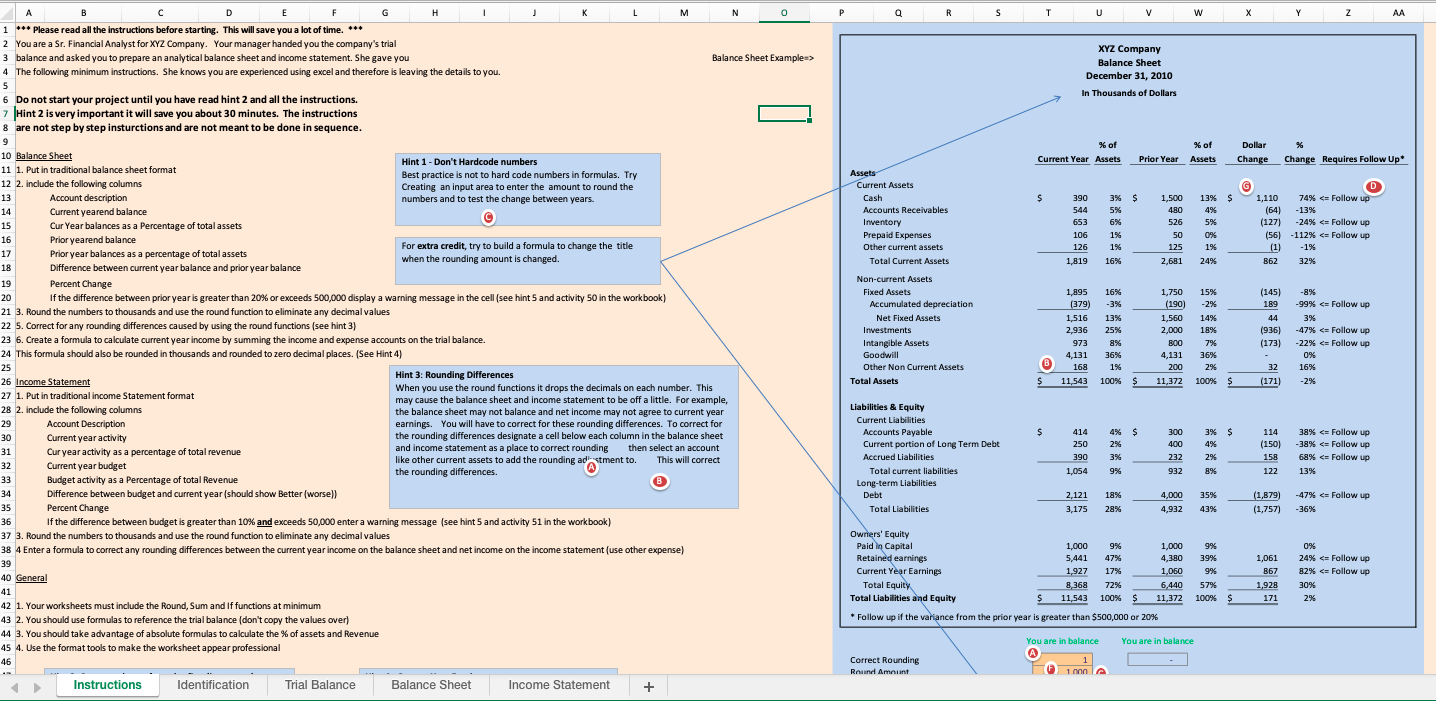
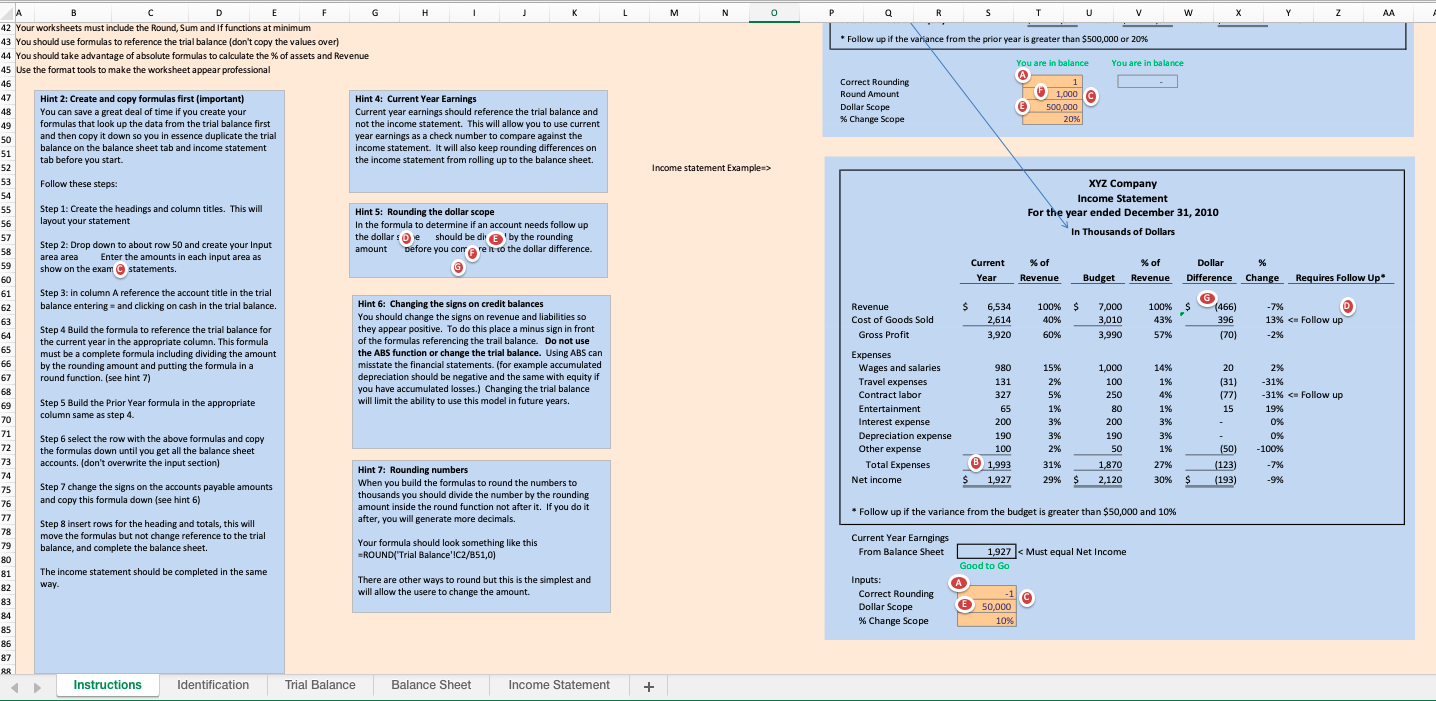
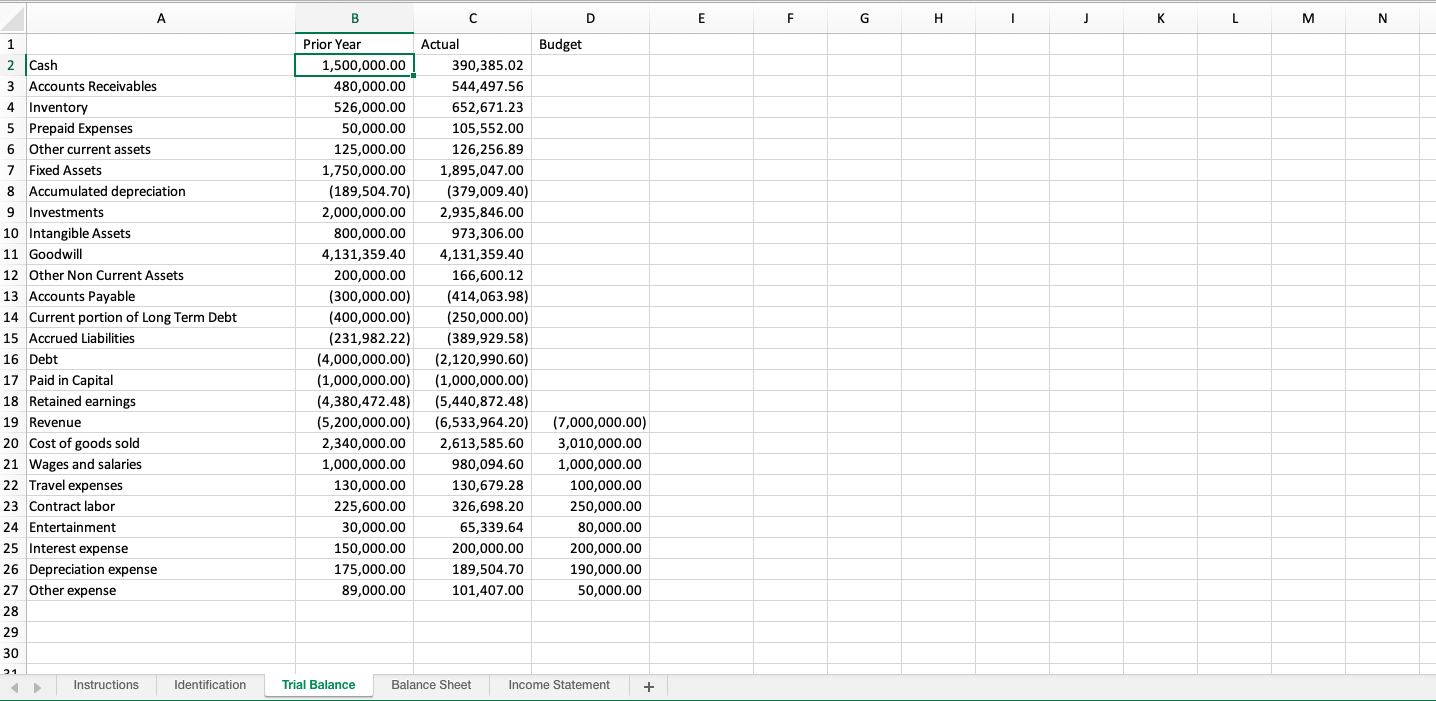
\fJ19 X V fx A B C D E F G H I J K L M N 0 P Q R S T U V W 20 D Instructions Identification Trial Balance Balance Sheet Income Statement + Zoom InA B C D E F G H J K L M N 0 Q R S T V W X Z AA *++ Please read all the instructions before starting. This will save you a lot of time. *++ 2 You are a Sr. Financial Analyst for XYZ Company. Your manager handed you the company's trial XYZ Company 3 balance and asked you to prepare an analytical balance sheet and income statement. She gave you Balance Sheet Example=> Balance Sheet The following minimum instructions. She knows you are experienced using excel and therefore is leaving the details to you. December 31, 2010 In Thousands of Dollars 6 Do not start your project until you have read hint 2 and all the instructions. Hint 2 is very important it will save you about 30 minutes. The instructions are not step by step insturctions and are not meant to be done in sequence. % of % of Dollar 10 Balance Sheet Hint 1 - Don't Hardcode numbers Current Year Assets Prior Year Assets Change Change Requires Follow Up* 11 1. Put in traditional balance sheet format Best practice is not to hard code numbers in formulas. Try Assets 12 2. include the following columns Creating an input area to enter the amount to round the Current Assets G D 13 Account description numbers and to test the change between years. Cash 390 1,500 13% S 1,110 74% Follow these steps: XYZ Company Income Statement Step 1: Create the headings and column titles. This will Hint 5: Rounding the dollar scope For the year ended December 31, 2010 layout your statement In the formula to determine if an account needs follow up the dollar :De should be di E ) by the rounding In Thousands of Dollars Step 2: Drop down to about row 50 and create your Input area area Enter the amounts in each input area as amount before you con @re l to the dollar difference. Current % of % of Dollar 9% show on the exam C statements. Year Revenue Budget Revenue Difference Change Requires Follow Up* Step 3: in column A reference the account title in the trial G balance entering = and clicking on cash in the trial balance. Hint 6: Changing the signs on credit balances Revenue S 6,534 100% S 7,000 100% S 466 -7% You should change the signs on revenue and liabilities so Cost of Goods Sold 2,614 10% 3,010 43% 396 13%

Step by Step Solution

There are 3 Steps involved in it

1 Expert Approved Answer
Step: 1 Unlock blur-text-image

Question Has Been Solved by an Expert!

Get step-by-step solutions from verified subject matter experts

Step: 2 Unlock
Step: 3 Unlock

Students Have Also Explored These Related Finance Questions!