







Question: Excel Simulation: How to Multiply, Divide, and Subtract Amounts in Excel C A B C D E 3 Student Instructions: 4 A partially complete
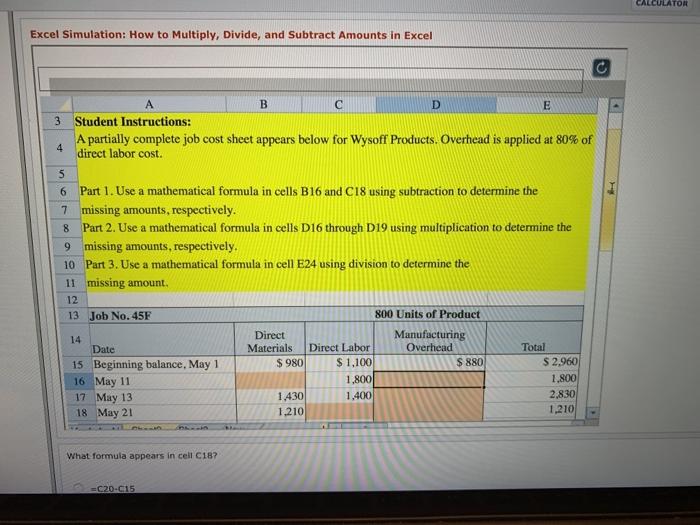
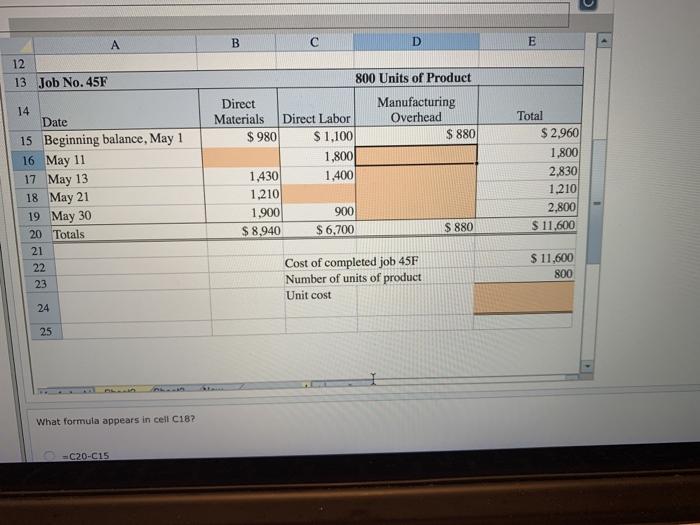
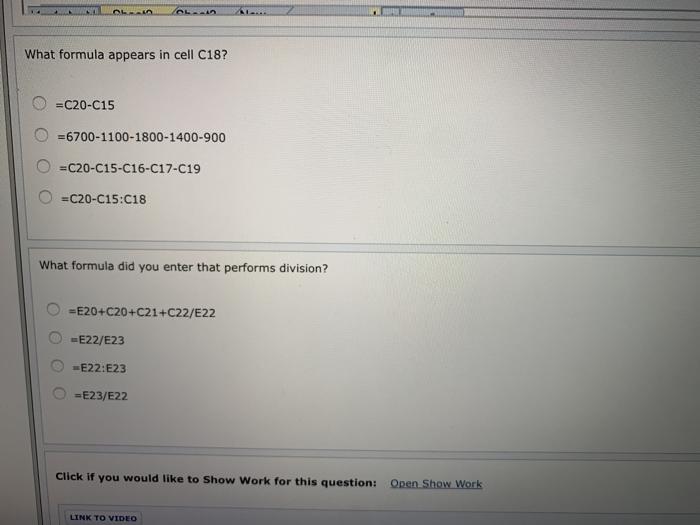
Excel Simulation: How to Multiply, Divide, and Subtract Amounts in Excel C A B C D E 3 Student Instructions: 4 A partially complete job cost sheet appears below for Wysoff Products. Overhead is applied at 80% of direct labor cost. 5 6 Part 1. Use a mathematical formula in cells B16 and C18 using subtraction to determine the 7 missing amounts, respectively. 8 Part 2. Use a mathematical formula in cells D16 through D19 using multiplication to determine the 9 missing amounts, respectively. 10 Part 3. Use a mathematical formula in cell E24 using division to determine the 11 missing amount. 22 12 14 13 Job No. 45F Date 800 Units of Product Direct Manufacturing Materials Direct Labor Overhead Total 15 Beginning balance, May 1 $ 980 $1,100 $880 $2,960 16 May 11 1,800 1,800 17 May 13 18 May 21 1,430 1,400 2,830 1,210 1,210 What formula appears in cell C187 -C20-C15 4 CALCULATOR
Step by Step Solution
There are 3 Steps involved in it

Get step-by-step solutions from verified subject matter experts
 Study Help