







Question: Excel Skills: Sorting, SUMIF, COUNTIF, and Conditional Formatting 1. Add the conditional formatting on the home tab) to the information in the Part 1 tab:
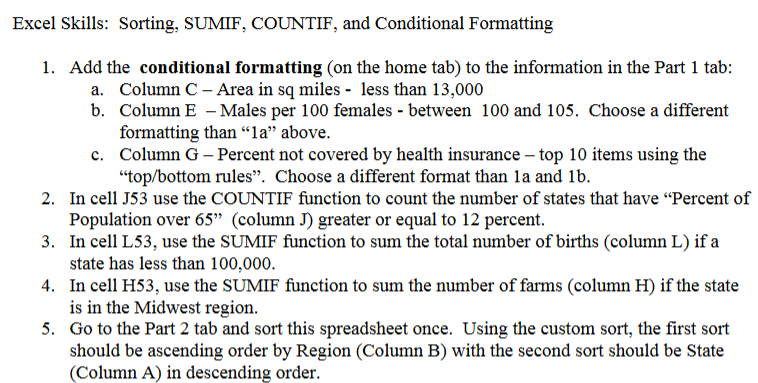
Excel Skills: Sorting, SUMIF, COUNTIF, and Conditional Formatting 1. Add the conditional formatting on the home tab) to the information in the Part 1 tab: a. Column C - Area in sq miles - less than 13,000 b. Column E - Males per 100 females - between 100 and 105. Choose a different formatting than la above. C. Column G - Percent not covered by health insurance - top 10 items using the "top/bottom rules. Choose a different format than la and 1b. 2. In cell J53 use the COUNTIF function to count the number of states that have "Percent of Population over 65" (column J) greater or equal to 12 percent. 3. In cell L53, use the SUMIF function to sum the total number of births (column L) if a state has less than 100,000. 4. In cell H53, use the SUMIF function to sum the number of farms (column H) if the state is in the Midwest region. 5. Go to the Part 2 tab and sort this spreadsheet once. Using the custom sort, the first sort should be ascending order by Region (Column B) with the second sort should be State (Column A) in descending order. Excel Skills: Sorting, SUMIF, COUNTIF, and Conditional Formatting 1. Add the conditional formatting on the home tab) to the information in the Part 1 tab: a. Column C - Area in sq miles - less than 13,000 b. Column E - Males per 100 females - between 100 and 105. Choose a different formatting than la above. C. Column G - Percent not covered by health insurance - top 10 items using the "top/bottom rules. Choose a different format than la and 1b. 2. In cell J53 use the COUNTIF function to count the number of states that have "Percent of Population over 65" (column J) greater or equal to 12 percent. 3. In cell L53, use the SUMIF function to sum the total number of births (column L) if a state has less than 100,000. 4. In cell H53, use the SUMIF function to sum the number of farms (column H) if the state is in the Midwest region. 5. Go to the Part 2 tab and sort this spreadsheet once. Using the custom sort, the first sort should be ascending order by Region (Column B) with the second sort should be State (Column A) in descending order
Step by Step Solution
There are 3 Steps involved in it

Get step-by-step solutions from verified subject matter experts
 Study Help