







Question: Excel Spreadsheet Create Help. Cover Sheet Formulas/Functions Cover Sheet to include: Name of workbook AVERAGE/SUM, Max, Mirn COUNT or COUNTA Date PROJECT created Created by...
Excel Spreadsheet Create Help.
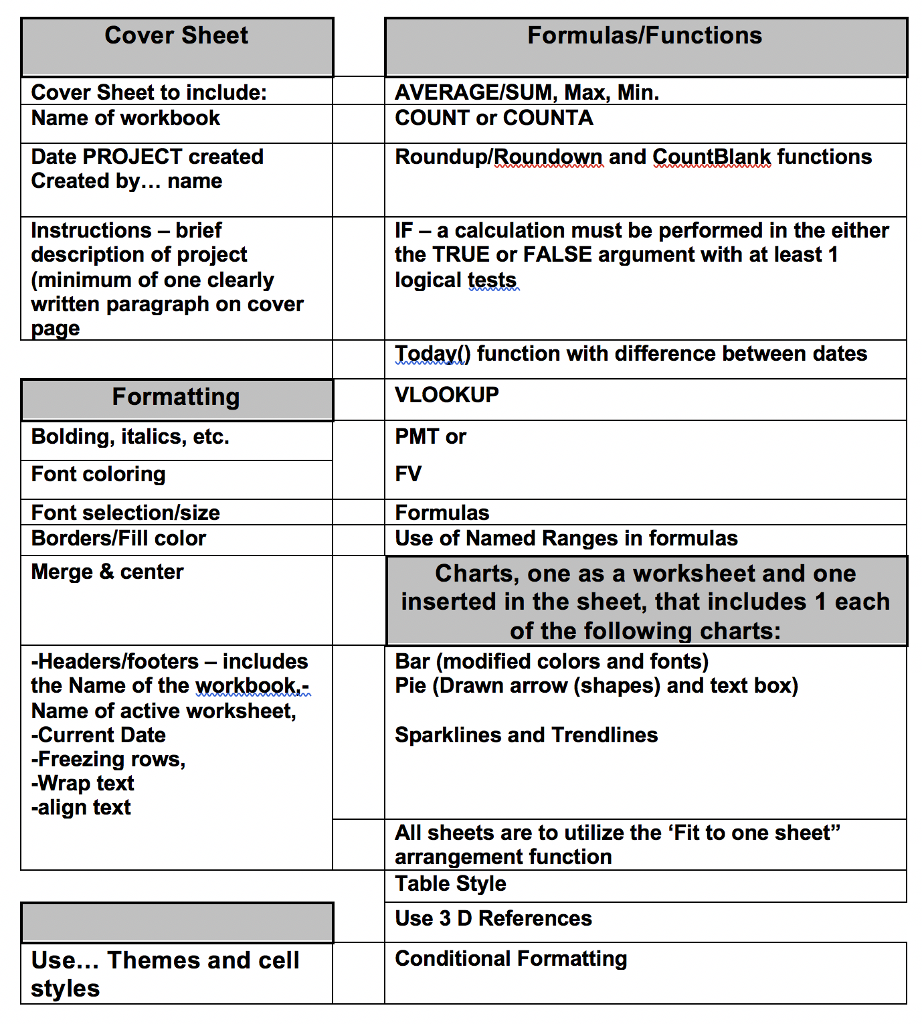
Cover Sheet Formulas/Functions Cover Sheet to include: Name of workbook AVERAGE/SUM, Max, Mirn COUNT or COUNTA Date PROJECT created Created by... name Roundup/Roundown and CountBlank functions Instructions -brief description of project (minimum of one clearly written paragraph on cover IF- a calculation must be performed in the either the TRUE or FALSE argument with at least 1 logical tests Today() function with difference between dates VLOOKUP PMT or FV Formulas Use of Named Ranges in formulas Formatting Bolding, italics, etc. Font coloring Font selection/size Borders/Fill color Merge & center Charts, one as a worksheet and one inserted in the sheet, that includes 1 each of the following charts: Headers/footers-includes the Name of the workbook- Name of active worksheet Current Date -Freezing rows, -Wrap text -align text Bar (modified colors and fonts) Pie (Drawn arrow (shapes) and text box) Sparklines and Trendline:s All sheets are to utilize the 'Fit to one sheet" arrangement function Table Style Use 3 D References Conditional Formatting Use... Themes and cell styles Cover Sheet Formulas/Functions Cover Sheet to include: Name of workbook AVERAGE/SUM, Max, Mirn COUNT or COUNTA Date PROJECT created Created by... name Roundup/Roundown and CountBlank functions Instructions -brief description of project (minimum of one clearly written paragraph on cover IF- a calculation must be performed in the either the TRUE or FALSE argument with at least 1 logical tests Today() function with difference between dates VLOOKUP PMT or FV Formulas Use of Named Ranges in formulas Formatting Bolding, italics, etc. Font coloring Font selection/size Borders/Fill color Merge & center Charts, one as a worksheet and one inserted in the sheet, that includes 1 each of the following charts: Headers/footers-includes the Name of the workbook- Name of active worksheet Current Date -Freezing rows, -Wrap text -align text Bar (modified colors and fonts) Pie (Drawn arrow (shapes) and text box) Sparklines and Trendline:s All sheets are to utilize the 'Fit to one sheet" arrangement function Table Style Use 3 D References Conditional Formatting Use... Themes and cell styles
Step by Step Solution
There are 3 Steps involved in it

Get step-by-step solutions from verified subject matter experts
 Study Help