







Question: Exceptions This assignment is not as complicated as it might seem. Just proceed step-by-step through Part-A, Part-B and Part-C. *Needed Files* AccountTest.java : /** This
Exceptions
This assignment is not as complicated as it might seem. Just proceed step-by-step through Part-A, Part-B and Part-C.
*Needed Files*
AccountTest.java :
/**
This program demonstrates how the BankAccount
class constructor throws custom exceptions.
*/
public class AccountTest
{
public static void main(String [] args)
{
// Force a NegativeStartingBalance exception.
try
{
BankAccount account =
/ew BankAccount(-100.0);
new BankAccount("-101.0");
System.out.println("Bank account has been created");
}
catch(NegativeStartingBalance e)
{
System.out.println(e.getMessage());
}
}
}
BankAccount.java :
/**
The BankAccount class simulates a bank account.
*/
public class BankAccount
{
private double balance; // Account balance
/**
This constructor sets the starting balance
at 0.0.
*/
public BankAccount()
{
balance = 0.0;
}
/**
This constructor sets the starting balance
to the value passed as an argument.
@param startBalance The starting balance.
@exception NegativeStartingBalance When
startBalance is negative.
*/
public BankAccount(double startBalance)
throws NegativeStartingBalance
{
if (startBalance
throw new NegativeStartingBalance(startBalance);
balance = startBalance;
}
/**
This constructor sets the starting balance
to the value in the String argument.
@param str The starting balance, as a String.
*/
public BankAccount(String str)
throws NegativeStartingBalance
{
this(Double.parseDouble(str));
// double startVal = ;
// BankAccount(startVal);
// throw new NegativeStartingBalance(str);
// balance = Double.parseDouble(str);
}
/**
The deposit method makes a deposit into
the account.
@param amount The amount to add to the
balance field.
*/
public void deposit(double amount)
{
balance += amount;
}
/**
The deposit method makes a deposit into
the account.
@param str The amount to add to the
balance field, as a String.
*/
public void deposit(String str)
{
balance += Double.parseDouble(str);
}
/**
The withdraw method withdraws an amount
from the account.
@param amount The amount to subtract from
the balance field.
*/
public void withdraw(double amount)
{
balance -= amount;
}
/**
The withdraw method withdraws an amount
from the account.
@param str The amount to subtract from
the balance field, as a String.
*/
public void withdraw(String str)
{
balance -= Double.parseDouble(str);
}
/**
The setBalance method sets the account balance.
@param b The value to store in the balance field.
*/
public void setBalance(double b)
{
balance = b;
}
/**
The setBalance method sets the account balance.
@param str The value, as a String, to store in
the balance field.
*/
public void setBalance(String str)
{
balance = Double.parseDouble(str);
}
/**
The getBalance method returns the
account balance.
@return The value in the balance field.
*/
public double getBalance()
{
return balance;
}
}
NegativeStartingBalance.java :
/**
NegativeStartingBalance exceptions are thrown by the
BankAccount class when a negative starting balance is
passed to the constructor.
*/
public class NegativeStartingBalance
extends Exception
{
/**
This constructor uses a generic
error message.
*/
public NegativeStartingBalance()
{
super("Error: Negative starting balance");
}
/**
This constructor specifies the bad starting
balance in the error message.
@param The bad starting balance.
*/
public NegativeStartingBalance(double amount)
{
super("Error: Negative starting balance: " +
amount);
}
}
Payroll.java :
/**
The Payroll class stores data about an employee's pay
for the Payroll Class programming challenge.
*/
public class Payroll
{
private String name; // Employee name
private int idNumber; // ID number
private double payRate; // Hourly pay rate
private double hoursWorked; // Number of hours worked
/**
The constructor initializes an object with the
employee's name and ID number.
@param n The employee's name.
@param i The employee's ID number.
*/
public Payroll(String n, int i)
{
name = n;
idNumber = i;
}
/**
The setName sets the employee's name.
@param n The employee's name.
*/
public void setName(String n)
{
name = n;
}
/**
The setIdNumber sets the employee's ID number.
@param i The employee's ID number.
*/
public void setIdNumber(int i)
{
idNumber = i;
}
/**
The setPayRate sets the employee's pay rate.
@param p The employee's pay rate.
*/
public void setPayRate(double p)
{
payRate = p;
}
/**
The setHoursWorked sets the number of hours worked.
@param h The number of hours worked.
*/
public void setHoursWorked(double h)
{
hoursWorked = h;
}
/**
The getName returns the employee's name.
@return The employee's name.
*/
public String getName()
{
return name;
}
/**
The getIdNumber returns the employee's ID number.
@return The employee's ID number.
*/
public int getIdNumber()
{
return idNumber;
}
/**
The getPayRate returns the employee's pay rate.
@return The employee's pay rate.
*/
public double getPayRate()
{
return payRate;
}
/**
The getHoursWorked returns the hours worked by the
employee.
@return The hours worked.
*/
public double getHoursWorked()
{
return hoursWorked;
}
/**
The getGrossPay returns the employee's gross pay.
@return The employee's gross pay.
*/
public double getGrossPay()
{
return hoursWorked * payRate;
}
}
PayrollDemo.java :
import java.util.Scanner;
/**
This program demonstrates a solution to the
Payroll Class programming challenge.
*/
public class PayrollDemo
{
public static void main(String[] args)
{
// Variables for input
String name; // An employee's name
int id; // An employee's ID number
double payRate; // An employee's pay rate
double hoursWorked; // The number of hours worked
// Create a Scanner object for keyboard input.
Scanner keyboard = new Scanner(System.in);
// Get the employee's name.
System.out.print("Enter the employee's name: ");
name = keyboard.nextLine();
// Get the employee's ID number.
System.out.print("Enter the employee's ID number: ");
id = keyboard.nextInt();
// Get the employee's pay rate.
System.out.print("Enter the employee's hourly pay rate: ");
payRate = keyboard.nextDouble();
// Get the number of hours worked by the employee.
System.out.print("Enter the number of hours worked " +
" by the employee: ");
hoursWorked = keyboard.nextDouble();
// Create a Payroll object and store the data in it.
Payroll worker = new Payroll(name, id);
worker.setPayRate(payRate);
worker.setHoursWorked(hoursWorked);
// Display the employee's payroll data.
System.out.println(" Employee Payroll Data");
System.out.println("Name: " + worker.getName());
System.out.println("ID Number: " + worker.getIdNumber());
System.out.println("Hourly pay rate: " + worker.getPayRate());
System.out.println("Hours worked: " + worker.getHoursWorked());
System.out.println("Gross pay: $" + worker.getGrossPay());
}
}
Pages 730-733 :
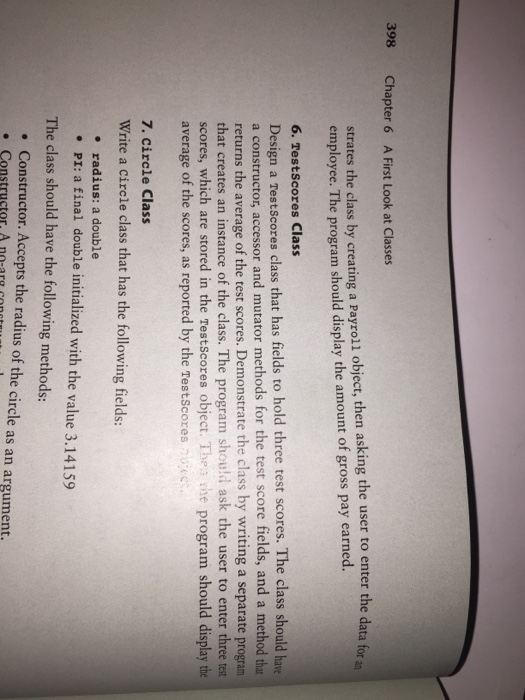
Page 397:
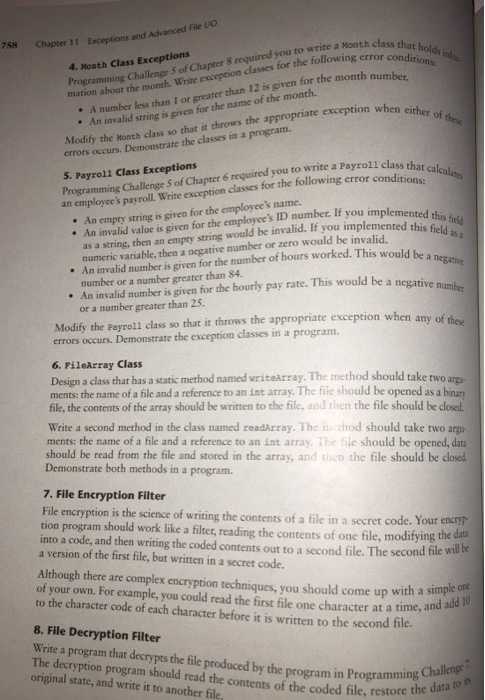
Page 758:
Part-A
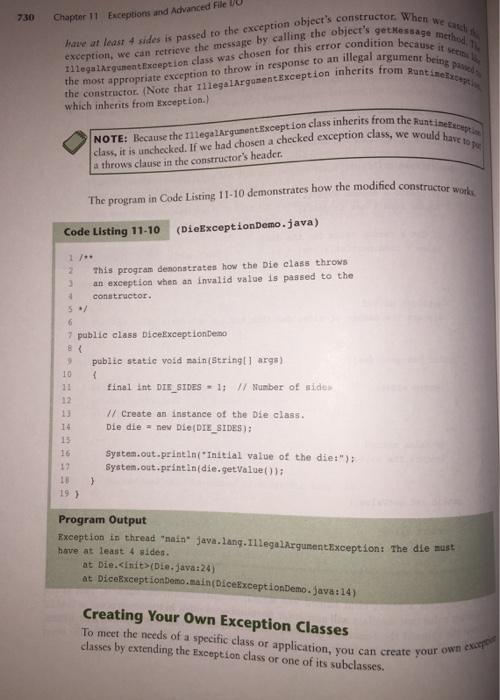
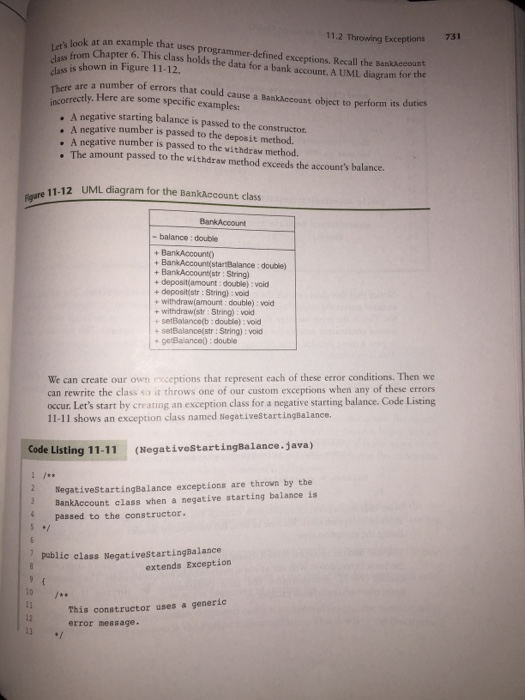
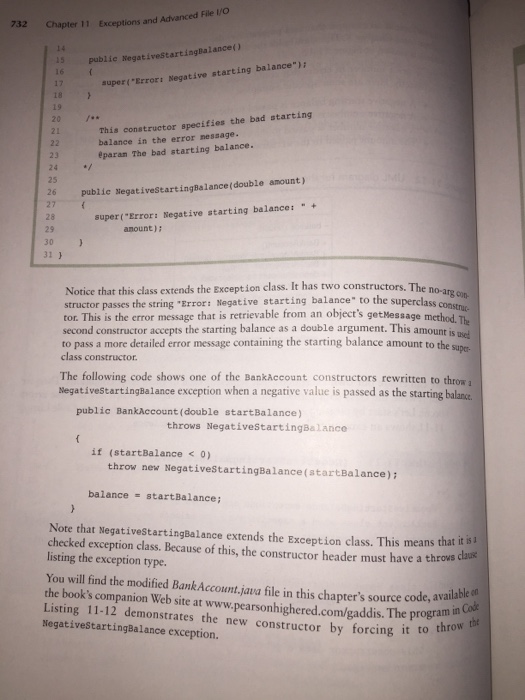
Set up and run the code for the topic Creating Your Own Exception Classes on pages 730-733. You will need some source files from Source Code Listings provided for you on Distributed Documents.
Set up a java folder containing:
AccountTest.java
BankAccount.java
NegativeStartingBalance.java.
Compile the 3 files
Run AccountTest.
This provides a sample of how to handle exceptions under program control instead of just letting the program crash. This will be a guide for doing Part-C below.
Part-B
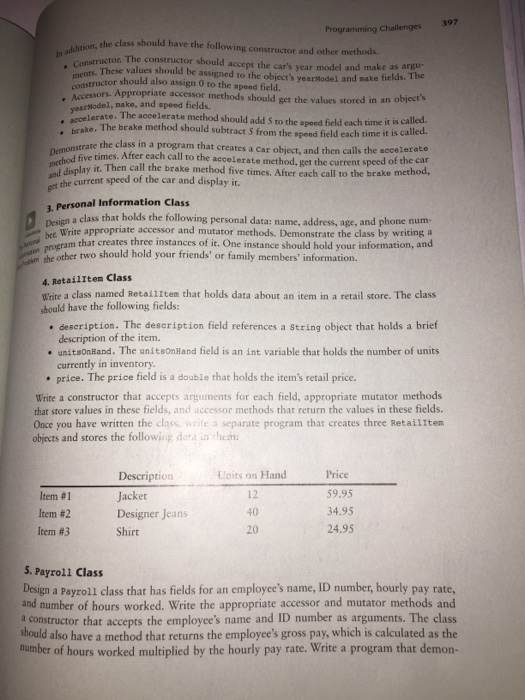
You are provided with the textbook solution to Programming Challenge-5: Payroll Class on page 397.
Set this up to run as described in chapter-5 page 397. Errors lead to program crashes showing a call-back sequence to help you find your errors and have a chance at fixing them.
Part-C
Use the classes from Part-B above to complete Programming Challenge #5 on page 758. Use the ideas and methodology from Part-A to aid you in constructing and using custom exception classes for this assignment. The instructions for this are repeated here with small modifications:
Write exception classes for the following 4 error conditions:
An empty string is given for the employees name.
An invalid value is given for the employees identification number. If you implemented this field as a string, then an empty string would be invalid. If you implemented this field as a numeric variable, then a negative number or zero would be invalid.
An invalid number is given for the number of hours worked. This would be a negative number or a number greater than 84. Hours worked may have a decimal fraction.
An invalid number is given for the hourly pay rate. This would be a negative number or a number greater than 25. Pay rate may have a decimal fraction.
Modify the Payroll class from Part-B so that it throws the appropriate exceptions when any one of these 4 exceptions occurs.
You should note that each different exception requires a separate class (so you need 4 exception classes). Also, note that you need to add a throws clause to the heading line of each method that may throw a specific exception. (See how Part-A handles these needs.) Demonstrate the exception classes in a demo program. You will need separate try-catch blocks for each exception that you are handling.
What to hand in:
Demonstrate to your teacher all the working exceptions from Part-C above.
Then submit your program listings in a Zip file.
![*/ public class AccountTest { public static void main(String [] args) {](https://dsd5zvtm8ll6.cloudfront.net/si.experts.images/questions/2024/09/66f5360d0fd4a_18866f5360c8a328.jpg)
Step by Step Solution
There are 3 Steps involved in it
1 Expert Approved Answer
Step: 1 Unlock

Question Has Been Solved by an Expert!
Get step-by-step solutions from verified subject matter experts
Step: 2 Unlock
Step: 3 Unlock
 Study Help