







Question: Execute the following commands: import string sup=string.ascii_uppercase; slow=string.ascii_lowercase s=sup+slow (This problem tests index slicing. Pick all statements that are True) To print the uppercase letters
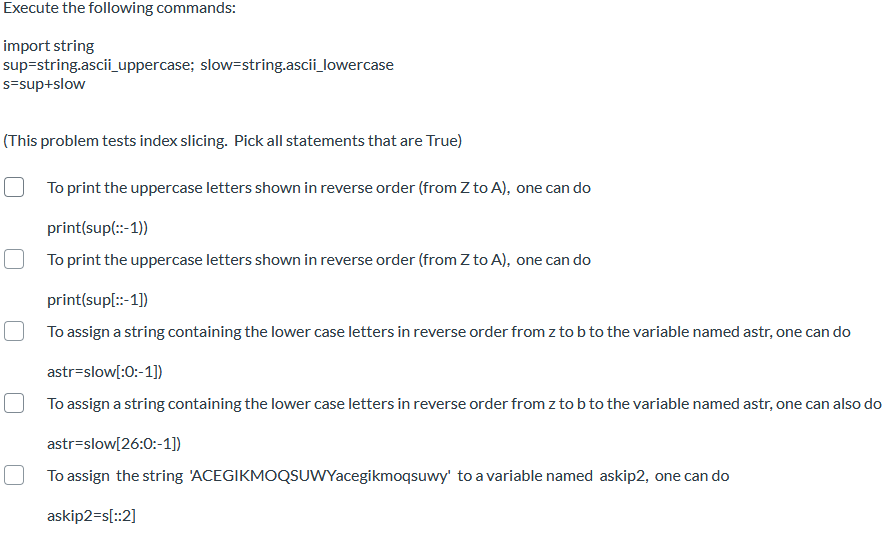
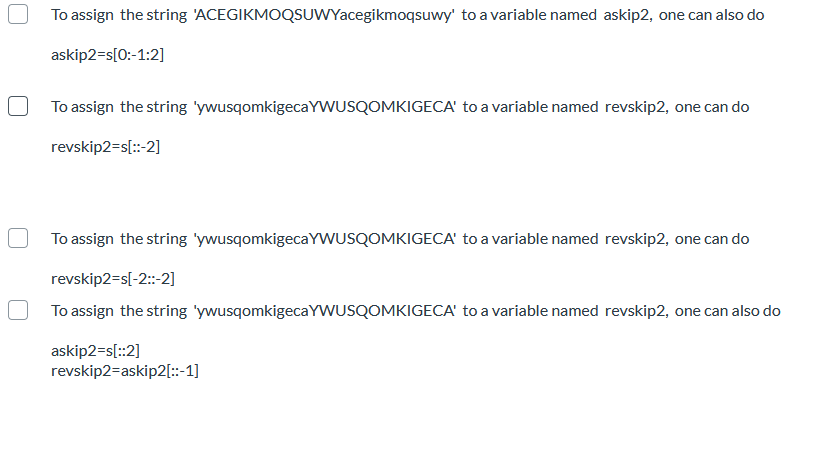
Execute the following commands: import string sup=string.ascii_uppercase; slow=string.ascii_lowercase s=sup+slow (This problem tests index slicing. Pick all statements that are True) To print the uppercase letters shown in reverse order (from Z to A), one can do print(suple:-1)) To print the uppercase letters shown in reverse order (from Z to A), one can do print(sup[:-1]) To assign a string containing the lower case letters in reverse order from z tob to the variable named astr, one can do astr=slow[:0:-1]) To assign a string containing the lower case letters in reverse order from z to b to the variable named astr, one can also do astr=slow[26:0:-1]) To assign the string 'ACEGIKMOQSUWYacegikmoqsuwy' to a variable named askip2, one can do askip2=s[::2] To assign the string 'ACEGIKMOQSUWYacegikmoqsuwy' to a variable named askip2, one can also do askip2=s[0:-1:2] To assign the string 'ywusqomkigecaYWUSQOMKIGECA' to a variable named revskip2, one can do revskip2=s[::-2] To assign the string 'ywusqomkigecaYWUSQOMKIGECA' to a variable named revskip2, one can do revskip2=s[-2:-2] To assign the string 'ywusqomkigecaYWUSQOMKIGECA' to a variable named revskip2, one can also do askip2=s[::2] revskip2=askip2[::-1]
Step by Step Solution
There are 3 Steps involved in it

Get step-by-step solutions from verified subject matter experts
 Study Help