







Question: Executing the same cell multiple times will overwrite the number, and no two code cells will have the same number. You can define multiple Code
Executing the same cell multiple times will overwrite the number, and no two code cells will have the same number.
You can define multiple Code cells, each with different elements, that are interdependant on eachothers' elements. For instance, we can define variable in one cell then use them to do something in another. As long as the cell containing the variables definitions has been run first, those variables will be accessaible in the second cell. Refer to the following example:
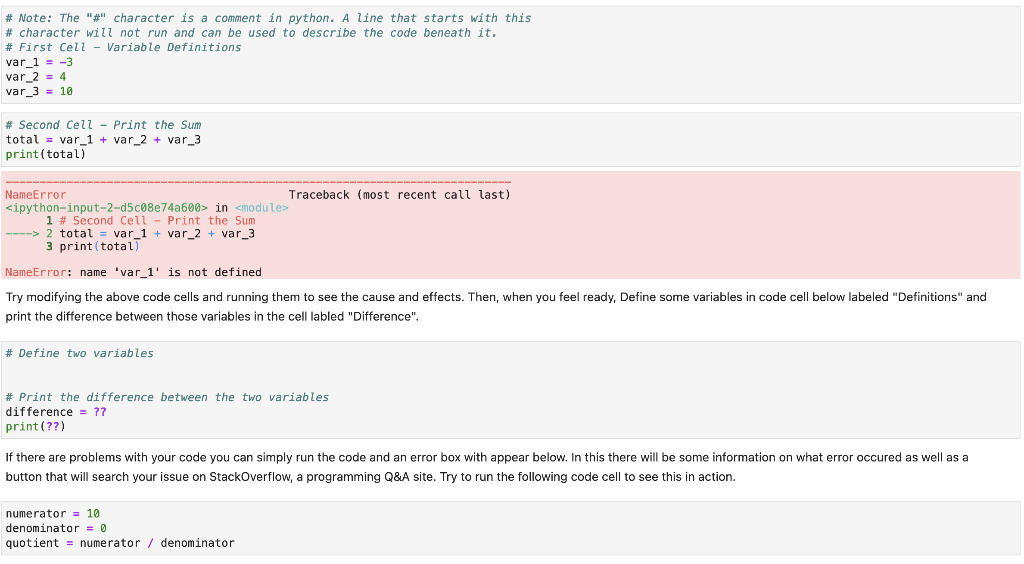
\# Note: The "\#" character is a comment in python. A line that starts with this \# character will not run and can be used to describe the code beneath it. \# First Cell - Variable Definitions var_1 = -3 var_2 =4 var_3 =10 \# Second Cell - Print the Sum total = var_1 + var_2 + var_3 print(total) Try modifying the above code cells and running them to see the cause and effects. Then, when you feel ready, Define some variables in code cell below labeled "Definitions" and print the difference between those variables in the cell labled "Difference". \# Define two variables \# Print the difference between the two variables difference = ?? print (??) If there are problems with your code you can simply run the code and an error box with appear below. In this there will be some information on what error occured as well as a button that will search your issue on StackOverflow, a programming Q\&A site. Try to run the following code cell to see this in action. numerator =10 denominator =0 quotient = numerator / denominator
Step by Step Solution
There are 3 Steps involved in it

Get step-by-step solutions from verified subject matter experts
 Study Help