







Question: Exercise 1: 1. Create a class Address. The Address class has a building no, street name, a city and a country as attributes (as string
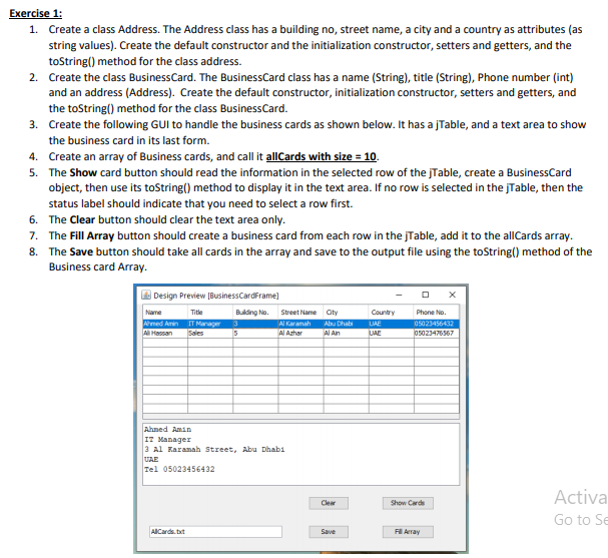
Exercise 1: 1. Create a class Address. The Address class has a building no, street name, a city and a country as attributes (as string values). Create the default constructor and the initialization constructor, setters and getters, and the toString() method for the class address. 2. Create the class BusinessCard. The BusinessCard class has a name (String), title (String), Phone number (int) and an address (Address). Create the default constructor, initialization constructor, setters and getters, and the toString() method for the class Business Card. 3. Create the following Gul to handle the business cards as shown below. It has ajTable, and a text area to show the business card in its last form. 4. Create an array of Business cards, and call it allCards with size = 10. 5. The show card button should read the information in the selected row of the jTable, create a BusinessCard object, then use its toString() method to display it in the text area. If no row is selected in the JTable, then the status label should indicate that you need to select a row first. 6. The Clear button should clear the text area only. 7. The Fill Array button should create a business card from each row in the JTable, add it to the allCards array. 8. The Save button should take all cards in the array and save to the output file using the toString() method of the Business card Array Design Preview [Business Cardframe] Building Me Sweethane Gry Name med Ari IT Maraw Aan Al Karama Abu Alan Country UAE UAE Phone No. 05023496032 05023476.567 5 Ahmed Amin IT Manager 3 Al Karamah Street, Abu Dhabi UAE Tel 05023456432 Show Cards Activa Go to se Alardet Save Fay Exercise 1: 1. Create a class Address. The Address class has a building no, street name, a city and a country as attributes (as string values). Create the default constructor and the initialization constructor, setters and getters, and the toString() method for the class address. 2. Create the class BusinessCard. The BusinessCard class has a name (String), title (String), Phone number (int) and an address (Address). Create the default constructor, initialization constructor, setters and getters, and the toString() method for the class Business Card. 3. Create the following Gul to handle the business cards as shown below. It has ajTable, and a text area to show the business card in its last form. 4. Create an array of Business cards, and call it allCards with size = 10. 5. The show card button should read the information in the selected row of the jTable, create a BusinessCard object, then use its toString() method to display it in the text area. If no row is selected in the JTable, then the status label should indicate that you need to select a row first. 6. The Clear button should clear the text area only. 7. The Fill Array button should create a business card from each row in the JTable, add it to the allCards array. 8. The Save button should take all cards in the array and save to the output file using the toString() method of the Business card Array Design Preview [Business Cardframe] Building Me Sweethane Gry Name med Ari IT Maraw Aan Al Karama Abu Alan Country UAE UAE Phone No. 05023496032 05023476.567 5 Ahmed Amin IT Manager 3 Al Karamah Street, Abu Dhabi UAE Tel 05023456432 Show Cards Activa Go to se Alardet Save Fay
Step by Step Solution
There are 3 Steps involved in it

Get step-by-step solutions from verified subject matter experts
 Study Help