


Question: Exercise 1: Open up the registry editor by typing REGEDIT in the command prompt. From the registry editor change the default directory that you see
 Exercise 1: Open up the registry editor by typing REGEDIT in
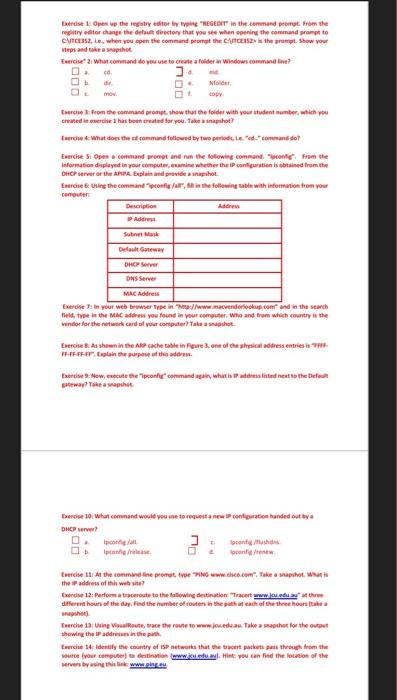
Exercise 1: Open up the registry editor by typing REGEDIT in the command prompt. From the registry editor change the default directory that you see when opening the command prompt to C:\ITCE352, i.e., when you open the command prompt the C:\ITCE352> is the prompt. Show your steps and take a snapshot.
Exercise 2: What command do you use to create a folder in Windows command line?
a. cd. d. md.
b. dir. e. Nfolder.
c. mov. f. copy.
Exercise 3: From the command prompt, show that the folder with your student number, which you created in exercise 1 has been created for you. Take a snapshot?
Exercise 4: What does the cd command followed by two periods, i.e. cd.. command do?
Exercise 5: Open a command prompt and run the following command. Ipconfig. From the information displayed in your computer, examine whether the IP configuration is obtained from the DHCP server or the APIPA. Explain and provide a snapshot.
Exercise 6: Using the command ipconfig /all, fill in the following table with information from your computer:
Description Address
IP Address
Subnet Mask
Default Gateway
DHCP Server
DNS Server
MAC Address
Exercise 7: In your web browser type in http://www.macvendorlookup.com and in the search field, type in the MAC address you found in your computer. Who and from which country is the vendor for the network card of your computer? Take a snapshot.
Exercise 8: As shown in the ARP cache table in Figure 3, one of the physical address entries is FFFFFFFFFFFF. Explain the purpose of this address.
Exercise 9: Now, execute the ipconfig command again, what is IP address listed next to the Default gateway? Take a snapshot.
Exercise 10: What command would you use to request a new IP configuration handed out by a
DHCP server?
a. Ipconfig /all. c. Ipconfig /flushdns.
b. Ipconfig /release. d. Ipconfig /renew.
Exercise 11: At the commandline prompt, type PING www.cisco.com. Take a snapshot. What is the IP address of this web site?
Exercise 12: Perform a traceroute to the following destination: Tracert www.jcu.edu.au at three different hours of the day. Find the number of routers in the path at each of the three hours (take a snapshot).
Exercise 13: Using VisualRoute, trace the route to www.jcu.edu.au. Take a snapshot for the output showing the IP addresses in the path.
Exercise 14: Identify the country of ISP networks that the tracert packets pass through from the source (your computer) to destination (www.jcu.edu.au). Hint: you can find the location of the servers by using this link: www.ping.eu.

Eerde 1 Open up the regaty editor by REGEDIT" in the command prompt. From the registry dior change the detail directory that you see when opening the command prompt to ACESS, le, when you open the command promathe CCS the prompt. Show your vips and phot Exercise 2: What command do you use to create a folder Windows commandine? Dolar Esercise from the command prompt show that the folder with your student number which you created in the has been created for you. Take a snapshot Twee What does the command followed by two period, ed.comando Exercise S1 Open command prompt and run the following commande from the Information displayed in your computer, camine whether the configuration is obtained from the DHCP server or the APPA. Explain and provide a snapshot Esercise Using the commandons/ar, the following table with information from you puter Description Addre Son Mask catai DHCP Server DNSServer MAC Address Exercise in your web browser Type ://www.avenderlookup.com and in the search held, type in the MAC address you found in your computer. Who and from which country in the windor for the network and all your computer take a snapshot Exercise 8 As shown in the cache table in Figure 3.one of the shrical dress entries FFFFFF-Plantee of the Exercise ow, execute and command an, what is assisted next to the Default waaahet. ter 10 was command would you to get configuration handed out by a DHCP ? Esercise 1: At the command line promut typeING www.dic.com". Take a snapshot Wat is the address of the website? Exercise 12: Performanceroute to the following destination www.edust different hours of the day. Find the number of routes in the teacher e) Eerche 13 Using Route, trace the route to www.deaTake a rather for the showing the address in the path Everce Identify the country of ESP works that the tracert packets through from the our your compte destination www.al Hint you can find the location of the wervers by www

Step by Step Solution

There are 3 Steps involved in it

1 Expert Approved Answer
Step: 1 Unlock blur-text-image
Question Has Been Solved by an Expert!

Get step-by-step solutions from verified subject matter experts

Step: 2 Unlock
Step: 3 Unlock

Students Have Also Explored These Related Databases Questions!