







Question: Exercise 2: Review Exercise 16.4 Make a word address program for machining from stock the profile shown in Figure 16.18 in the textbook. Apply appropriate
Exercise 2: Review Exercise 16.4
Make a word address program for machining from stock the profile shown in Figure 16.18 in the textbook. Apply appropriate rough and finish boring as specified in the CNC Tool and Operations Sheet.
Assume the tool offsets, tool nose radius, and tool nose vector 2 have been entered into the offset file.
Program number: O1618.
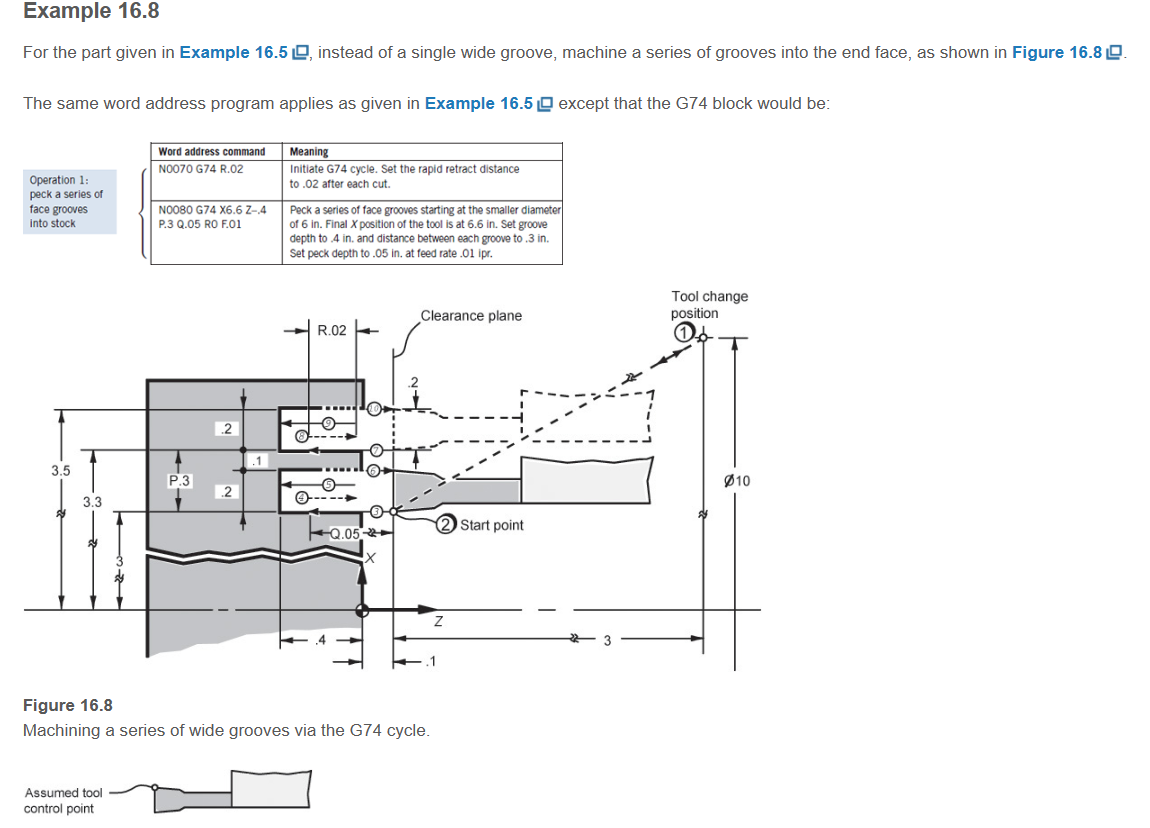
Example 16.8 For the part given in Example 16.5, instead of a single wide groove, machine a series of grooves into the end face, as shown in Figure 16.8 The same word address program applies as given in Example 16.5 except that the G74 block would be: Operation 1: peck a series of face grooves into stock Word address command N0070 G74 R.02 N0080 G74 X6.6 Z-.4 P.3 Q.05 RO F.01 Meaning Initiate G74 cycle. Set the rapid retract distance to .02 after each cut. Peck a series of face grooves starting at the smaller diameter of 6 in. Final X position of the tool is at 6.6 in. Set groove depth to .4 in. and distance between each groove to .3 in. Set peck depth to .05 in. at feed rate .01 ipr. .2 3.5 P.3 .2 3.3 Clearance plane R.02 .2 Tool change position 010 Start point Q.05 Figure 16.8 Machining a series of wide grooves via the G74 cycle. Assumed tool control point Z
Step by Step Solution
There are 3 Steps involved in it

Get step-by-step solutions from verified subject matter experts
 Study Help