







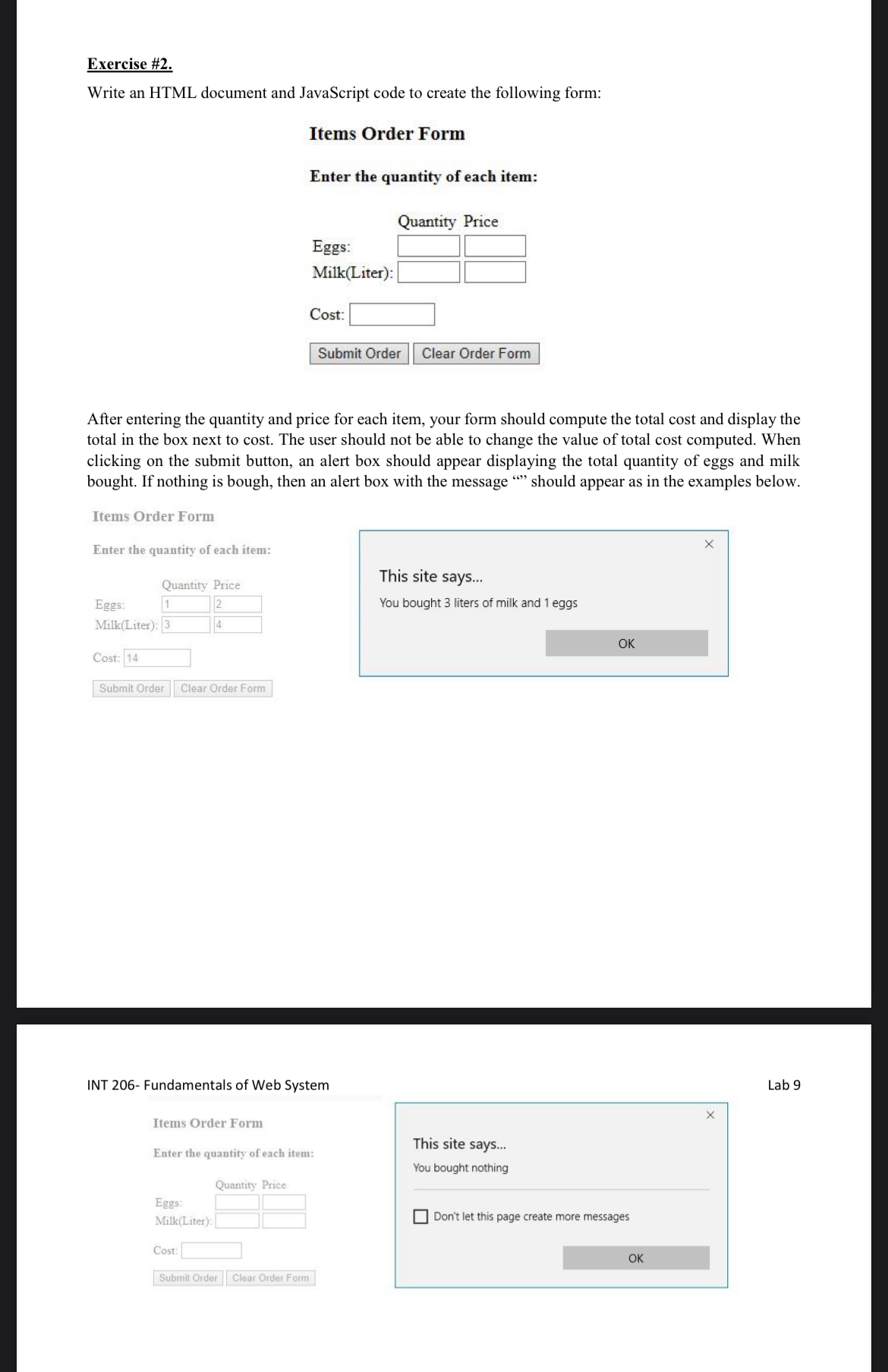
Question: Exercise # 2 . Write an HTML document and JavaScript code to create the following form: Items Order Form Enter the quantity of each item:
Exercise #
Write an HTML document and JavaScript code to create the following form:
Items Order Form
Enter the quantity of each item:
tableEggs:MilkLiter:
Cost:
After entering the quantity and price for each item, your form should compute the total cost and display the total in the box next to cost The user should not be able to change the value of total cost computed. When clicking on the submit button, an alert box should appear displaying the total quantity of eggs and milk bought. If nothing is bough, then an alert box with the message should appear as in the examples below.
Items Order Form
Enter the quantity of each item:
tableQuantity Price,Eggs:MilkLiter
This site says...
You bought liters of milk and eggs
OK
Cost:
Submlt Order Clear Order Form
INT Fundamentals of Web System
Lab
Items Order Form
Enter the quantity of each item:
This site says...
tableQuantity PriceEggs:
Step by Step Solution
There are 3 Steps involved in it
1 Expert Approved Answer
Step: 1 Unlock

Question Has Been Solved by an Expert!
Get step-by-step solutions from verified subject matter experts
Step: 2 Unlock
Step: 3 Unlock
 Study Help