







Question: Exercise 2-1: Complete Exercise 2-1: Exercises 1. If necessary, start QBO. 2. Add the following accounts to the Chart of Accounts. Number Detail Type Prepaid
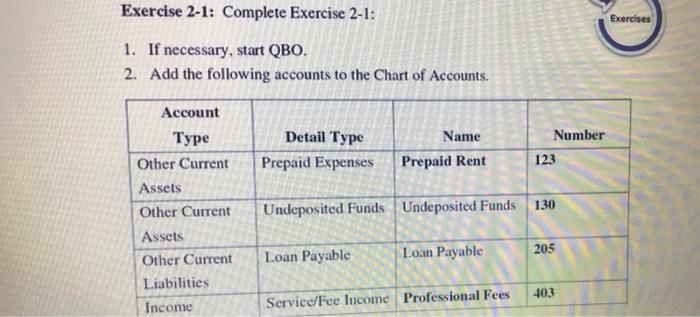
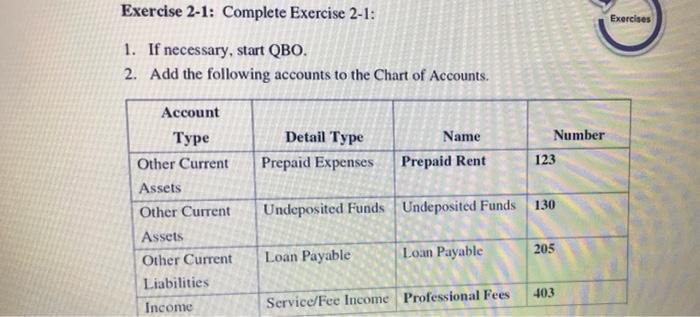
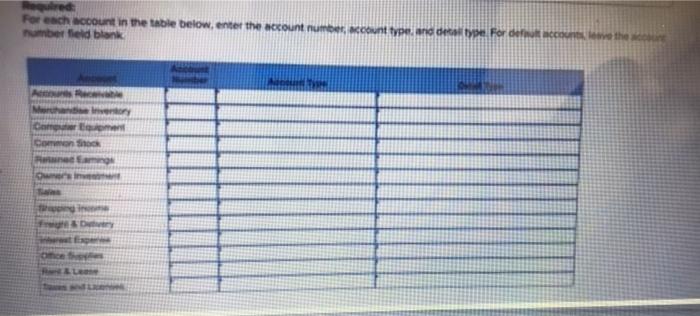
Exercise 2-1: Complete Exercise 2-1: Exercises 1. If necessary, start QBO. 2. Add the following accounts to the Chart of Accounts. Number Detail Type Prepaid Expenses Name Prepaid Rent 123 Account Type Other Current Assets Other Current Assets Other Current Liabilities Income Undeposited Funds Undeposited Funds 130 205 Loan Payable Loan Payable 403 Service/Fee Income Professional Fees Exercise 2-1: Complete Exercise 2-1: Exercises 1. If necessary, start QBO. 2. Add the following accounts to the Chart of Accounts. Detail Type Prepaid Expenses Name Prepaid Rent Number 123 Account Type Other Current Assets Other Current Assets Other Current Liabilities Income Undeposited Funds Undeposited Funds 130 205 Loan Payable Loan Payable 103 Service/Fee Income Professional Fees res For each account in the table below, enter the account number umber field blank out type de type For de conve the Inventory COS Exercise 2-1: Complete Exercise 2-1: Exercises 1. If necessary, start QBO. 2. Add the following accounts to the Chart of Accounts. Number Detail Type Prepaid Expenses Name Prepaid Rent 123 Account Type Other Current Assets Other Current Assets Other Current Liabilities Income Undeposited Funds Undeposited Funds 130 205 Loan Payable Loan Payable 403 Service/Fee Income Professional Fees Exercise 2-1: Complete Exercise 2-1: Exercises 1. If necessary, start QBO. 2. Add the following accounts to the Chart of Accounts. Detail Type Prepaid Expenses Name Prepaid Rent Number 123 Account Type Other Current Assets Other Current Assets Other Current Liabilities Income Undeposited Funds Undeposited Funds 130 205 Loan Payable Loan Payable 103 Service/Fee Income Professional Fees res For each account in the table below, enter the account number umber field blank out type de type For de conve the Inventory COS
Step by Step Solution
There are 3 Steps involved in it

Get step-by-step solutions from verified subject matter experts
 Study Help