







Question: Exercise 3 . 7 Finally, we will examine a section view from a 'real world' structural General Arrangement drawing, and attempt to understand it .
Exercise
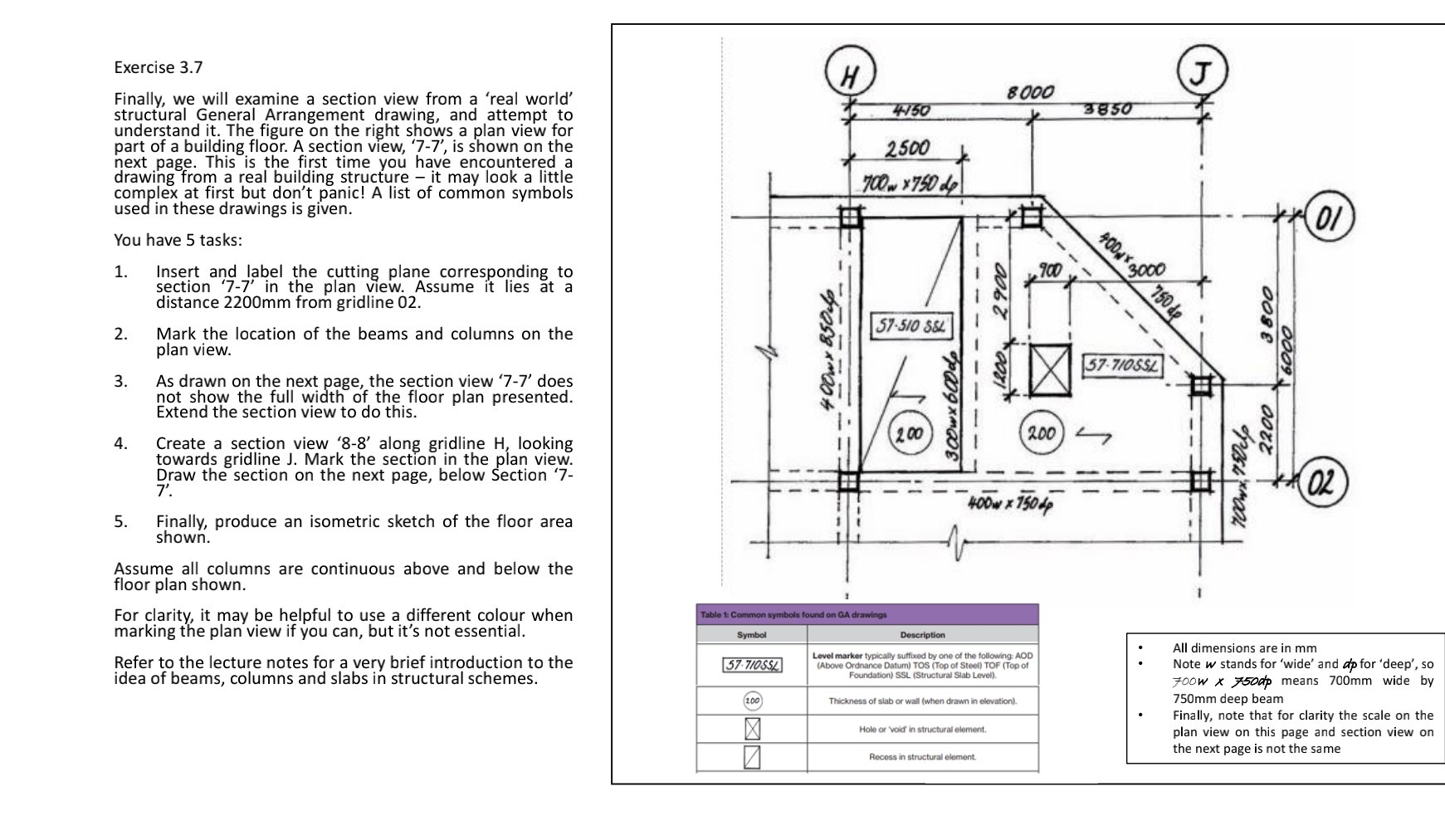
Finally, we will examine a section view from a 'real world' structural General Arrangement drawing, and attempt to understand it The figure on the right shows a plan view for part of a building floor. A section view, is shown on the next page. This is the first time you have encountered a drawing from a real building structure it may look a little complex at first but don't panic! A list of common symbols used in these drawings is given.
You have tasks:
Insert and label the cutting plane corresponding to section in the plan view. Assume it lies at a distance from gridline
Mark the location of the beams and columns on the plan view.
As drawn on the next page, the section view does not show the full width of the floor plan presented. Extend the section view to do this.
Create a section view along gridline looking towards gridline J Mark the section in the plan view. Draw the section on the next page, below Section
Finally, produce an isometric sketch of the floor area shown.
Assume all columns are continuous above and below the floor plan shown.
For clarity, it may be helpful to use a different colour when marking the plan view if you can, but it's not essential.
Refer to the lecture notes for a very brief introduction to the idea of beams, columns and slabs in structural schemes.
tableSymbolDescription SstableLevel marker typically suffixed by one of the following: AODAbove Ordnance Datum TOS Top of Steel TOF Top ofFoundation SSL Structural Slab LevelThickness of slab or wall when drawn in elevationHole or 'void in structural element.Recess in structural element.
All dimensions are in
Note stands for 'wide' and for 'deep', so Foow means wide by deep beam
Finally, note that for clarity the scale on the plan view on this page and section view on the next page is not the same
Step by Step Solution
There are 3 Steps involved in it
1 Expert Approved Answer
Step: 1 Unlock

Question Has Been Solved by an Expert!
Get step-by-step solutions from verified subject matter experts
Step: 2 Unlock
Step: 3 Unlock
 Study Help