







Question: Exercise 4.4 (E4.4.4.1) When you arrive at work the next morning, Rock Castle Construction's December bank statement is on your desk with the following note
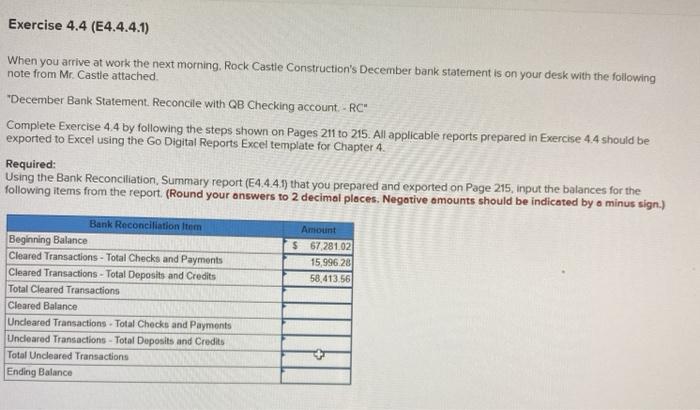
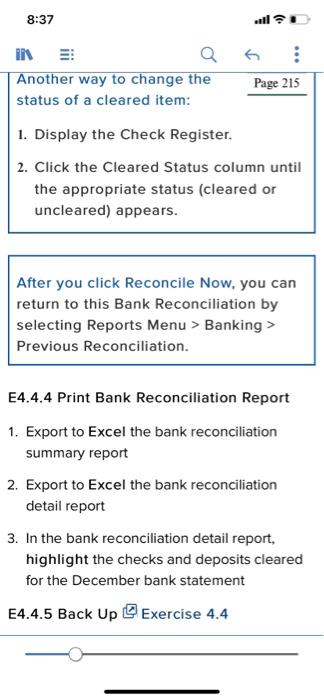
Exercise 4.4 (E4.4.4.1) When you arrive at work the next morning, Rock Castle Construction's December bank statement is on your desk with the following note from Mr. Castle attached "December Bank Statement. Reconcile with QB Checking account - RC" Complete Exercise 4.4 by following the steps shown on Pages 211 to 215. All applicable reports prepared in Exercise 4.4 should be exported to Excel using the Go Digital Reports Excel template for Chapter 4. Required: Using the Bank Reconciliation, Summary report (E4.4.4.1) that you prepared and exported on Page 215, input the balances for the following items from the report (Round your answers to 2 decimal places. Negative amounts should be indicated by a minus sign.) Amount $ 67,281.02 15.996.28 58,413.56 Bank Reconciliation Item Beginning Balance Cleared Transactions - Total Checks and Payments Cleared Transactions - Total Deposits and Credits Total Cleared Transactions Cleared Balance Uncleared Transactions - Total Checks and Payments Uncleared Transactions - Total Deposits and Credits Total Uncleared Transactions Ending Balance 8:37 IN Another way to change the status of a cleared item: Page 215 1. Display the Check Register. 2. Click the Cleared Status column until the appropriate status (cleared or uncleared) appears. After you click Reconcile Now, you can return to this Bank Reconciliation by selecting Reports Menu > Banking > Previous Reconciliation. E4.4.4 Print Bank Reconciliation Report 1. Export to Excel the bank reconciliation summary report 2. Export to Excel the bank reconciliation detail report 3. In the bank reconciliation detail report, highlight the checks and deposits cleared for the December bank statement E4.4.5 Back Up Exercise 4.4 Exercise 4.4 (E4.4.4.1) When you arrive at work the next morning, Rock Castle Construction's December bank statement is on your desk with the following note from Mr. Castle attached "December Bank Statement. Reconcile with QB Checking account - RC" Complete Exercise 4.4 by following the steps shown on Pages 211 to 215. All applicable reports prepared in Exercise 4.4 should be exported to Excel using the Go Digital Reports Excel template for Chapter 4. Required: Using the Bank Reconciliation, Summary report (E4.4.4.1) that you prepared and exported on Page 215, input the balances for the following items from the report (Round your answers to 2 decimal places. Negative amounts should be indicated by a minus sign.) Amount $ 67,281.02 15.996.28 58,413.56 Bank Reconciliation Item Beginning Balance Cleared Transactions - Total Checks and Payments Cleared Transactions - Total Deposits and Credits Total Cleared Transactions Cleared Balance Uncleared Transactions - Total Checks and Payments Uncleared Transactions - Total Deposits and Credits Total Uncleared Transactions Ending Balance 8:37 IN Another way to change the status of a cleared item: Page 215 1. Display the Check Register. 2. Click the Cleared Status column until the appropriate status (cleared or uncleared) appears. After you click Reconcile Now, you can return to this Bank Reconciliation by selecting Reports Menu > Banking > Previous Reconciliation. E4.4.4 Print Bank Reconciliation Report 1. Export to Excel the bank reconciliation summary report 2. Export to Excel the bank reconciliation detail report 3. In the bank reconciliation detail report, highlight the checks and deposits cleared for the December bank statement E4.4.5 Back Up Exercise 4.4
Step by Step Solution
There are 3 Steps involved in it

Get step-by-step solutions from verified subject matter experts
 Study Help