



Question: Exercise 5.1 Consider using MATLAB to compute the roots of the following nonlinear equation: 10(ar+bx+c) = 7.2 (E5.1) (a) Derive the quadratic equation (E5.la) which
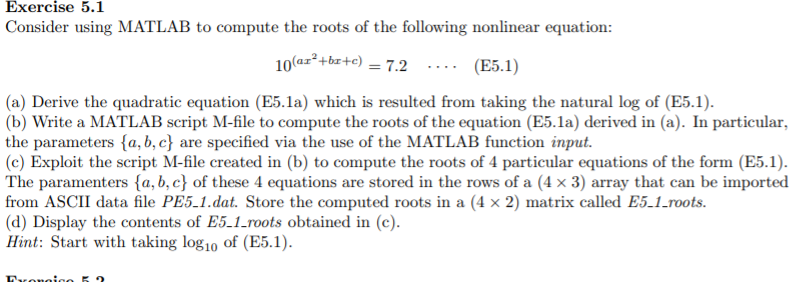
Exercise 5.1 Consider using MATLAB to compute the roots of the following nonlinear equation: 10(ar+bx+c) = 7.2 (E5.1) (a) Derive the quadratic equation (E5.la) which is resulted from taking the natural log of (E5.1). (b) Write a MATLAB script M-file to compute the roots of the equation (E5.1a) derived in (a). In particular, the parameters {a,b,c} are specified via the use of the MATLAB function input. (c) Exploit the script M-file created in (b) to compute the roots of 4 particular equations of the form (E5.1). The paramenters {a,b,c} of these 4 equations are stored in the rows of a (4 x 3) array that can be imported from ASCII data file PE5-1.dat. Store the computed roots in a (4 x 2) matrix called E5_1_roots. (d) Display the contents of E5.1 roots obtained in (c). Hint: Start with taking log10 of (E5.1). Tronico. Exercise 5.1 Consider using MATLAB to compute the roots of the following nonlinear equation: 10(ar+bx+c) = 7.2 (E5.1) (a) Derive the quadratic equation (E5.la) which is resulted from taking the natural log of (E5.1). (b) Write a MATLAB script M-file to compute the roots of the equation (E5.1a) derived in (a). In particular, the parameters {a,b,c} are specified via the use of the MATLAB function input. (c) Exploit the script M-file created in (b) to compute the roots of 4 particular equations of the form (E5.1). The paramenters {a,b,c} of these 4 equations are stored in the rows of a (4 x 3) array that can be imported from ASCII data file PE5-1.dat. Store the computed roots in a (4 x 2) matrix called E5_1_roots. (d) Display the contents of E5.1 roots obtained in (c). Hint: Start with taking log10 of (E5.1). Tronico
Step by Step Solution
There are 3 Steps involved in it

Get step-by-step solutions from verified subject matter experts