







Question: Exercise: In this exercise you'll create a web java application that insert data to a database that contains a table student with attributes: std id
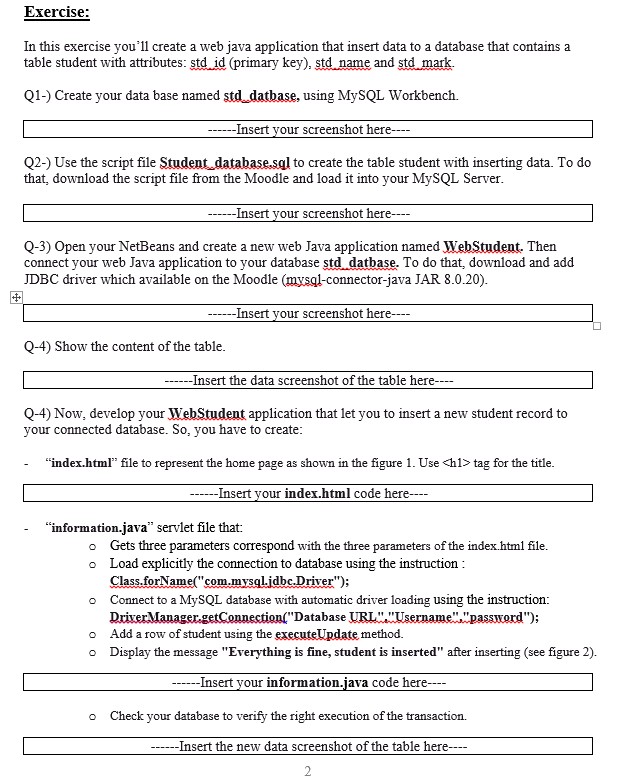
Exercise: In this exercise you'll create a web java application that insert data to a database that contains a table student with attributes: std id (primary key), std name and std mark. Q1-) Create your data base named std_datbase, using MySQL Workbench. ------Insert your screenshot here---- Q2-) Use the script file Student_database.sql to create the table student with inserting data. To do that download the script file from the Moodle and load it into your MySQL Server. ---- Insert your screenshot here---- Q-3) Open your NetBeans and create a new web Java application named WebStudent. Then connect your web Java application to your database std datbase. To do that, download and add JDBC driver which available on the Moodle (mysql-connector-java JAR 8.0.20). --Insert your screenshot here---- # Q-4) Show the content of the table. ------Insert the data screenshot of the table here---- Q-4) Now, develop your WebStudent application that let you to insert a new student record to your connected database. So, you have to create: "index.html" file to represent the home page as shown in the figure 1. Use
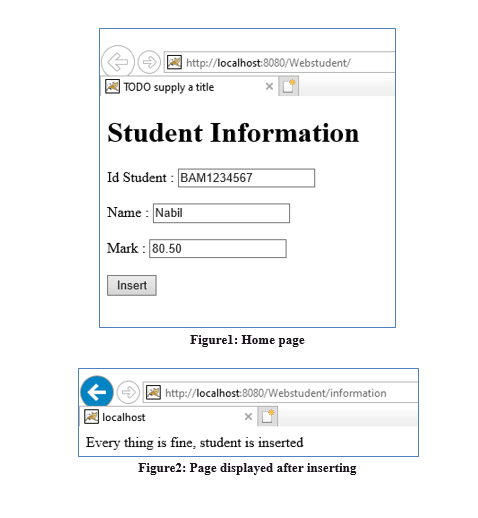
tag for the title. ------ Insert your index.html code here---- "information.java" serviet file that: o Gets three parameters correspond with the three parameters of the index.html file. o Load explicitly the connection to database using the instruction : Class.forName("com.mysql.jdbc.Driver"); Connect to a MySQL database with automatic driver loading using the instruction: Driver Manager.getConnection("Database URL". "Username"."password"); o Add a row of student using the executeUpdate method. o Display the message "Everything is fine, student is inserted" after inserting (see figure 2). ----Insert your information.java code here--- Check your database to verify the right execution of the transaction. ---- Insert the new data screenshot of the table here---- 2 http://localhost:8080/Webstudent/ TODO supply a title Student Information Id Student : BAM1234567 Name : Nabil Mark: 80.50 Insert Figurel: Home page http://localhost:8080/Webstudent/information localhost Every thing is fine, student is inserted Figure2: Page displayed after inserting
Step by Step Solution
There are 3 Steps involved in it

Get step-by-step solutions from verified subject matter experts
 Study Help