







Question: Exercise In this lab, we will create a few classes to represent a Bank system. A bank has various account holders in their system, and
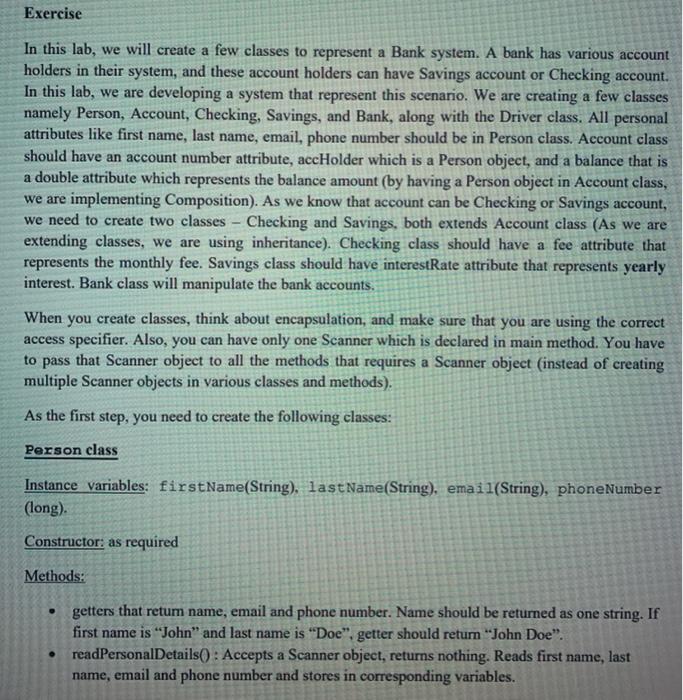
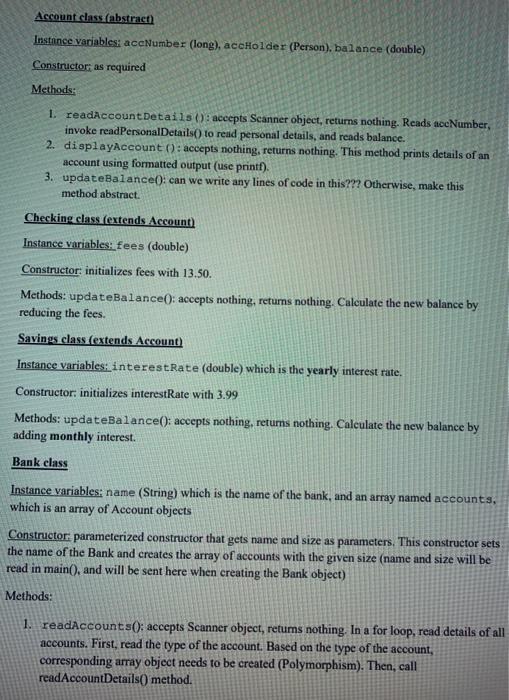
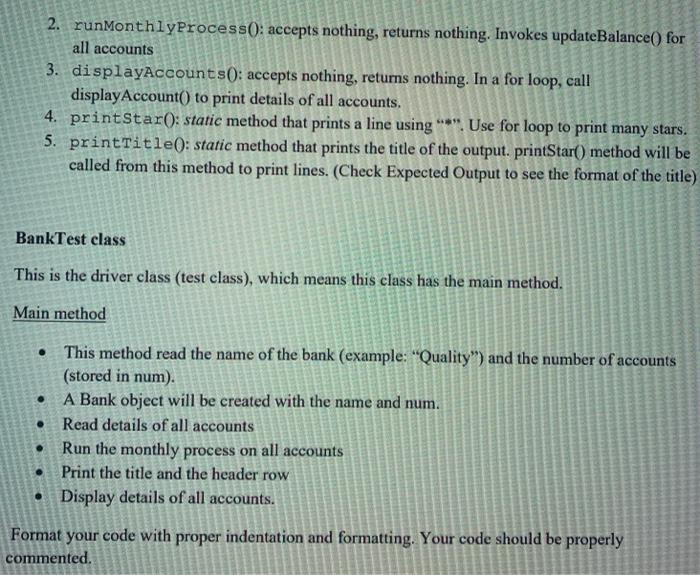
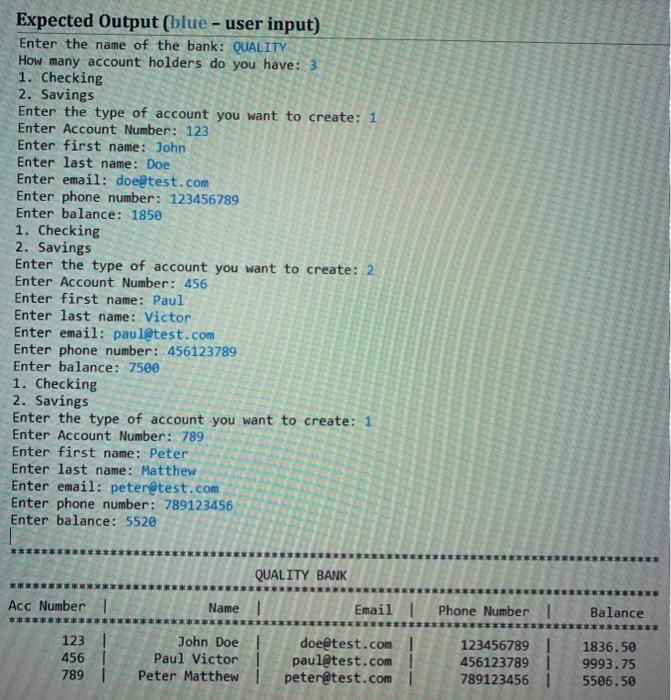
Exercise In this lab, we will create a few classes to represent a Bank system. A bank has various account holders in their system, and these account holders can have Savings account or Checking account. In this lab, we are developing a system that represent this scenario. We are creating a few classes namely Person, Account Checking, Savings, and Bank, along with the Driver class. All personal attributes like first name, last name, email, phone number should be in Person class. Account class should have an account number attribute, accHolder which is a Person object, and a balance that is a double attribute which represents the balance amount (by having a Person object in Account class, we are implementing Composition). As we know that account can be Checking or Savings account, we need to create two classes - Checking and Savings, both extends Account class (As we are extending classes, we are using inheritance). Checking class should have a fee attribute that represents the monthly fee. Savings class should have interestRate attribute that represents yearly interest. Bank class will manipulate the bank accounts. When you create classes, think about encapsulation, and make sure that you are using the correct access specifier. Also, you can have only one Scanner which is declared in main method. You have to pass that Scanner object to all the methods that requires a Scanner object (instead of creating multiple Scanner objects in various classes and methods). As the first step, you need to create the following classes: Person class Instance variables: firstName(String). lastName(String), email(String), phoneNumber (long). Constructor: as required Methods: getters that retum name, email and phone number. Name should be returned as one string. If first name is "John and last name is "Doe". getter should return "John Doe". readPersonalDetails(): Accepts a Scanner object, returns nothing. Reads first name, last name, email and phone number and stores in corresponding variables. Account class (abstract) Instance variables: aceNumber (long), aceholder (Person), balance (double) Constructor as required Methods: I readAccount Details : aceepts Scanner object, returns nothing. Reads accNumber, invoke readPersonal Details to read personal details, and reads balance. 2. displayAccount : accepts nothing, returns nothing. This method prints details of an account using formatted output (use printf). 3. updateBalance(): can we write any lines of code in this??? Otherwise, make this method abstract. Checking class extends Account Instance variables: fees (double) Constructor: initializes fees with 13.50. Methods: updateBalance(): accepts nothing, retums nothing. Calculate the new balance by reducing the fees. Savings class (extends Account) Instance variables: interest Rate (double) which is the yearly interest rate. Constructor: initializes interestRate with 3.99 Methods: updateBalance(): accepts nothing, returns nothing. Calculate the new balance by adding monthly interest. Bank class Instance variables: name (String) which is the name of the bank, and an array named accounts, which is an array of Account objects Constructor parameterized constructor that gets name and size as parameters. This constructor sets the name of the Bank and creates the array of accounts with the given size (name and size will be read in main(), and will be sent here when creating the Bank object) Methods: 1. readAccounts(): accepts Scanner object, retums nothing. In a for loop, read details of all accounts. First, read the type of the account. Based on the type of the account, corresponding array object needs to be created (Polymorphism). Then, call readAccount Details() method. 2. runMonthlyProcess(): accepts nothing, returns nothing. Invokes updateBalance() for all accounts 3. displayAccounts(): accepts nothing, returns nothing. In a for loop, call display Account() to print details of all accounts. 4. printStar(: static method that prints a line using "*". Use for loop to print many stars. 5. printTitle(): static method that prints the title of the output.printStar() method will be called from this method to print lines. (Check Expected Output to see the format of the title) BankTest class This is the driver class (test class), which means this class has the main method. Main method . This method read the name of the bank (example: Quality") and the number of accounts (stored in num). A Bank object will be created with the name and num. Read details of all accounts Run the monthly process on all accounts Print the title and the header row Display details of all accounts. . Format your code with proper indentation and formatting. Your code should be properly commented. Expected Output (blue - user input) Enter the name of the bank: QUALITY How many account holders do you have: 3 1. Checking 2. Savings Enter the type of account you want to create: 1 Enter Account Number: 123 Enter first name: John Enter last name: Doe Enter email: doe@test.com Enter phone number: 123456789 Enter balance: 1850 1. Checking 2. Savings Enter the type of account you want to create: 2 Enter Account Number: 456 Enter first name: Paul Enter last name: Victor Enter email: paul@test.com Enter phone number: 456123789 Enter balance: 7500 1. Checking 2. Savings Enter the type of account you want to create: 1 Enter Account Number: 789 Enter first name: Peter Enter last name: Matthew Enter email: peter@test.com Enter phone number: 789123456 Enter balance: 5520 QUALITY BANK Acc Number 1 Name Email | Phone Number 1 Balance 1231 456 789 John Doel Paul Victor Peter Matthew doe@test.com paul@test.com peter@test.com 123456789 456123789 7891234561 1836.50 9993.75 5506.50
Step by Step Solution
There are 3 Steps involved in it

Get step-by-step solutions from verified subject matter experts
 Study Help