







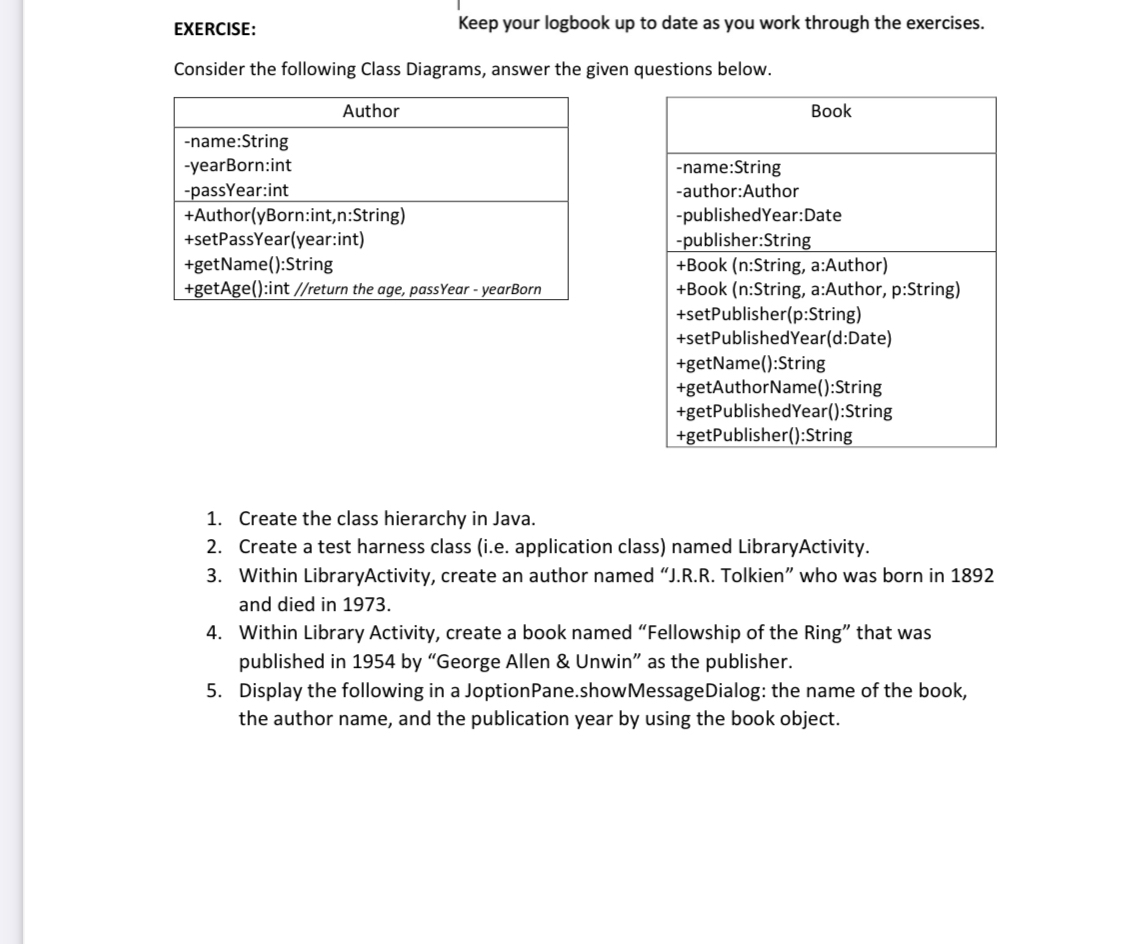
Question: EXERCISE: Keep your logbook up to date as you work through the exercises. Consider the following Class Diagrams, answer the given questions below. table
EXERCISE:
Keep your logbook up to date as you work through the exercises.
Consider the following Class Diagrams, answer the given questions below.
tableAuthorname:StringyearBorn:intpassYear:intAuthoryBorn:int,n:StringsetPassYearyear:intgetName:StringgetAge:int return the age, passYear yearBorn
tableBooktablename:Stringauthor:AuthorpublishedYear:Datepublisher:StringBook n:String, a:AuthorBook n:String, a:Author, p:StringsetPublisherp:StringsetPublishedYeard:DategetName:StringgetAuthorName:StringgetPublishedYear:StringgetPublisher:String
Create the class hierarchy in Java.
Create a test harness class ie application class named LibraryActivity.
Within LibraryActivity, create an author named JRR Tolkien" who was born in and died in
Within Library Activity, create a book named "Fellowship of the Ring" that was published in by "George Allen & Unwin" as the publisher.
Display the following in a JoptionPane.showMessageDialog: the name of the book, the author name, and the publication year by using the book object.
Step by Step Solution
There are 3 Steps involved in it
1 Expert Approved Answer
Step: 1 Unlock

Question Has Been Solved by an Expert!
Get step-by-step solutions from verified subject matter experts
Step: 2 Unlock
Step: 3 Unlock
 Study Help