







Question: Exercise l: Using Basic HTML Tags Open index.txt and save it as index.html Add the appropriate tags in order to get the following html page:
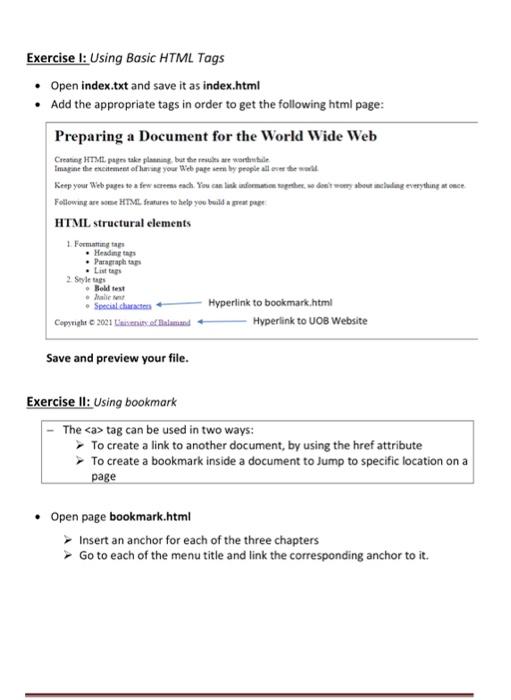
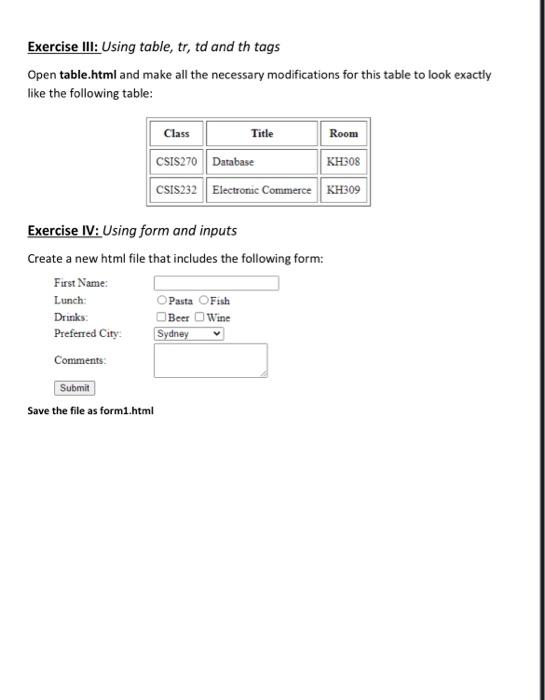
Exercise l: Using Basic HTML Tags Open index.txt and save it as index.html Add the appropriate tags in order to get the following html page: Preparing a Document for the World Wide Web Creating HTML take planing, but there we are Imagine the excitement of your web pages by people all the Keep your Web pages to a few reseach. You can link domate de sourcing everything once Following HTML fratures to help you build a preppe HTML structural elements 1 Formatting Mending . Paragraph taps . Lists 2 Styles Boldest Mali Special charts Hyperlink to bookmark.html Copyright 2001 Lasse Bed Hyperlink to UOB Website Save and preview your file. Exercise II: Using bookmark The tag can be used in two ways: To create a link to another document, by using the href attribute To create a bookmark inside a document to Jump to specific location on a page Open page bookmark.html Insert an anchor for each of the three chapters Go to each of the menu title and link the corresponding anchor to it. Exercise III: Using table, tr, td and th tags Open table.html and make all the necessary modifications for this table to look exactly like the following table: Class Title Room CSIS270 Database KH308 CSIS232 Electronic Commerce KH309 Exercise IV: Using form and inputs Create a new html file that includes the following form: First Name: Lunch: Pasta Fish Drinks Beer Wine Preferred City Sydney Comments: Submit Save the file as form1.html
Step by Step Solution
There are 3 Steps involved in it
Sure Heres a stepbystep guide to complete each exercise Exercise I Creating indexhtml Open indextxt ... View full answer

Get step-by-step solutions from verified subject matter experts
 Study Help