







Question: Exhibit 6.8: Notebook Computer Assembly Process Sheet TASK TASK TIME (SECONDS) TASKS THAT MUST PRECEDE 1. Assemble Cover. 84 2. Install LCD in Cover.
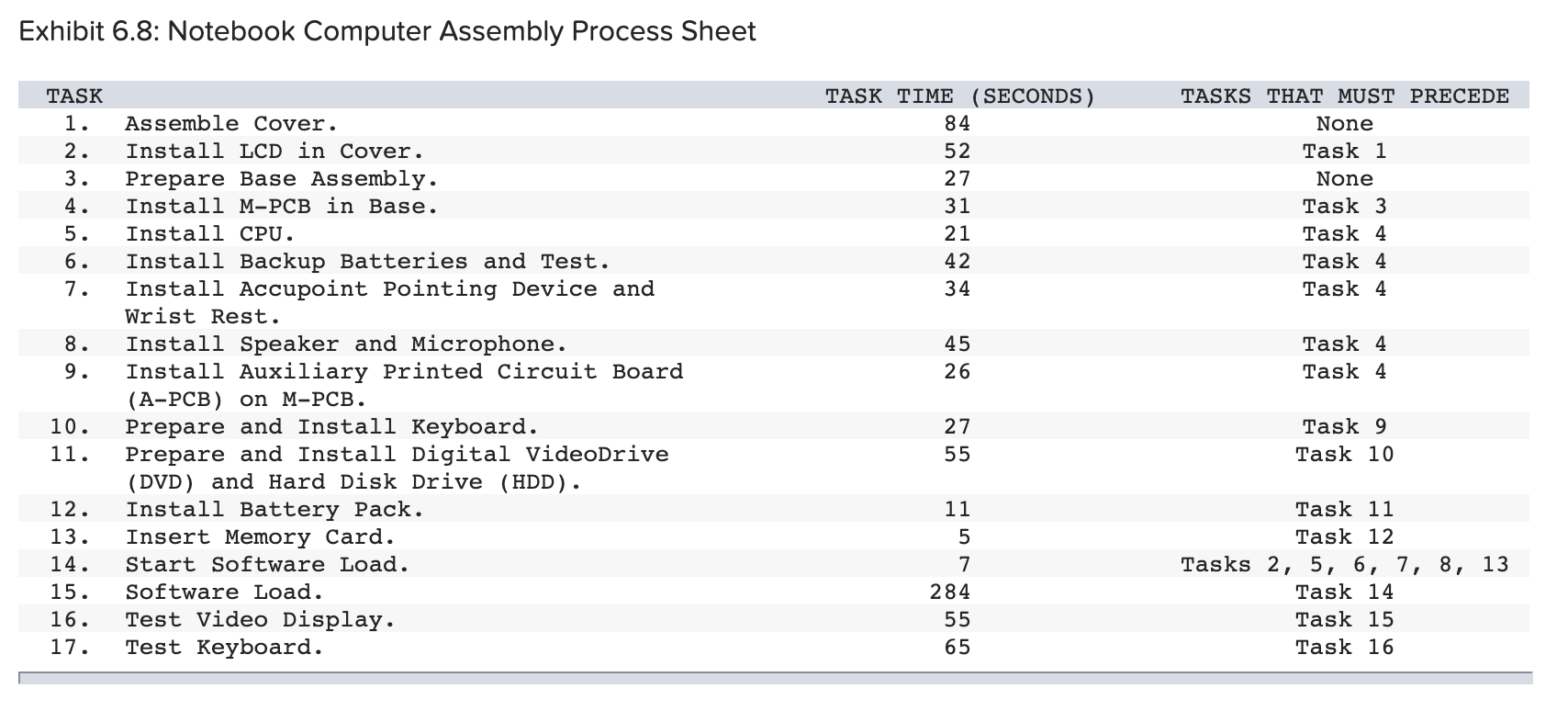
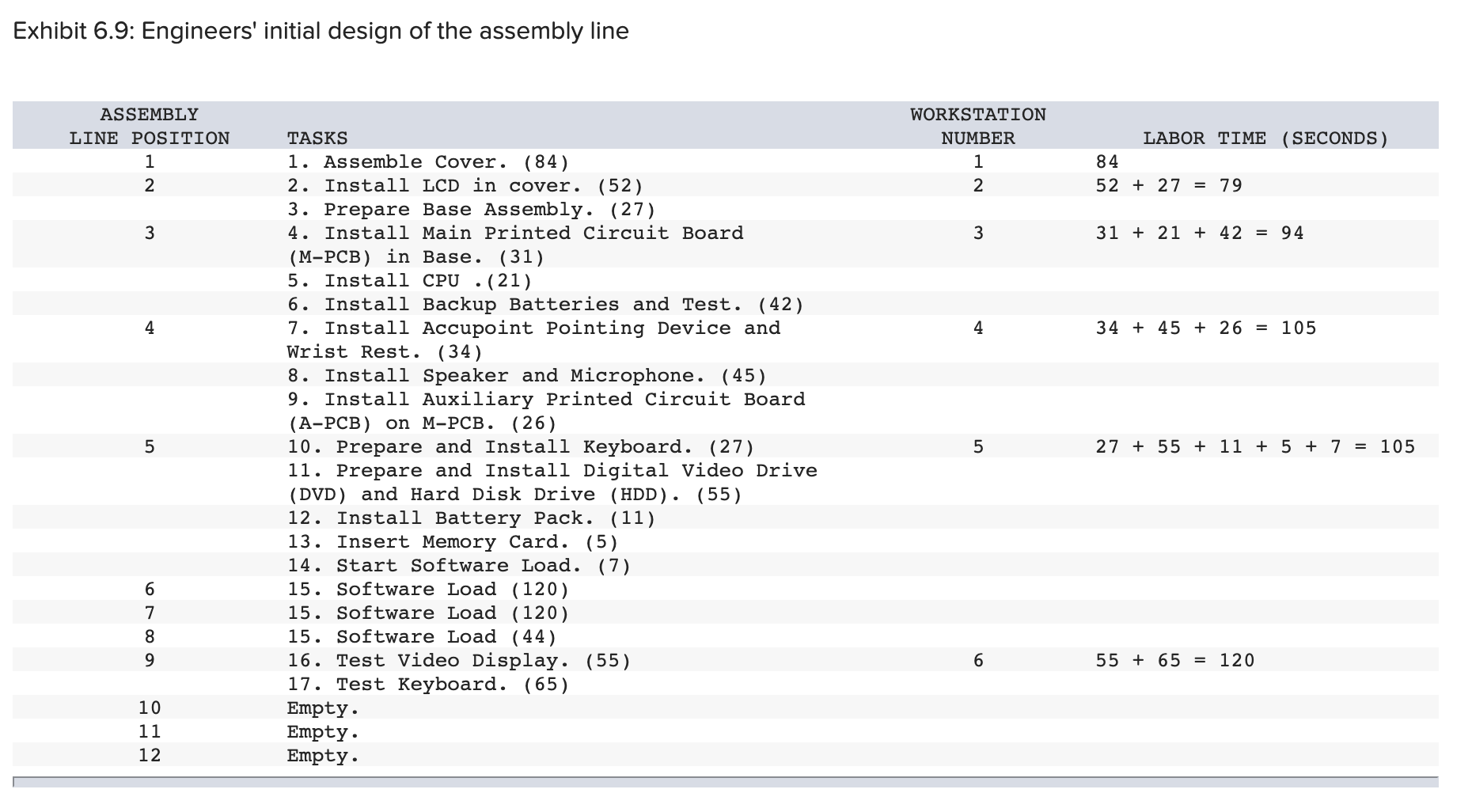
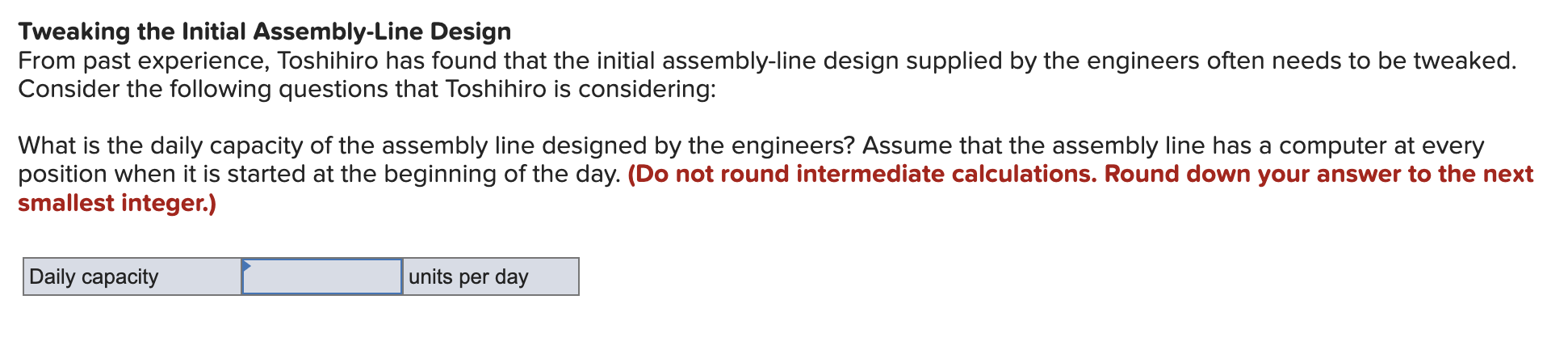
Exhibit 6.8: Notebook Computer Assembly Process Sheet TASK TASK TIME (SECONDS) TASKS THAT MUST PRECEDE 1. Assemble Cover. 84 2. Install LCD in Cover. 52 3. Prepare Base Assembly. 27 None Task 1 None 4. Install M-PCB in Base. 31 Task 3 56 5. Install CPU. 21 Task 4 6. Install Backup Batteries and Test. 42 Task 4 7. Install Accupoint Pointing Device and Wrist Rest. 34 Task 4 8. Install Speaker and Microphone. 45 9. Install Auxiliary Printed Circuit Board (A-PCB) on M-PCB. 26 56 Task 4 Task 4 10. Prepare and Install Keyboard. 11. 12. Prepare and Install Digital VideoDrive (DVD) and Hard Disk Drive (HDD). Install Battery Pack. 27 55 11 25 13. Insert Memory Card. 157 14. Start Software Load. 15. Software Load. 16. Test Video Display. 17. Test Keyboard. 284 55 65 Task 9 Task 10 Task 11 Task 12 Tasks 2, 567 8, 13 Task 14 Task 15 Task 16 Exhibit 6.9: Engineers' initial design of the assembly line ASSEMBLY LINE POSITION 1 2 TASKS 1. Assemble Cover. (84) 2. Install LCD in cover. (52) 3. Prepare Base Assembly. (27) WORKSTATION NUMBER LABOR TIME (SECONDS) 1 84 2 52 + 27 = 79 3 3121 + 42 = 94 3 4. Install Main Printed Circuit Board (M-PCB) in Base. (31) 5. Install CPU (21) 4 6. Install Backup Batteries and Test. (42) 7. Install Accupoint Pointing Device and Wrist Rest. (34) 4 34 +45 + 26 = 105 8. Install Speaker and Microphone. (45) 9. Install Auxiliary Printed Circuit Board (A-PCB) on M-PCB. (26) 5 10. Prepare and Install Keyboard. (27) 11. Prepare and Install Digital Video Drive 5 27 +55 + 11 + 5 + 7 = 105 (DVD) and Hard Disk Drive (HDD). (55) 12. Install Battery Pack. (11) 13. Insert Memory Card. (5) 14. Start Software Load. (7) 6189 15. Software Load (120) 7 15. Software Load (120) 10 11 15. Software Load (44) 16. Test Video Display. (55) 17. Test Keyboard. (65) Empty. Empty. 6 5565 = 120 12 Empty. Tweaking the Initial Assembly-Line Design From past experience, Toshihiro has found that the initial assembly-line design supplied by the engineers often needs to be tweaked. Consider the following questions that Toshihiro is considering: What is the daily capacity of the assembly line designed by the engineers? Assume that the assembly line has a computer at every position when it is started at the beginning of the day. (Do not round intermediate calculations. Round down your answer to the next smallest integer.) Daily capacity units per day
Step by Step Solution
There are 3 Steps involved in it

Get step-by-step solutions from verified subject matter experts
 Study Help