Experiment 8. Centos.
![to view the local address [root@localhost -]# ifconfig ens 32: flags=4163 mtu](https://dsd5zvtm8ll6.cloudfront.net/si.experts.images/questions/2024/09/66f4edaa51eaa_65766f4eda9b83a4.jpg)
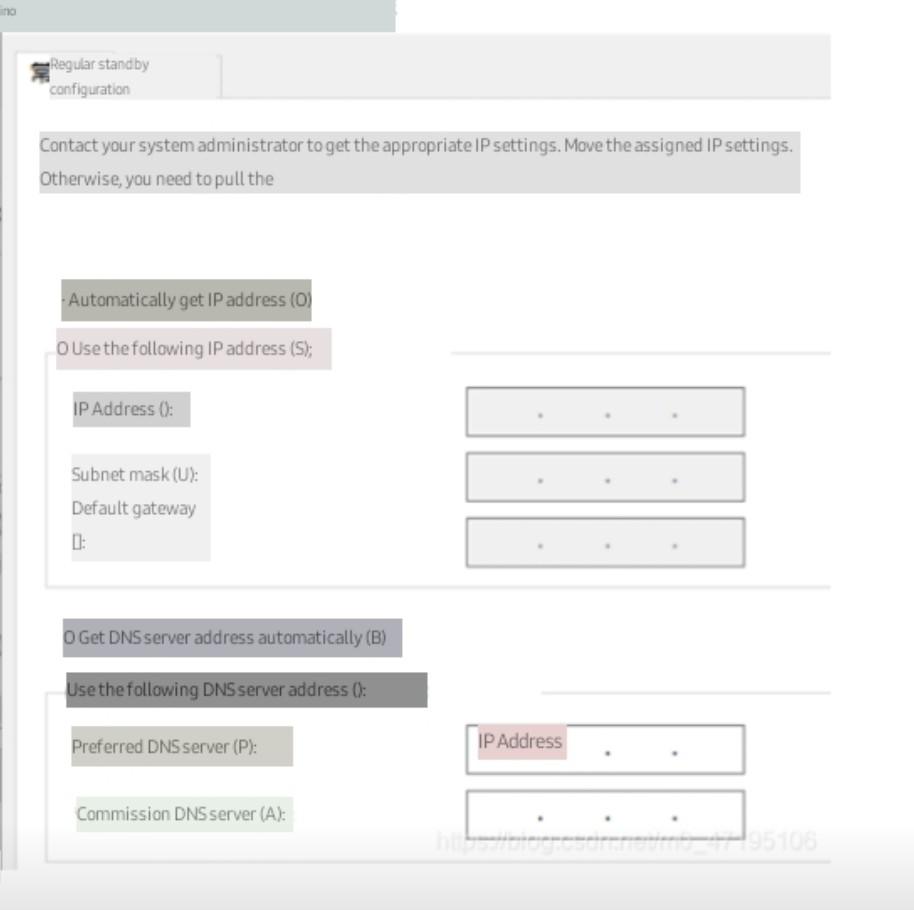
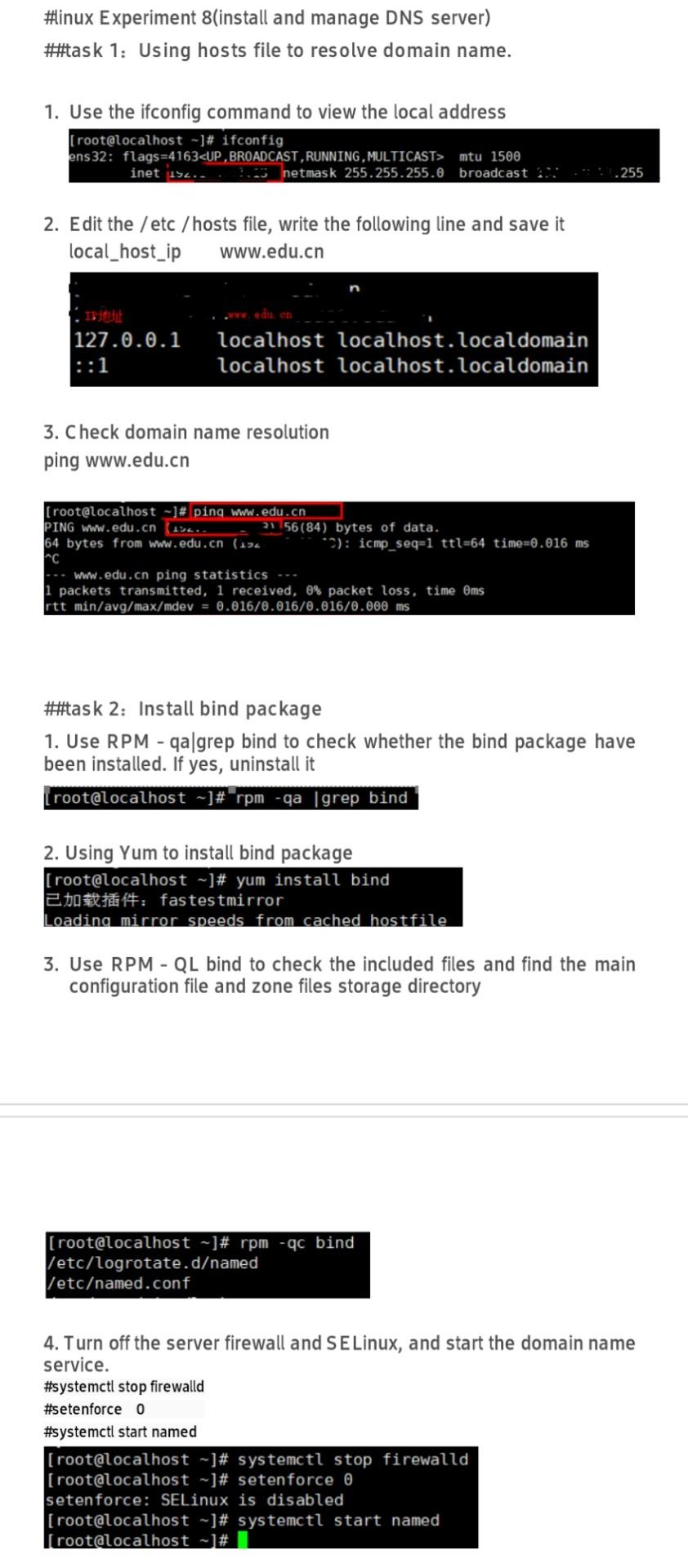
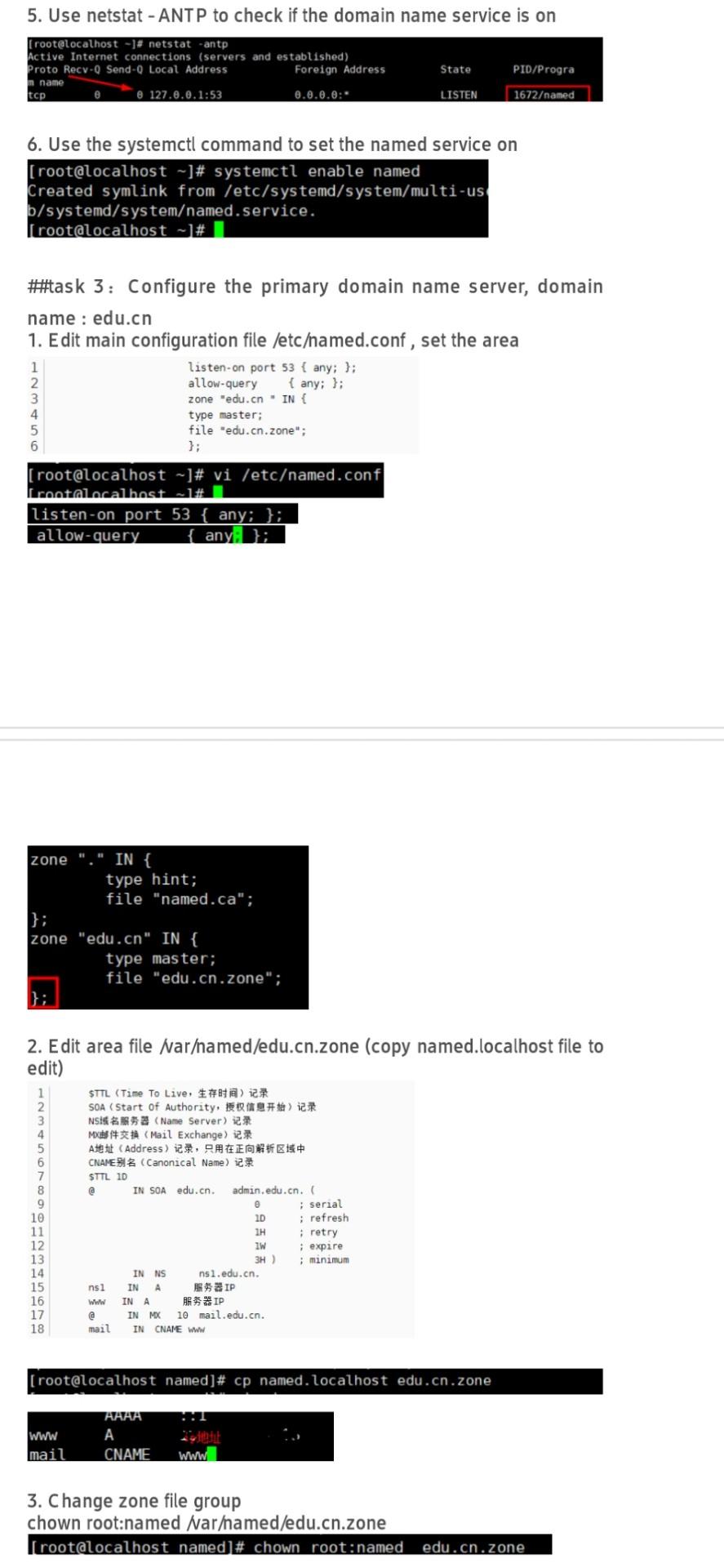
#inux Experiment 8(install and manage DNS server) #task 1: Using hosts file to resolve domain name. 1. Use the ifconfig command to view the local address [root@localhost -]# ifconfig ens 32: flags=4163 mtu 1500 net 192. netmask 255.255.255.0 broadcast 2 .255 2. Edit the /etc/hosts file, write the following line and save it local_host_ip www.edu.cn 127.0.0.1 localhost localhost.localdomain localhost localhost.localdomain ::1 3. Check domain name resolution ping www.edu.cn [root@localhost - ]# ping www.edu.cn PING www.edu.cn 15.. 21 56(84) bytes of data. 64 bytes from www.edu.cn (194 *2): icmp_seq=1 ttl=64 time=0.016 ms nC --- www.edu.cn ping statistics -- 1 packets transmitted, 1 received, 0% packet loss, time Oms rtt min/avg/max/mdev = 0.016/0.016/0.016/0.000 ms #task 2: Install bind package 1. Use RPM - qa grep bind to check whether the bind package have been installed. If yes, uninstall it [root@localhost -]# rpm -qa grep bind 2. Using Yum to install bind package [root@localhost -]# yum install bind 2001: fastestmirror Loading mirror speeds from cached hostfile 3. Use RPM - QL bind to check the included files and find the main configuration file and zone files storage directory [root@localhost - ]# rpm -qc bind /etc/logrotate.damed /etcamed.conf 4. Turn off the server firewall and SE Linux, and start the domain name service. #systemctl stop firewalld #setenforce 0 #systemctl start named [root@localhost ~]# systemctl stop firewalld [root@localhost ~]# setenforce o setenforce: SELinux is disabled [root@localhost - ]# systemctl start named [root@localhost -]# 5. Use netstat - ANTP to check if the domain name service is on [root@localhost -]# netstat -antp Active Internet connections (servers and established) Proto Recy-Q Send - Local Address Foreign Address m name tcp 8 127.0.0.1:53 0.0.0.0: State PID/Progra LISTEN 1672amed 6. Use the systemctl command to set the named service on [root@localhost -]# systemctl enable named Created symlink from /etc/systemd/system/multi-us b/systemd/systemamed.service. [root@localhost - # #task 3: Configure the primary domain name server, domain name : edu.cn 1. Edit main configuration file /etcamed.conf, set the area listen-on port 53 { any; }; allow-query {any; }; 1 zone "edu.cn - IN { type master; file "edu.cn.zone"; 5 6 [root@localhost - ]# vi /etcamed.conf frontalocalhost listen -on port 53 { any; }; allow-query any: }; zone IN { type hint; file "named.ca"; }; zone "edu.cn" IN { type master; file "edu.cn.zone"; 2. Edit area file Naramed/edu.cn.zone (copy named.localhost file to edit) 1 2 3 4 5 6 7 8 9 10 11 12 13 14 15 16 17 18 STTL (Time To Live. ### SOA (Start Of Authority, 9th 2 NS (Name Server) (Mail Exchange) A(Address), CNAMEBI Canonical Name) 2 STTL 10 @ IN SOA edu.cn admin.edu.cn ; serial 10 ; refresh : retry w : expire 3H) : minimum IN NS ns1.edu.cn. ns1 IN A IP Www INA IP IN MO 10 mail.edu.cn. mail INCNAME www [root@localhost named]# cp named.localhost edu.cn.zone WWW mail A CNAME 3. Change zone file group chown root:named Naramed/edu.cn.zone [root@localhost named]# chown root:named edu.cn.zone 4. Use named checkconf and named checkzone to check the main configuration file and zone file [root@localhost named]# named-checkconf [root@localhost named]# named-checkzone edu.cn edu.cn.zone zone edu.cn/IN: loaded serial 0 OK [root@localhost named]# 5. services named restart: Restart the named service 6. NSLOOKUP verifies the server configuration (server address) [root@localhost named]# nslookup > server -iptet Default server: TP that Address: CIPE www.edu.cn Server: IPUIE Address: IPO Name: www.edu.cn Address: IPhi. https://blog.csdn.net/mo_47195106 7. Set the domain name server address of the host as the virtual machine address, and check the domain name resolution. Execute ping www.edu.cn at the host. Configure as follows before execution: VMware Network Adapter VMnet) Internet iki 4 (TCP/IPv4) 1$ # : ,IP,, IP . VMware Virtual Ethernet Adap IP (0) (O) 0IP($): IP): (U): Microsof * VMware Bridge Protocol V Microsof Internet Wit 4 (TCP/IPv4 i Microsof Microsoft LLDP We Internet HW 6 (TCP/IPv6 V. & mtu 1500 net 192. netmask 255.255.255.0 broadcast 2 .255 2. Edit the /etc/hosts file, write the following line and save it local_host_ip www.edu.cn 127.0.0.1 localhost localhost.localdomain localhost localhost.localdomain ::1 3. Check domain name resolution ping www.edu.cn [root@localhost - ]# ping www.edu.cn PING www.edu.cn 15.. 21 56(84) bytes of data. 64 bytes from www.edu.cn (194 *2): icmp_seq=1 ttl=64 time=0.016 ms nC --- www.edu.cn ping statistics -- 1 packets transmitted, 1 received, 0% packet loss, time Oms rtt min/avg/max/mdev = 0.016/0.016/0.016/0.000 ms #task 2: Install bind package 1. Use RPM - qa grep bind to check whether the bind package have been installed. If yes, uninstall it [root@localhost -]# rpm -qa grep bind 2. Using Yum to install bind package [root@localhost -]# yum install bind 2001: fastestmirror Loading mirror speeds from cached hostfile 3. Use RPM - QL bind to check the included files and find the main configuration file and zone files storage directory [root@localhost - ]# rpm -qc bind /etc/logrotate.damed /etcamed.conf 4. Turn off the server firewall and SE Linux, and start the domain name service. #systemctl stop firewalld #setenforce 0 #systemctl start named [root@localhost ~]# systemctl stop firewalld [root@localhost ~]# setenforce o setenforce: SELinux is disabled [root@localhost - ]# systemctl start named [root@localhost -]# 5. Use netstat - ANTP to check if the domain name service is on [root@localhost -]# netstat -antp Active Internet connections (servers and established) Proto Recy-Q Send - Local Address Foreign Address m name tcp 8 127.0.0.1:53 0.0.0.0: State PID/Progra LISTEN 1672amed 6. Use the systemctl command to set the named service on [root@localhost -]# systemctl enable named Created symlink from /etc/systemd/system/multi-us b/systemd/systemamed.service. [root@localhost - # #task 3: Configure the primary domain name server, domain name : edu.cn 1. Edit main configuration file /etcamed.conf, set the area listen-on port 53 { any; }; allow-query {any; }; 1 zone "edu.cn - IN { type master; file "edu.cn.zone"; 5 6 [root@localhost - ]# vi /etcamed.conf frontalocalhost listen -on port 53 { any; }; allow-query any: }; zone IN { type hint; file "named.ca"; }; zone "edu.cn" IN { type master; file "edu.cn.zone"; 2. Edit area file Naramed/edu.cn.zone (copy named.localhost file to edit) 1 2 3 4 5 6 7 8 9 10 11 12 13 14 15 16 17 18 STTL (Time To Live. ### SOA (Start Of Authority, 9th 2 NS (Name Server) (Mail Exchange) A(Address), CNAMEBI Canonical Name) 2 STTL 10 @ IN SOA edu.cn admin.edu.cn ; serial 10 ; refresh : retry w : expire 3H) : minimum IN NS ns1.edu.cn. ns1 IN A IP Www INA IP IN MO 10 mail.edu.cn. mail INCNAME www [root@localhost named]# cp named.localhost edu.cn.zone WWW mail A CNAME 3. Change zone file group chown root:named Naramed/edu.cn.zone [root@localhost named]# chown root:named edu.cn.zone 4. Use named checkconf and named checkzone to check the main configuration file and zone file [root@localhost named]# named-checkconf [root@localhost named]# named-checkzone edu.cn edu.cn.zone zone edu.cn/IN: loaded serial 0 OK [root@localhost named]# 5. services named restart: Restart the named service 6. NSLOOKUP verifies the server configuration (server address) [root@localhost named]# nslookup > server -iptet Default server: TP that Address: CIPE www.edu.cn Server: IPUIE Address: IPO Name: www.edu.cn Address: IPhi. https://blog.csdn.net/mo_47195106 7. Set the domain name server address of the host as the virtual machine address, and check the domain name resolution. Execute ping www.edu.cn at the host. Configure as follows before execution: VMware Network Adapter VMnet) Internet iki 4 (TCP/IPv4) 1$ # : ,IP,, IP . VMware Virtual Ethernet Adap IP (0) (O) 0IP($): IP): (U): Microsof * VMware Bridge Protocol V Microsof Internet Wit 4 (TCP/IPv4 i Microsof Microsoft LLDP We Internet HW 6 (TCP/IPv6 V. &




