







Question: Expression Evaluation It is good design practice when making a user interface for an application such as a calculator to separate the user interface from
Expression Evaluation
It is good design practice when making a user interface for an application such as a calculator to separate the user interface from the "model" or the "logic" of the application. This simplifies the design and improves your ability to maintain the program over time. In this design, the model doesn't know anything about the user interface. It never calls any of the methods of the interface. The model can be tested separately from the interface using, for example, a main method and print statements.
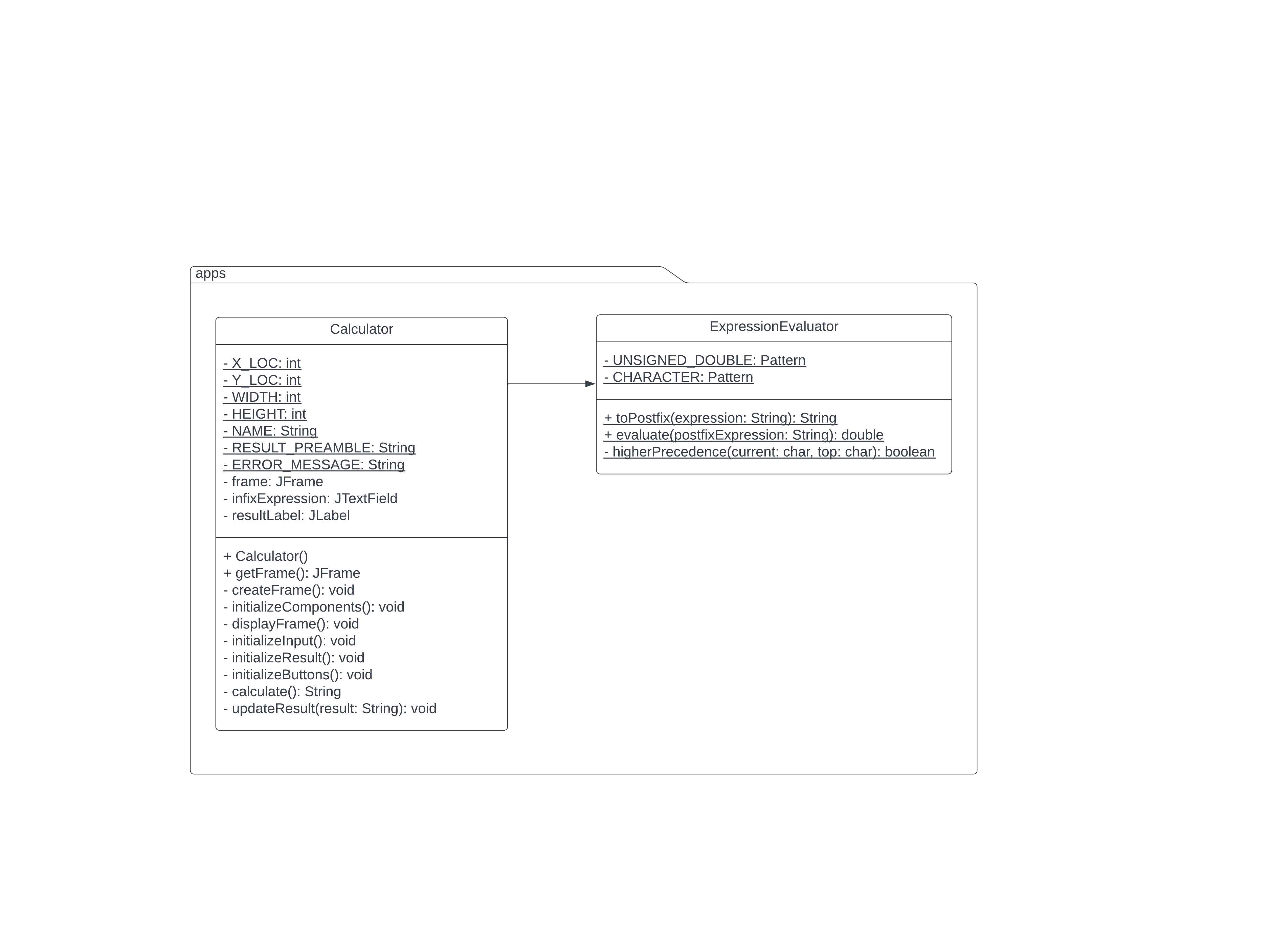
The expression evaluator class is our model and is where we are putting all of the code for evaluating postfix expressions and producing the result. The entire class is static, since the class is stateless it does not need to hold on to information outside of its methods
Constants
UNSIGNEDDOUBLE
This is a pattern that represents what an unsigned double should look like in text. Set it to the following statement:
Pattern.compiledddEed;
CHARACTER
This is a pattern that represents what a character should look like in text. Set it to the following statement:
Pattern.compileS;
higherPrecedence
While evaluating our expressions, we will need to be able to check if a given operator has higher precedence than another. This is our helper method that will accomplish this.
Return true if the operator on the top of the stack second parameter is of higher or equal precedence than the current operator first parameter
Return false otherwise.
Hint: You can do this with a single return statement.
toPostfix
This method accepts a mathematical expression as a string in infix notation and returns the corresponding postfix version of the expression.
Your notes and materials from lecture show this algorithm.
The algorithm is also on page in your textbook.
If there is an error, return null.
Note that when you get the text from the textbox, it will be in the form of a String. You will need to parse the String, pulling out numbers unsigned doubles parentheses, and operators.
You can use a Scanner to iterate through your input String. If you have named your Scanner input, you can use:
input.hasNextUNSIGNEDDOUBLE
to use our Pattern to determine if the next input is a double. If it is a double, then you can use:
input.findInLineUNSIGNEDDOUBLE;
to read a String that contains a double from the Scanner, or use
input.findInLineCHARACTER;
to get a String that contains the next char from the Scanner if the next is not a double.
Read Appendix B for help in understanding how to use the regular expressions you have been given.
evaluate
This method accepts a mathematical expression as a string in postfix notation, calculates the answer to the expression, and returns the answer.
It would be a good idea to write a "performOperation" helper method that takes two doubles and a character and returns the result of the operation. This will make your calculate method smaller and simpler.
Your notes and materials from lecture show this algorithm.
The algorithm is also on page of your textbook.
If there is an error, return Double.NaN.
Note that when you get the text from the textbox, it will be in the form of a String. You will need to parse the String, pulling out numbers unsigned doubles parentheses, and operators.
You can use a Scanner to iterate through your input String. If you have named your Scanner input, you can use:
input.hasNextUNSIGNEDDOUBLE
to use our Pattern to determine if the next input is a double. If it is a double, then you can use:
input.findInLineUNSIGNEDDOUBLE;
to read a String that contains a double from the Scanner, or use
input.findInLineCHARACTER;
to get a String that contains the next char from the Scanner if the next is not a double.
Read Appendix B for help in understanding how to use the regular expressions you have been given.
Step by Step Solution
There are 3 Steps involved in it
1 Expert Approved Answer
Step: 1 Unlock

Question Has Been Solved by an Expert!
Get step-by-step solutions from verified subject matter experts
Step: 2 Unlock
Step: 3 Unlock
 Study Help