







Question: Extend the GUI with an additional function to be applied to Task 1 needle dropping: 1 . It should allow the user to select a
Extend the GUI with an additional function to be applied to Task needle dropping:
It should allow the user to select a needle by clicking on or near it with the mouse. The needle will then be highlighted in a different colour.
The n needles with most similar orientation will then be highlighted in yet another colour. The default value is n and the value of n can be modified through the GUI.
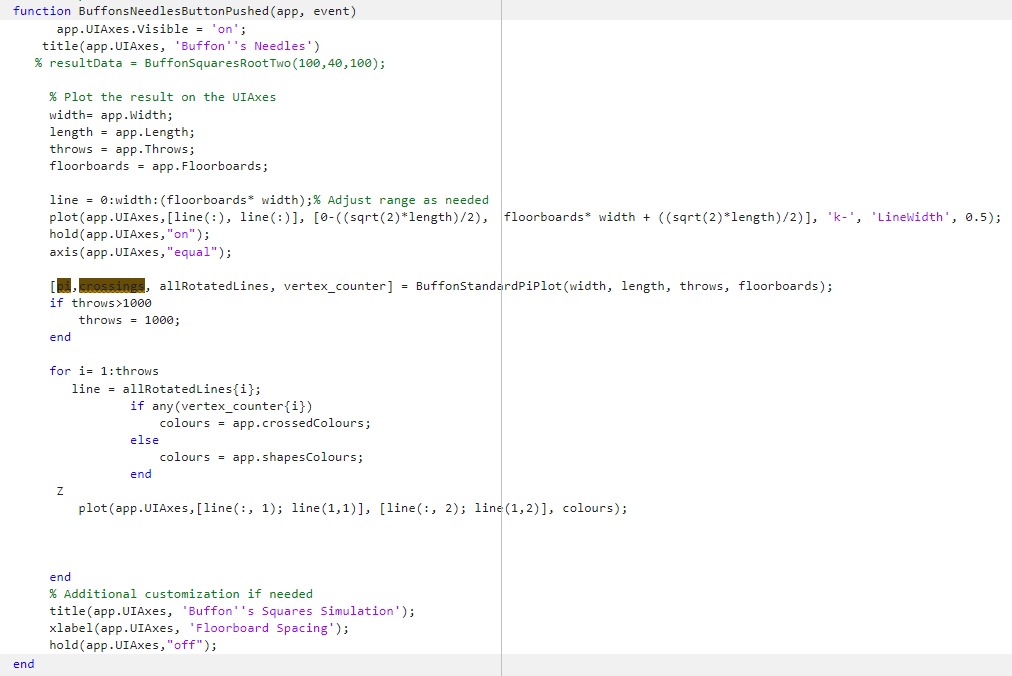
this is the gui function:
function BuffonsNeedlesButtonPushedapp event
app.UIAxes.Visible on;
titleappUIAxes, 'Buffon's Needles'
resultData BuffonSquaresRootTwo ;
Plot the result on the UIAxes
width app.width;
length app Length;
throws Throws;
floorboards app.Floorboards;
line : width:floorboards width; Adjust range as needed
plotappUIAxes,line linesqrt width sqrtlengthk 'LineWidth',
This is code for task :
Step by Step Solution
There are 3 Steps involved in it
1 Expert Approved Answer
Step: 1 Unlock

Question Has Been Solved by an Expert!
Get step-by-step solutions from verified subject matter experts
Step: 2 Unlock
Step: 3 Unlock
 Study Help