







Question: External CSS EXTERNAL JS it. Term freject Details You need to prepare a web ste for a company which provides online shopoing and gre detals
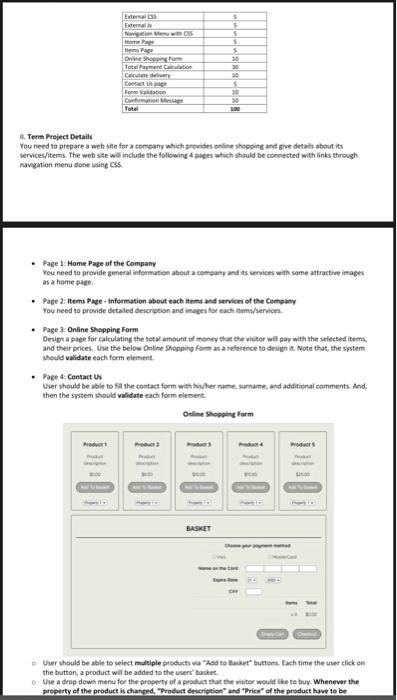
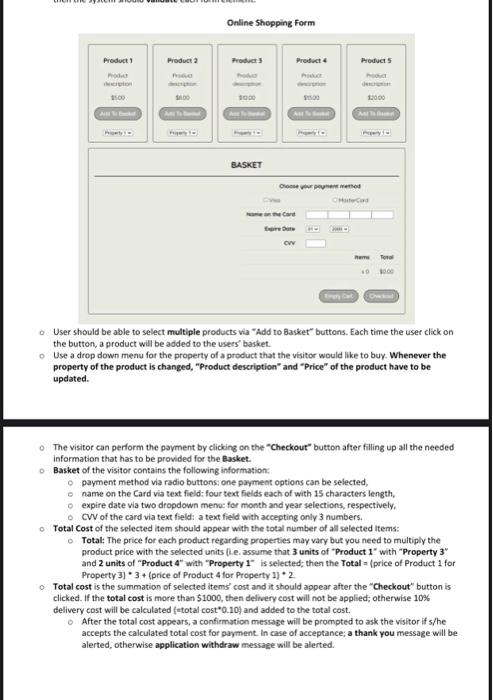
it. Term freject Details You need to prepare a web ste for a company which provides online shopoing and gre detals about its services/iterms. The web site will include the following 4 papes which should be connected with links through navigation menu done using CSS. - Page 1: Home Page of the Company You need to provide general information about a cempany and ass services with some attractive images as a home pige. - Page 2- Items Page - Information about each ittms and services of the Cemoany You need to provide detaled description and images for each items/services. - Page 3: Online Shoppine Form Design a page for calculating the total amount of money that the visiter will pay with the selected item. and their prices. Use the below Online Shopping Form as a relerence to derign it. Note that, the system should validate each form element. - Page 4: Contact Us User thould be able to fll the contact form with hifher name, surname, and additional camments. And, then the system should validate each foem element. Online shoppint Farm o. User should be able to select multiple products wa "Ada to Bucket" buttors. Fach time the user click an the button, a product will be added to the users' basket. Whe a drop dews menu for the property of a product that the vititer weuld the to bry. Whenever the property of the product is thanged, "Produtt descriztion" and "Price" of the product have to be 0. User should be able to select multiple products va "Add to Basket" buttons. Each time the user click on the button, a product will be added to the users' basket. - Use a drop down menu for the property of a product that the visitor would like to buy. Whenever the property of the product is changed, "Product description" and "Price" of the product have to be updated. The visitor can perform the payment by clicking on the "Checkout" button after filling up all the needed information that has to be provided for the Basket. Basket of the visitor contains the following information: o payment method via radio buttons; one payment options can be selected, - name on the Card via text field: four text fields each of with 15 characters length, o expire date via two dropdown menu: for month and year selections, respectively, o CVV of the card via text field: a text field with accepting only 3 numbers. Total Cost of the selected item should appear with the total number of all selected Items: o Total: The price for each product regarding properties may vary but you need to multiply the product price with the selected units fi.e. assume that 3 units of "Product 1 " with "Property 3" and 2 units of "Product 4 " with "Property 1 is selected; then the Total = (price of Product 1 for Property 3)3+ (price of Product 4 for Property 1)2. Total cost is the summation of selected items" cost and it should appear after the "Checkout" button is clicked. If the total cost is more than $1000, then delivery cost will not be applied; otherwise 10% delivery cost will be calculated (ntotal cost*0.10) and added to the total cost. - After the total cost appears, a confirmation message will be prompted to ask the visitor if s/he accepts the calculated total cost for payment. In case of acceptance; a thank you message will be alerted, otherwise application withdraw message will be alerted
Step by Step Solution
There are 3 Steps involved in it

Get step-by-step solutions from verified subject matter experts
 Study Help