







Question: ez question python debug test queation: test: my_try: wrong_output: check: how to solve this situationwhy did it cannot runhow to avoid it in fulturecould you
ez question python debug test queation:
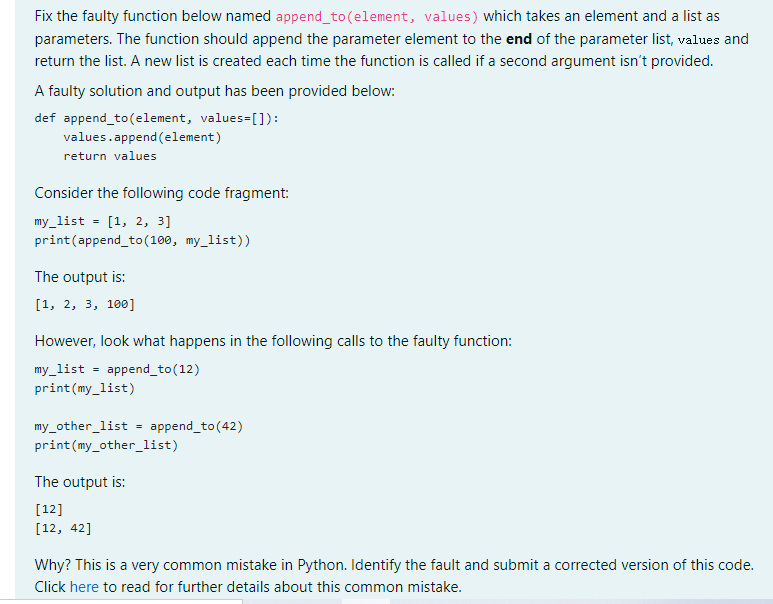
test:
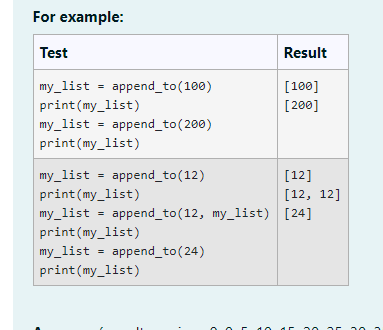
my_try:
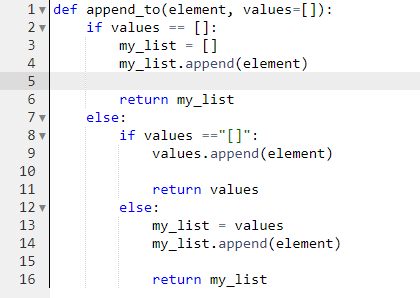
wrong_output:
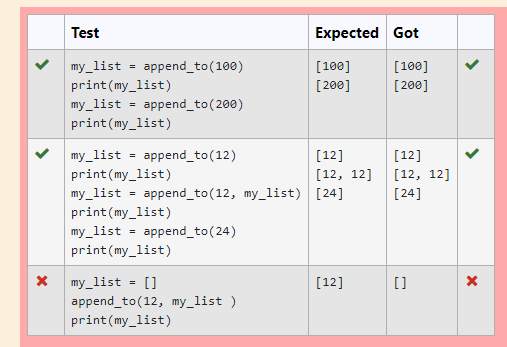
check:
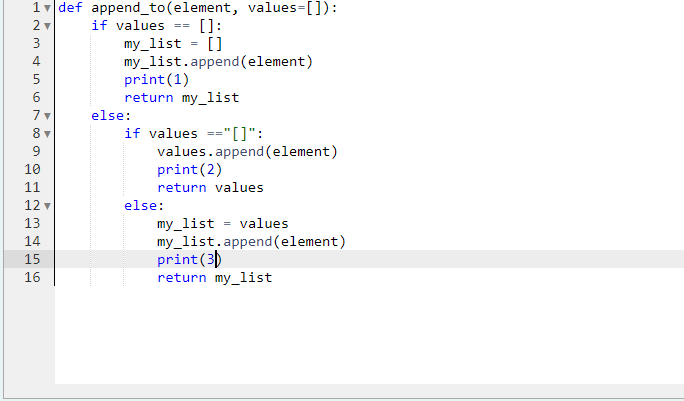

how to solve this situationwhy did it cannot runhow to avoid it in fulturecould you show me the answer of this question and i can compare it with mine thank you
Fix the faulty function below named append_to(element, values) which takes an element and a list as parameters. The function should append the parameter element to the end of the parameter list, values and return the list. A new list is created each time the function is called if a second argument isn't provided. A faulty solution and output has been provided below: def append_to(element, values=[]): values.append(element) return values Consider the following code fragment: my_list = [1, 2, 3] print(append_to (100, my_list)) The output is: [1, 2, 3, 100] However, look what happens in the following calls to the faulty function: my_list = append_to (12) print(my_list) my_other_list append_to (42) print(my_other_list) The output is: [12] [12, 42] Why? This is a very common mistake in Python. Identify the fault and submit a corrected version of this code. Click here to read for further details about this common mistake. For example: Test Result my_list = append_to (100) [100] print(my_list) [200] my_list = append_to(200) print(my_list) my_list = append_to (12) [12] print(my_list) [12, 12] my_list = append_to(12, my_list) [24] print(my_list) my_list = append_to (24) print(my_list) C C a 1 ) 1 m 1 v def append_to(element, values[]): 2 if values == []: 3 my_list = [] 4 my_list.append(element) 5 6 return my_list 7 else: 8 if values =="[]": 9 values.append(element) 10 11 return values 12 else: 13 my_list = values 14 my_list.append(element) 15 16 return my_list Test Expected Got [100] [200] [100] [200] my_list append_to(100) print(my_list) my_list append_to (200) print(my_list) [12] (12, 12] [24] my_list = append_to(12) [12] print(my_list) (12, 12] my_list = append_to(12, my_list) [24] print(my_list) my_list = append_to (24) print(my_list) X [12] [] X my_list = [] append_to(12, my_list ) print(my_list) 1def append_to(element, values=[]): 2 if values []: 3 my_list [] 4 my_list.append(element) 5 print(1) 6 return my_list 7 else: 8 if values =="[]": 9 values.append(element) 10 print(2) 11 return values 12 else: 13 my_list values 14 my_list.append(element) 15 print(3) 16 return my_list x [12] X my_list [] append_to(12, my_list) print(my_list) 1 []
Step by Step Solution
There are 3 Steps involved in it

Get step-by-step solutions from verified subject matter experts
 Study Help