







Question: F333 Financial Statement Analysis Excel Case Study #3 Inventory Accounting Methods NAME: Tedi N FIFO Inventory Value Calculator Cost of Goods Sold Units Sold Units
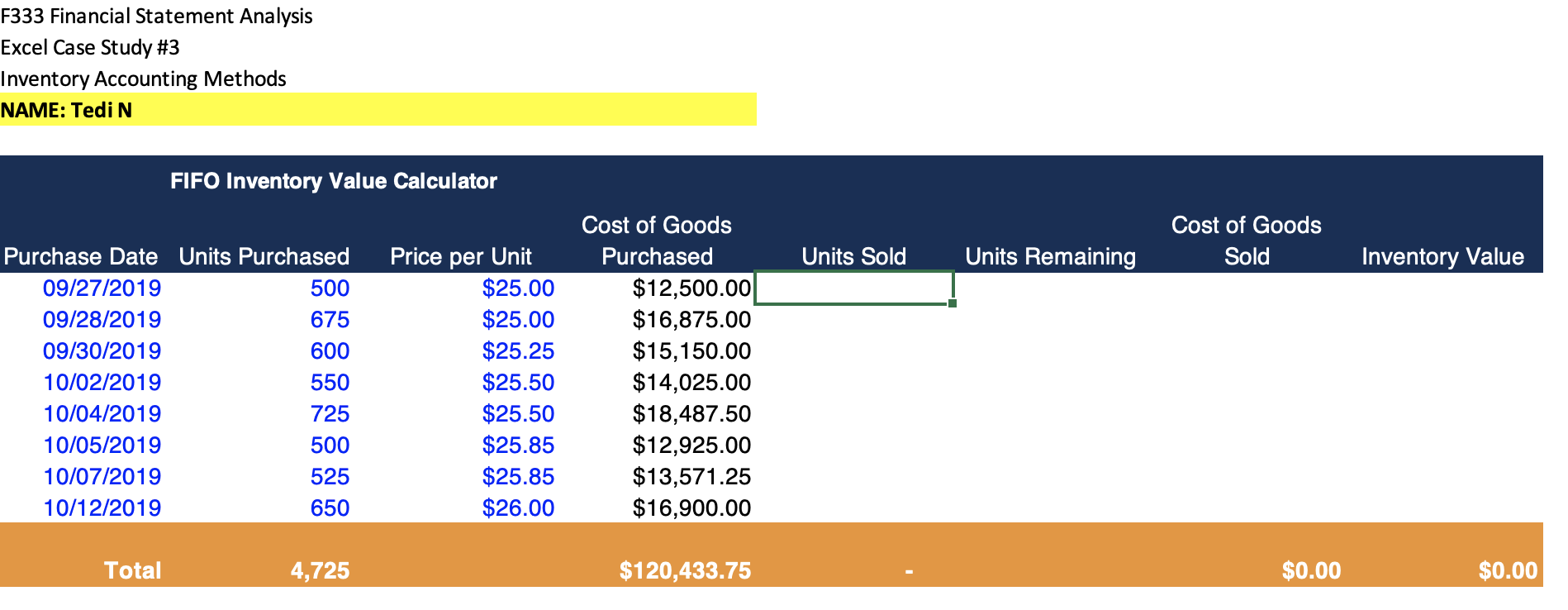

F333 Financial Statement Analysis Excel Case Study #3 Inventory Accounting Methods NAME: Tedi N FIFO Inventory Value Calculator Cost of Goods Sold Units Sold Units Remaining Inventory Value Purchase Date Units Purchased 09/27/2019 500 09/28/2019 675 09/30/2019 600 10. 19 550 10/04/2019 725 10/05/2019 500 10/07/2019 525 10/12/2019 650 Price per Unit $25.00 $25.00 $25.25 $25.50 $25.50 $25.85 $25.85 $26.00 Cost of Goods Purchased $12,500.00 $16,875.00 $15,150.00 $14,025.00 $18,487.50 $12,925.00 $13,571.25 $16,900.00 Total 4,725 $120,433.75 $0.00 $0.00 Instructions: Begin by completing Worksheet 1 and 2 (do not forget there are 2 worksheets in the Excel file!). You are to assume the firm sells 4,200 units between 9/27/2019 and 10/12/2019. Assume this is a new firm and the inventory balance was zero prior to 9/27/2019. Use the information from the TOTAL line item (row 17) to answer the following three questions. F333 Financial Statement Analysis Excel Case Study #3 Inventory Accounting Methods NAME: Tedi N FIFO Inventory Value Calculator Cost of Goods Sold Units Sold Units Remaining Inventory Value Purchase Date Units Purchased 09/27/2019 500 09/28/2019 675 09/30/2019 600 10. 19 550 10/04/2019 725 10/05/2019 500 10/07/2019 525 10/12/2019 650 Price per Unit $25.00 $25.00 $25.25 $25.50 $25.50 $25.85 $25.85 $26.00 Cost of Goods Purchased $12,500.00 $16,875.00 $15,150.00 $14,025.00 $18,487.50 $12,925.00 $13,571.25 $16,900.00 Total 4,725 $120,433.75 $0.00 $0.00 Instructions: Begin by completing Worksheet 1 and 2 (do not forget there are 2 worksheets in the Excel file!). You are to assume the firm sells 4,200 units between 9/27/2019 and 10/12/2019. Assume this is a new firm and the inventory balance was zero prior to 9/27/2019. Use the information from the TOTAL line item (row 17) to answer the following three questions
Step by Step Solution
There are 3 Steps involved in it

Get step-by-step solutions from verified subject matter experts
 Study Help