







Question: Fall 2 0 2 4 CIS 5 2 4 Project ( Group Project ) ( Due Oct 2 0 ) In this project you are
Fall CIS Project Group Project
Due Oct
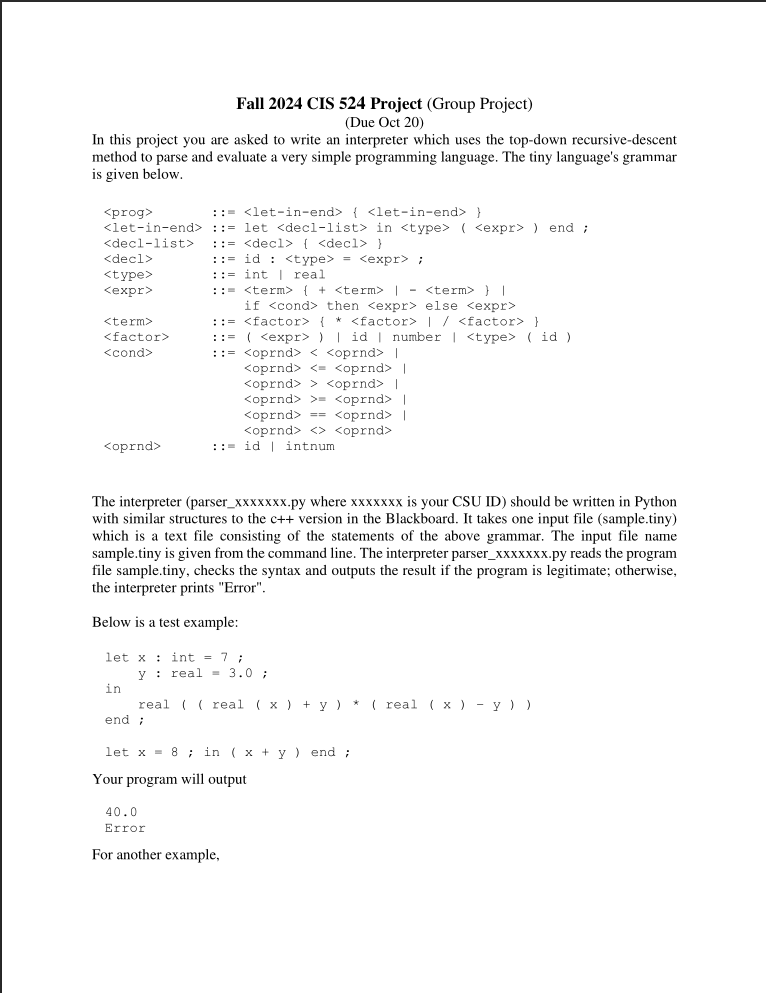
In this project you are asked to write an interpreter which uses the topdown recursivedescent
method to parse and evaluate a very simple programming language. The tiny language's grammar
is given below.
::
:: let in end ;
::
:: id : ;
:: int real
::
if then else
::
:: id number id
::
:: id intnum
The interpreter parserxxxxxxxpy where xxxxxxx is your CSU ID should be written in Python
with similar structures to the c version in the Blackboard. It takes one input file sampletiny
which is a text file consisting of the statements of the above grammar. The input file name
sample.tiny is given from the command line. The interpreter parserxxxxxxxpy reads the program
file sample.tiny, checks the syntax and outputs the result if the program is legitimate; otherwise,
the interpreter prints "Error".
Below is a test example:
let x : int ;
y : real ;
in
real real x y real x y
end ;
let x ; in x y end ;
Your program will output
Error
For another example,
let x : int ;
in
int x x x
end ;
let r : real ;
pi : real ;
in
real pi r r
end ;
let a : int ;
b : real ;
c : real b b ;
in
real if a then b else c
end ;
Your program should display
Submit via Blackboard:
Upload your parserxxxxxxxpy file to the project submission area on Blackboard.
Make sure the file is correctly named using your CSU ID
No other files should be submitted.
let x : int ;
in
int x x x
end ;
let r : real ;
pi : real ;
in
real pi r r
end ;
let a : int ;
b : real ;
c : real b b ;
in
real if a then b else c
end ;
Your program should display
beginarrayl
endarray
Submit via Blackboard:
Upload your parserxxxxxxxpy file to the project submission area on Blackboard.
Make sure the file is correctly named using your CSU ID
No other files should be submitted.
Step by Step Solution
There are 3 Steps involved in it
1 Expert Approved Answer
Step: 1 Unlock

Question Has Been Solved by an Expert!
Get step-by-step solutions from verified subject matter experts
Step: 2 Unlock
Step: 3 Unlock
 Study Help