



Question: Fao Fa0/1 STAFF PC1 Refer the exhibit write Cisco IOS commands in empty blanks to perform the basic a switch configuration. a) Set switch device
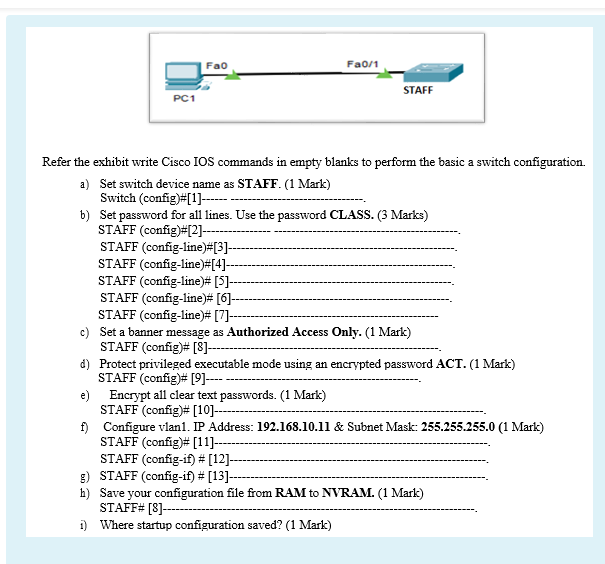
Fao Fa0/1 STAFF PC1 Refer the exhibit write Cisco IOS commands in empty blanks to perform the basic a switch configuration. a) Set switch device name as STAFF. (1 Mark) Switch(config)#[1]-- b) Set password for all lines. Use the password CLASS. 3 Marks) STAFF (config)#[2]-- STAFF (config-line) [3]- STAFF (config-line)#[4]-- STAFF (config-line)# [5]- STAFF (config-line)# [6]-- STAFF (config-line)# [7]--- c) Set a banner message as Authorized Access Only. (1 Mark) STAFF (config)# [8] --- d) Protect privileged executable mode using an encrypted password ACT. (1 Mark) STAFF (config)# [9]---- e) Encrypt all clear text passwords. (1 Mark) STAFF (config)# [10]-- f) Configure vian1. IP Address: 192.168.10.11 & Subnet Mask: 255.255.255.0 (1 Mark) STAFF (config)# [11]-- STAFF (config-if)# [12]- ) STAFF (config-if)# [13]--- h) Save your configuration file from RAM to NVRAM. (1 Mark) STAFF# [8]----- 1) Where startup configuration saved? (1 Mark)
Step by Step Solution
There are 3 Steps involved in it

Get step-by-step solutions from verified subject matter experts