







Question: Fast please 16. Complete the Java FX program that will create a GUI interface as shown in the figure below with 2 buttons having the
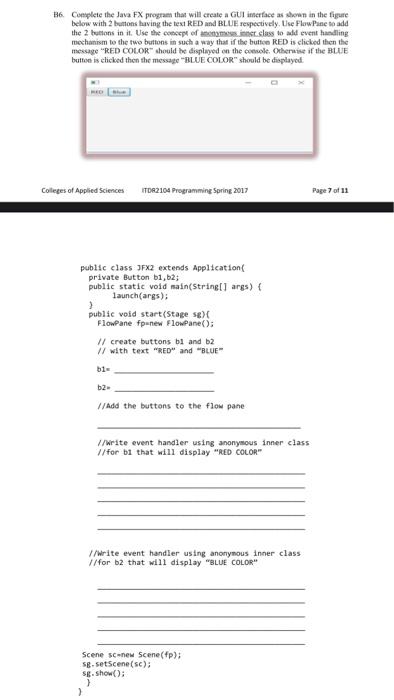
16. Complete the Java FX program that will create a GUI interface as shown in the figure below with 2 buttons having the text RED and BLUE respectively. Use Flow Pane to add the 2 buttons in it. Use the concept of st. class to add event handling mechanism to the two buttons in such a way that if the button RED is clicked then the message "RED COLOR" should be displayed on the coole. Otherwise if the BLUE button is clicked then the message BLUE COLOR" should be displayed Colleges of Applied Sciences ITDA2104 Programming Spring 2017 Page 7 of 11 public class JFX2 extends Application private Button b1,b2; public static void main(String[] args) { launch(args): > public void start(Stage sex Flowpane fpenew FlowPane(); // create buttons bi and b2 // with text "RED" and "BLUE 61 b2 // Add the buttons to the flow pane //Write event handler using anonymous inner class //for bi that will display "RED COLOR" //Write event handler using anonymous inner class //for b2 that will display "BLUE COLOR" Scene scenew Scene(fp); se.setScene(s): Sg.show(); } >
Step by Step Solution
There are 3 Steps involved in it

Get step-by-step solutions from verified subject matter experts
 Study Help