







Question: Favorite Number program Calculator program Random Number Sorter program For each feature, provide the symbol, short code example, or explanation. Submit as

Favorite Number program 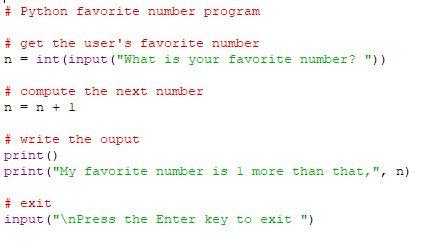
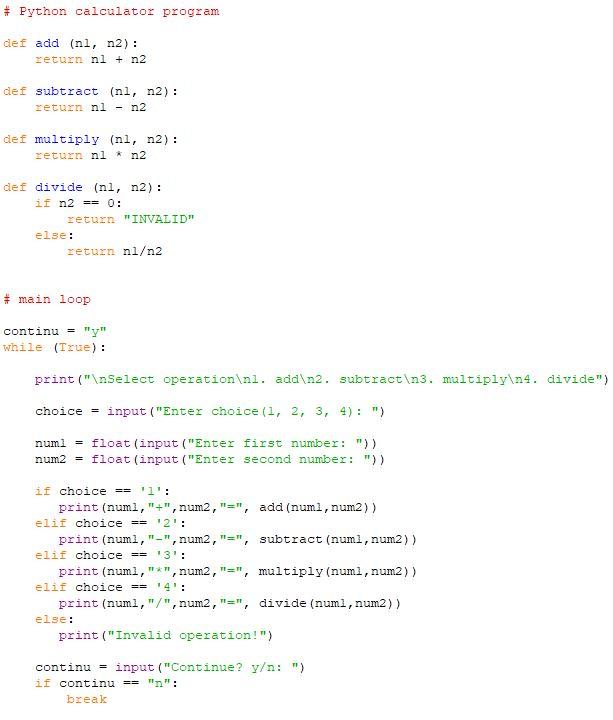
Calculator program
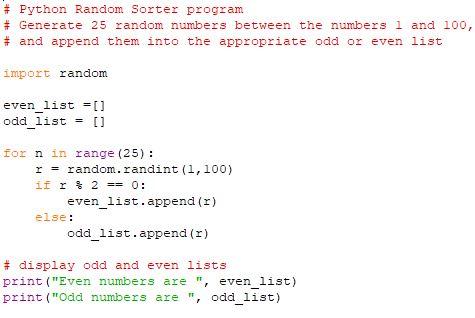
Random Number Sorter program
For each feature, provide the symbol, short code example, or explanation. Submit as a Word document with the naming convention of YourName_2_2.
Submit your completed assignment by following the directions linked below. Please check the Course Calendar for specific due dates.
Save your assignment as a Microsoft Word document. (Mac users, please remember to append the ".docx" extension to the filename.) The name of the file should be your first initial and last name, followed by an underscore and the name of the assignment, and an underscore and the date.
Following are three Python programs. For each program: Type in the program Execute it successfully using appropriate input data Take screenshots of both the code window as well as the output window Insert the 6 screenshots into a document. Submit as a Word or PDF document with the naming convention of YourName_2_1. Favorite Number program
Step by Step Solution
There are 3 Steps involved in it

Get step-by-step solutions from verified subject matter experts
 Study Help