



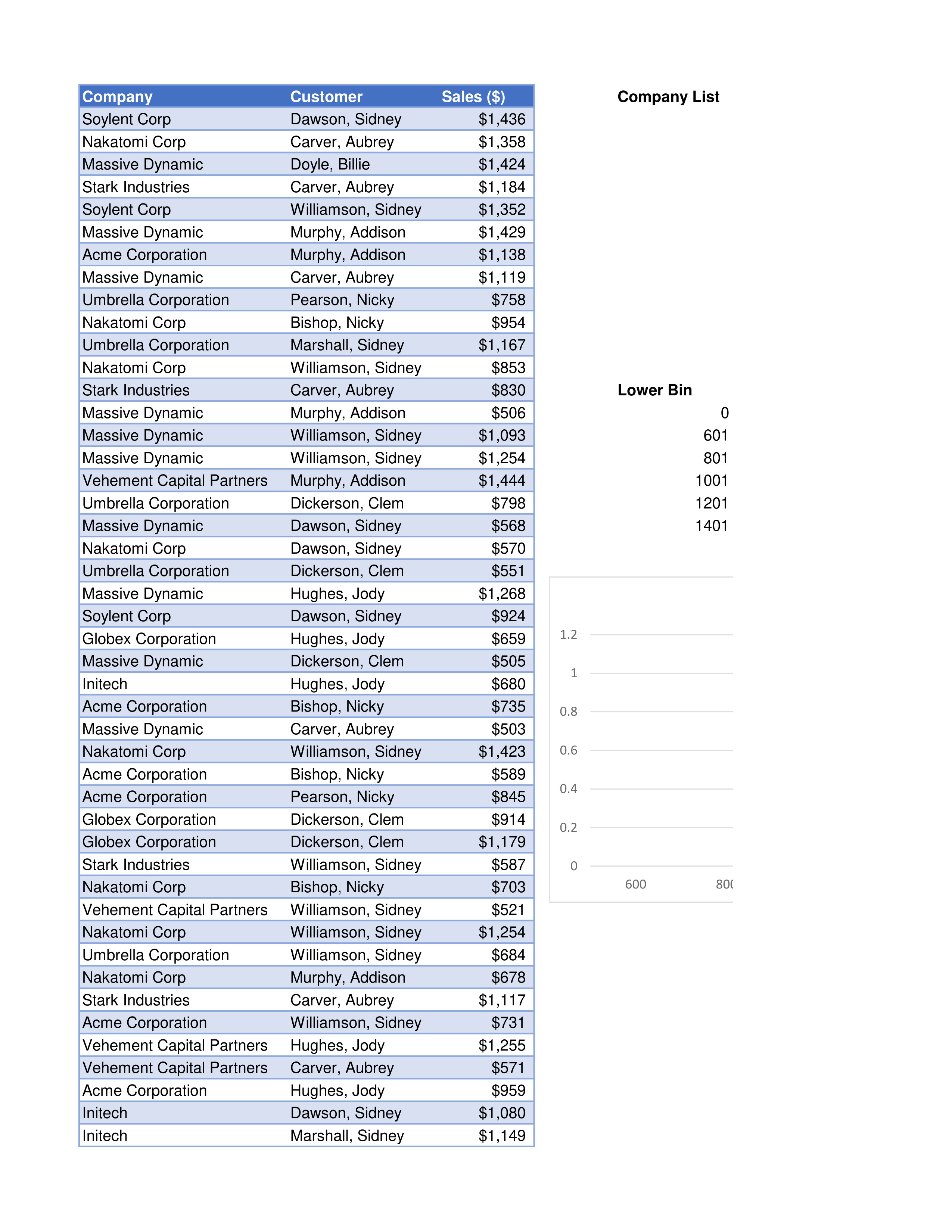
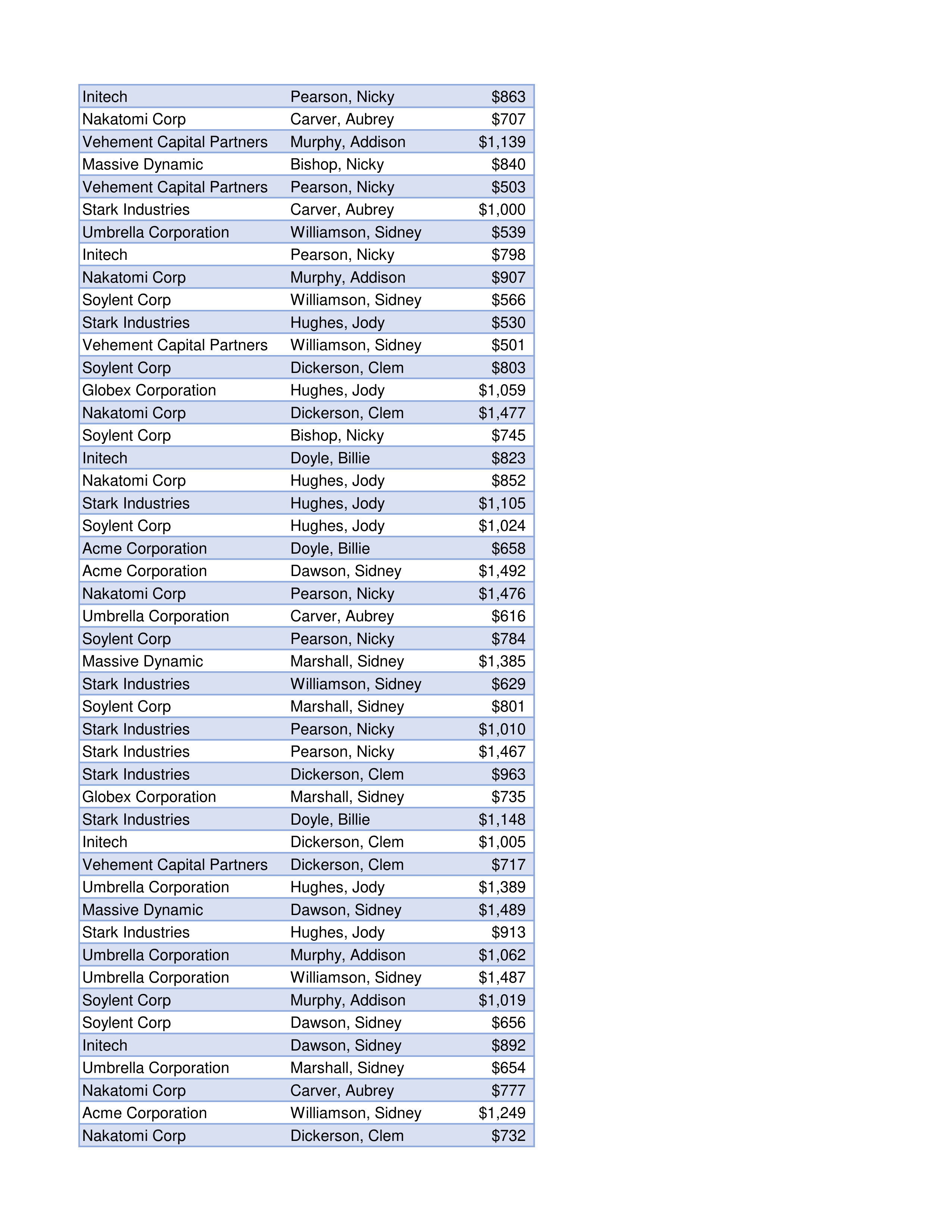
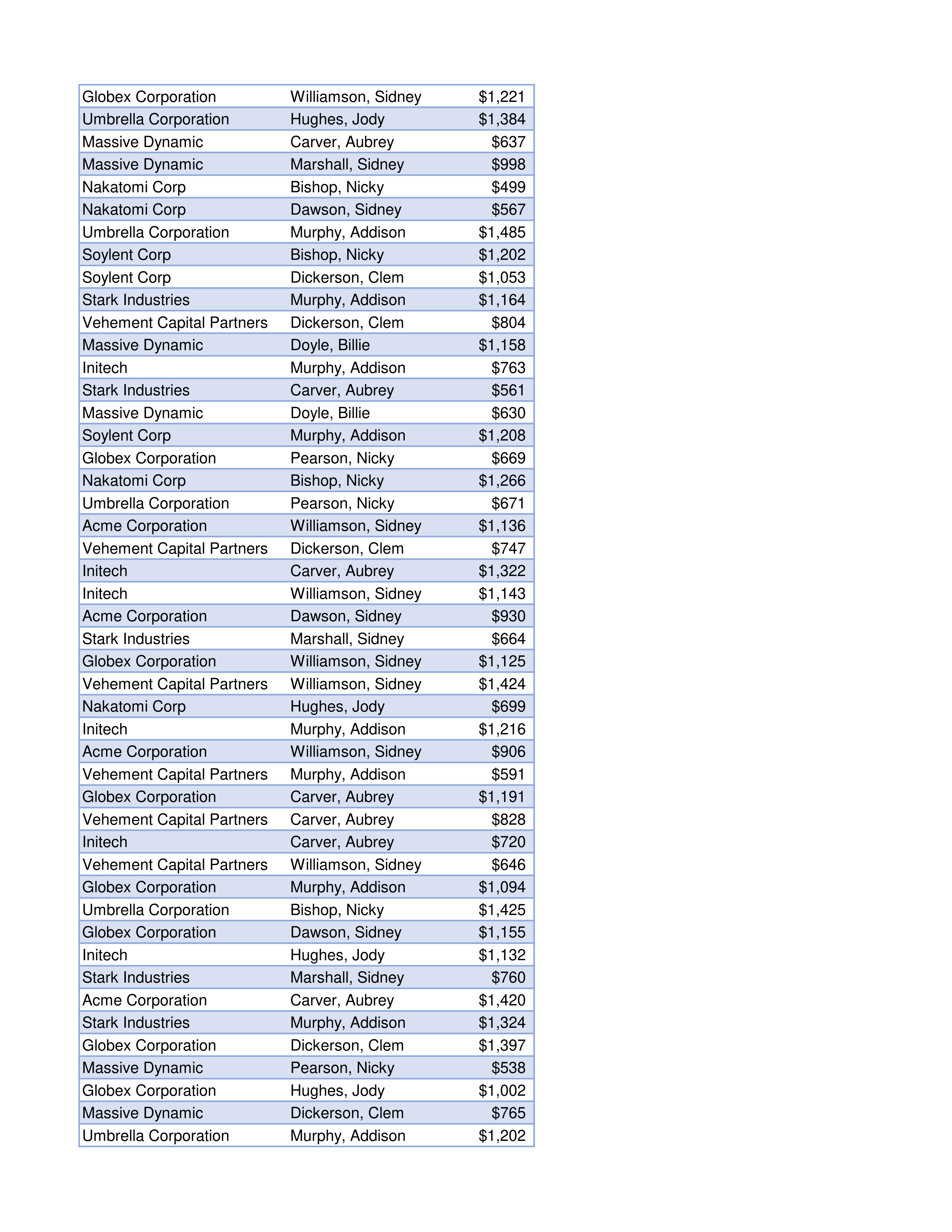
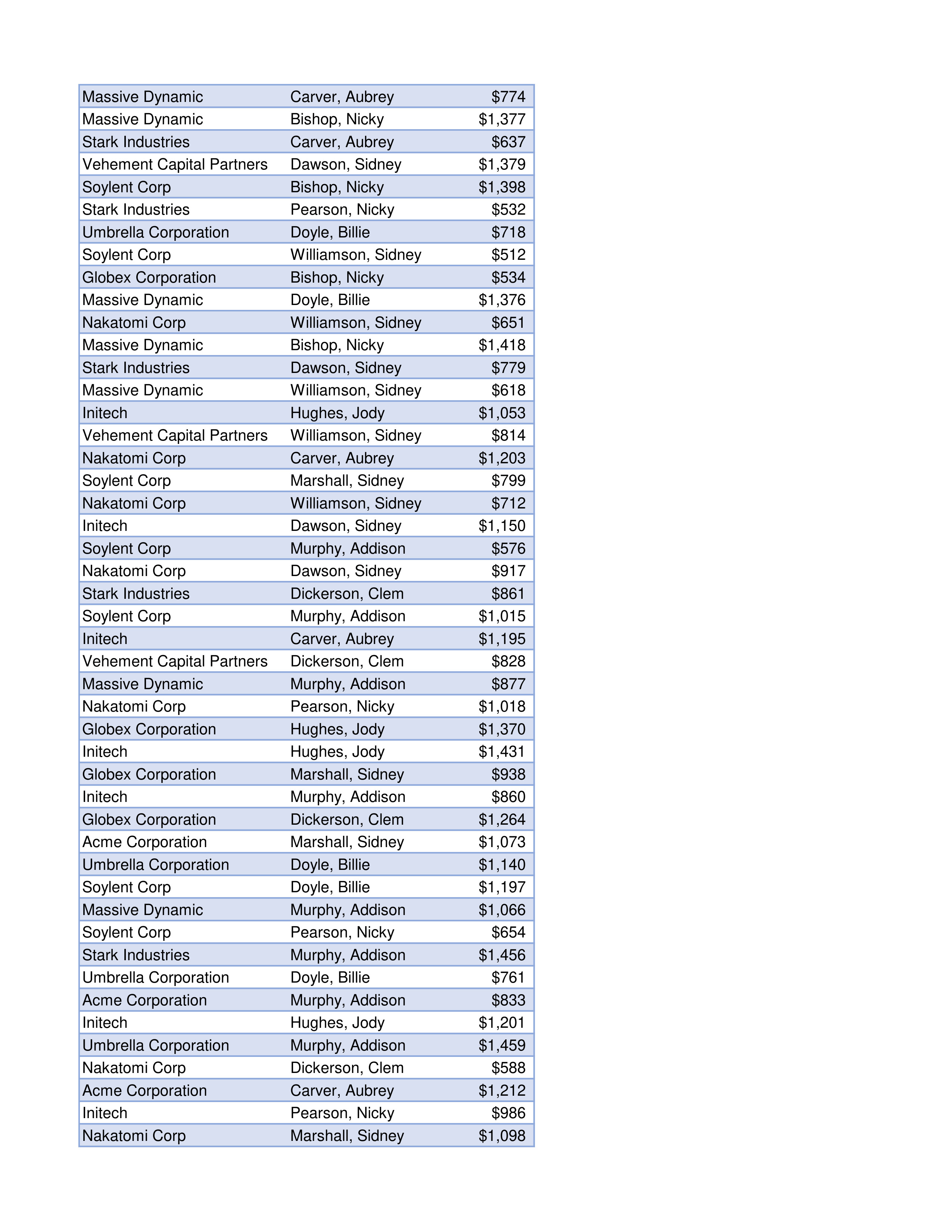
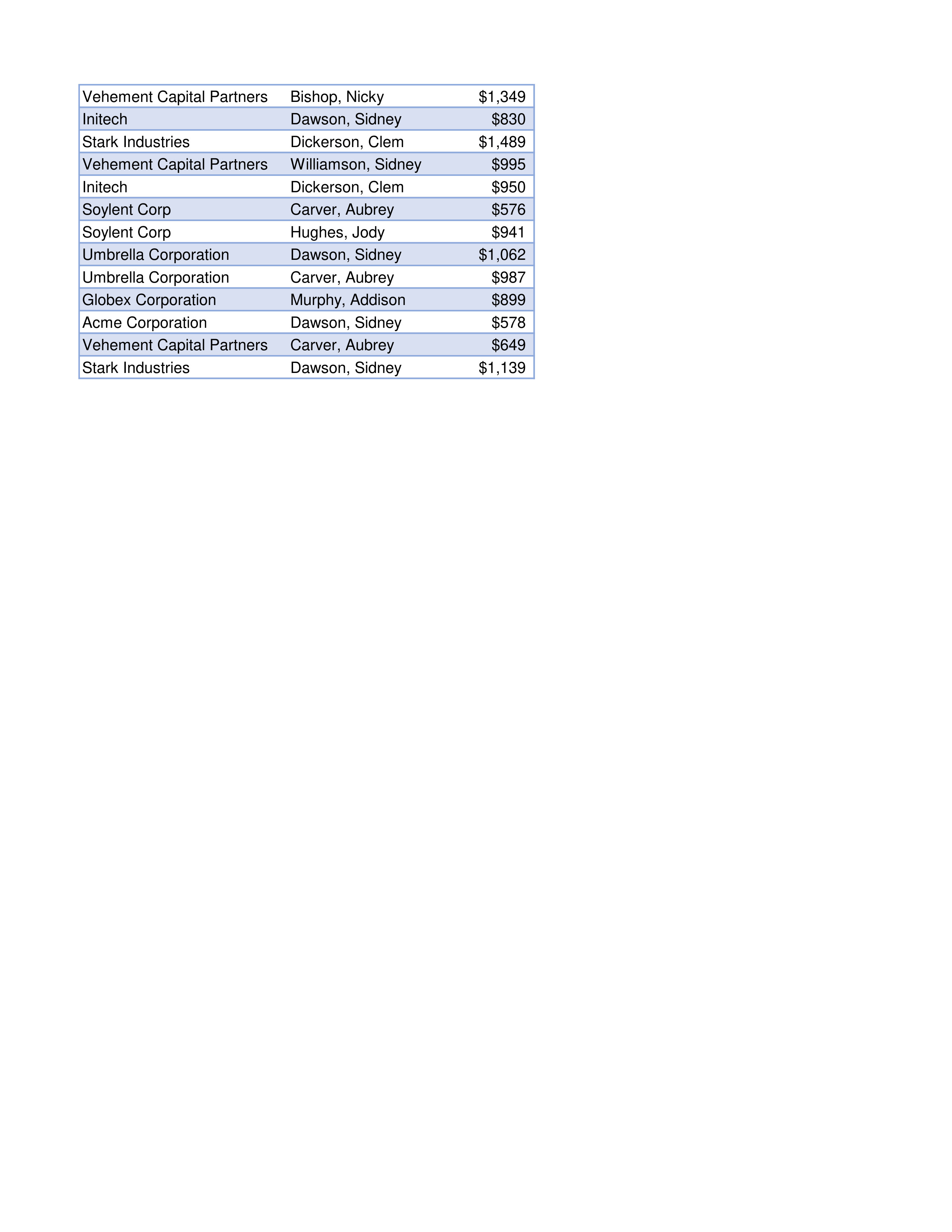
Question: fffffCompany List Sorted Customer List Sorted Company Selection Customer Selection Sum of Sales Count of Records Company Upper Bin Frequency 600 800 1000 1200 1400
![WebAssign 1. [-/100 Points] DETAILS MY NOTES CAMMBAS A.E.010. ASK YOUR TEACHER](https://dsd5zvtm8ll6.cloudfront.net/si.experts.images/questions/2024/11/673bf1484244c_640673bf14823129.jpg)
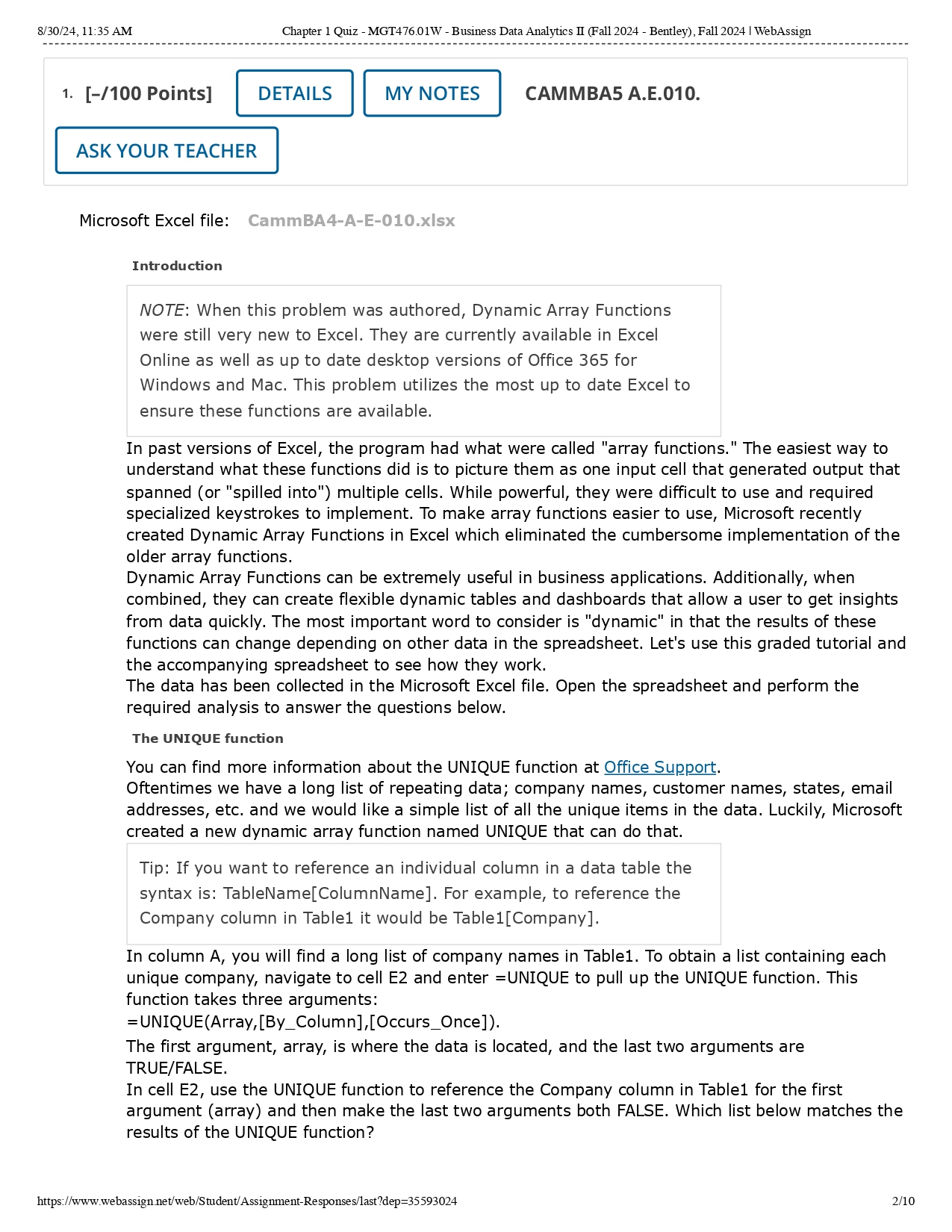
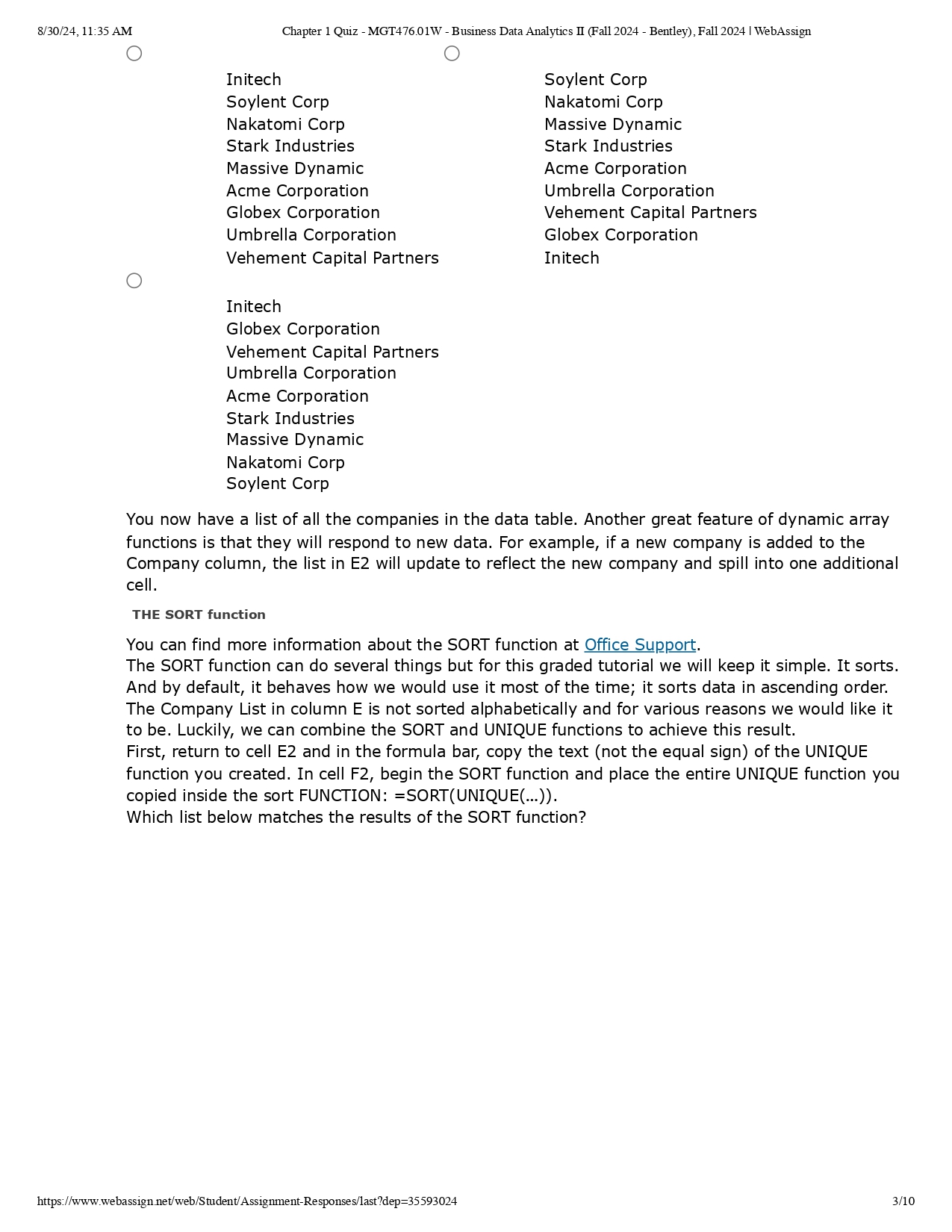
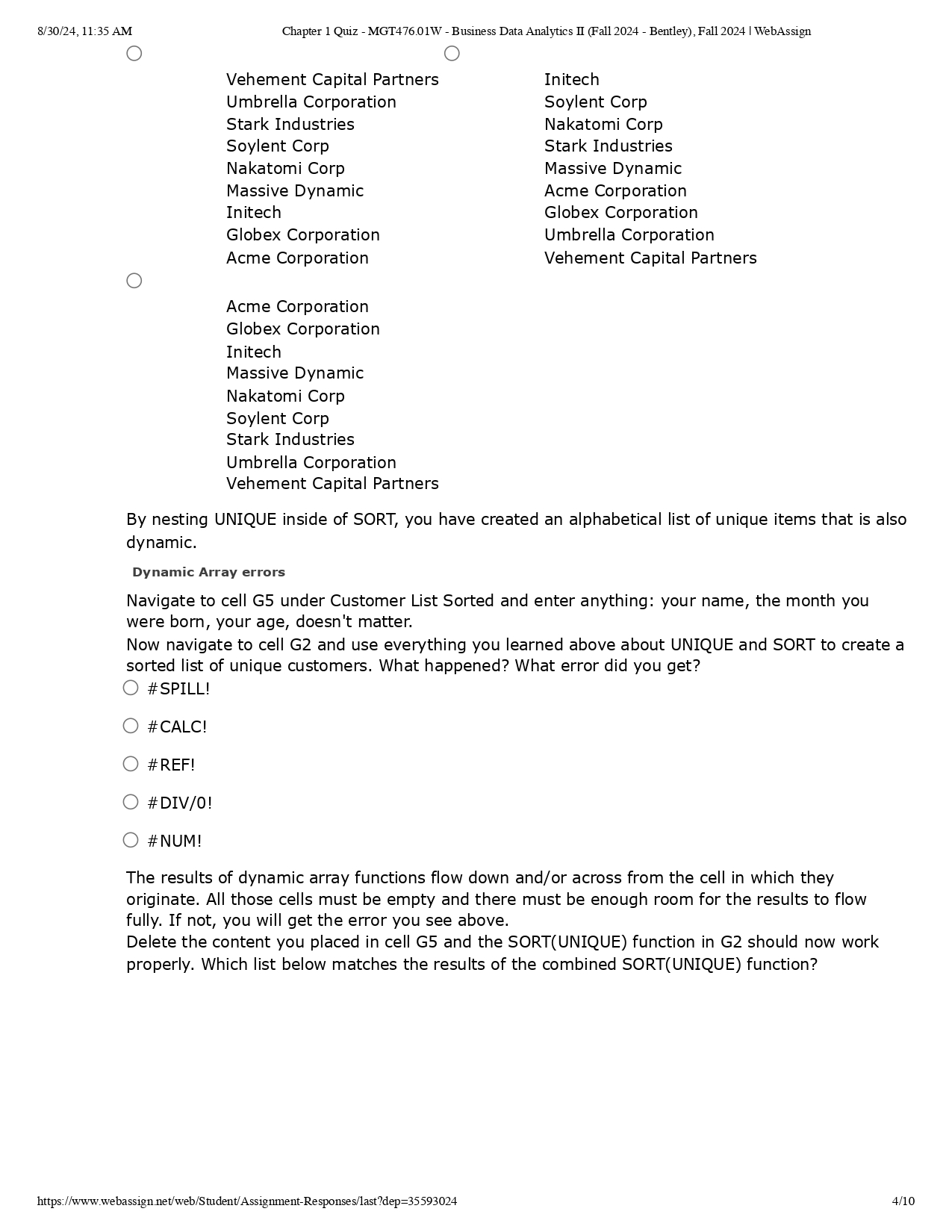
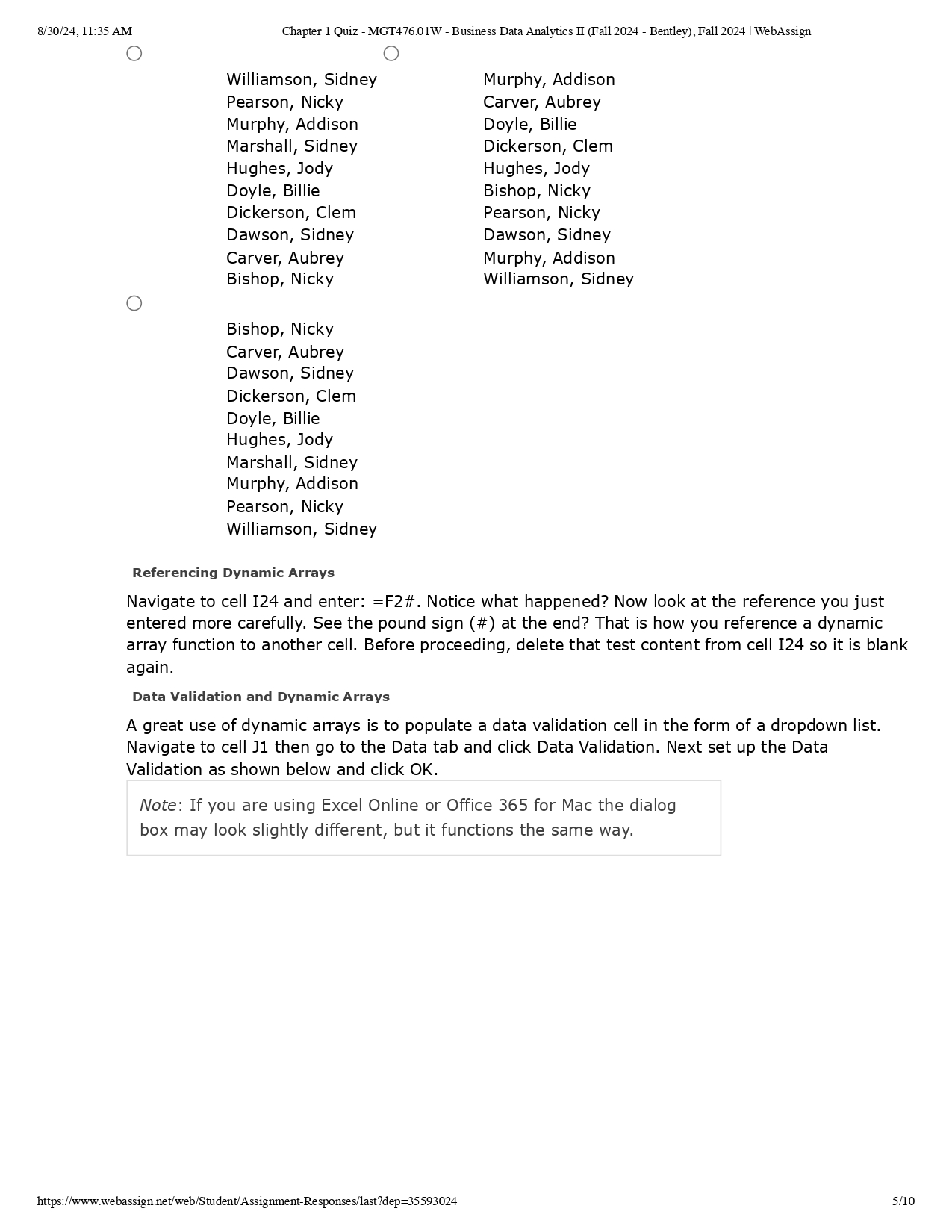
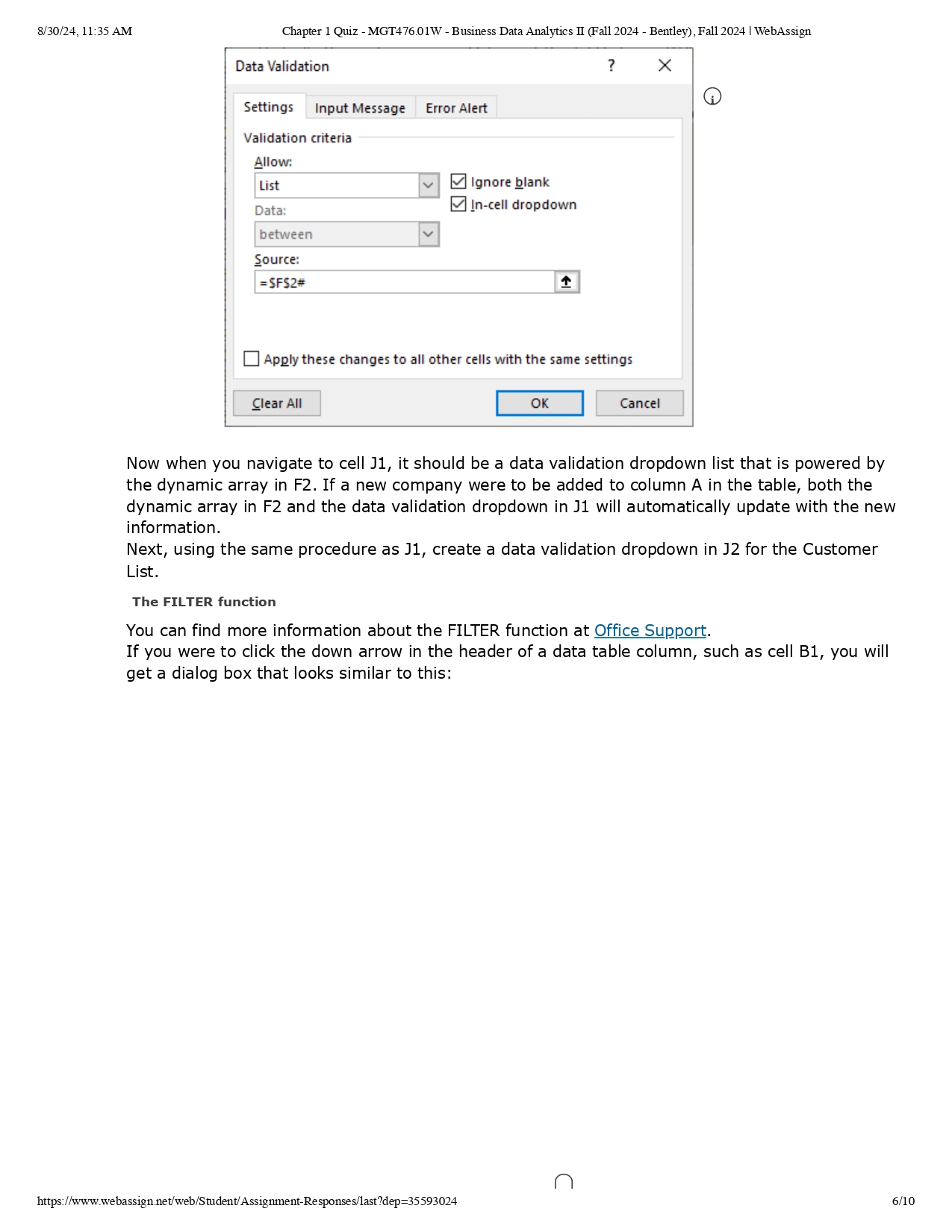
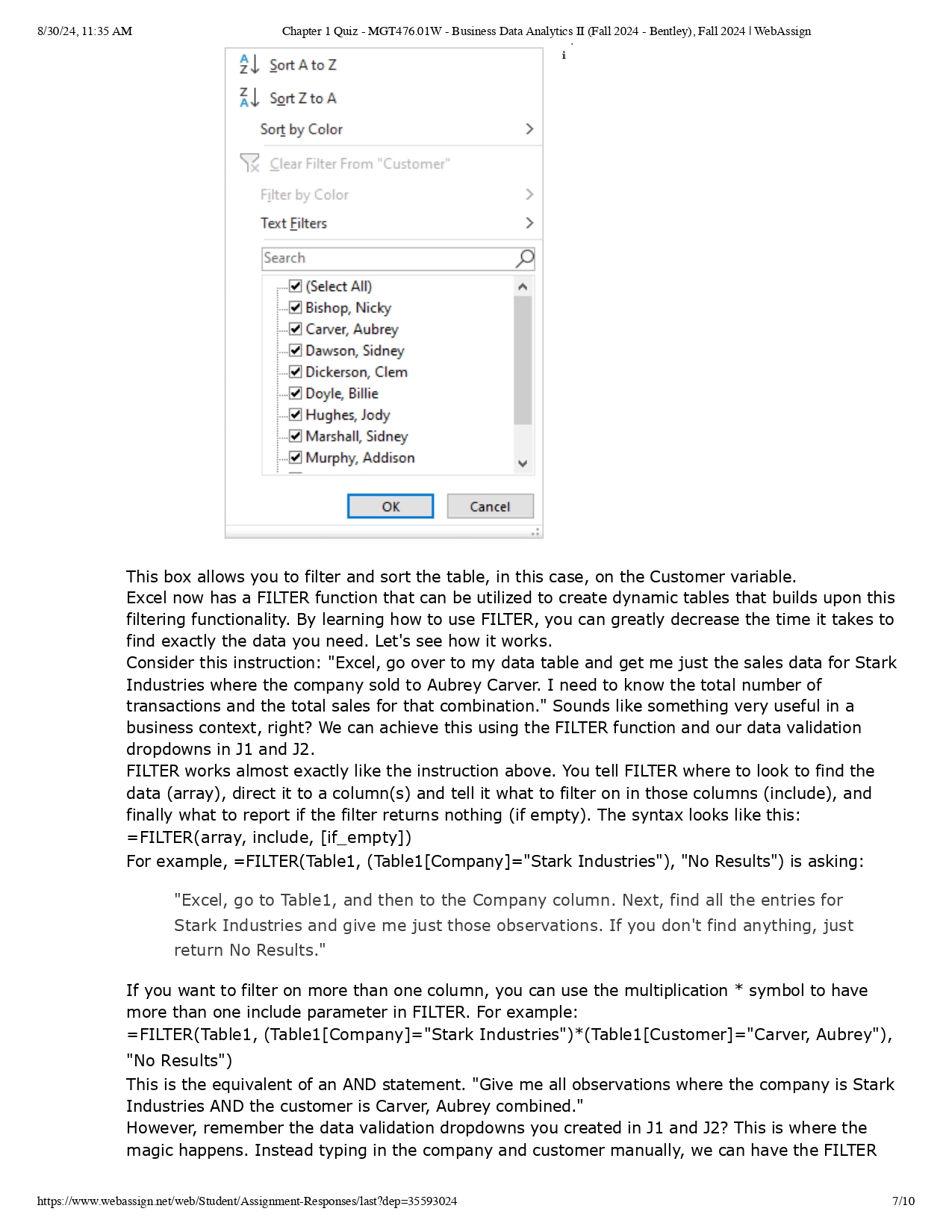
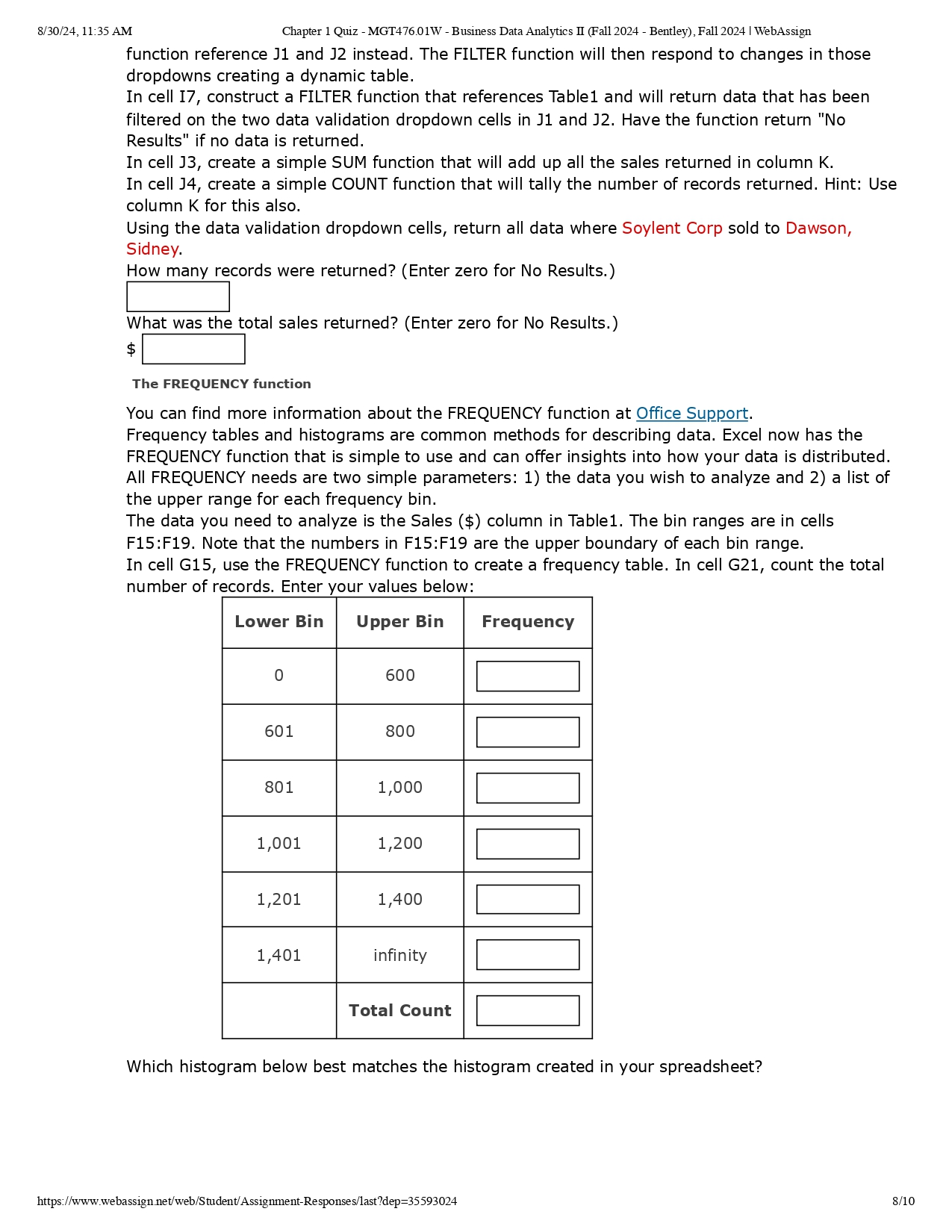
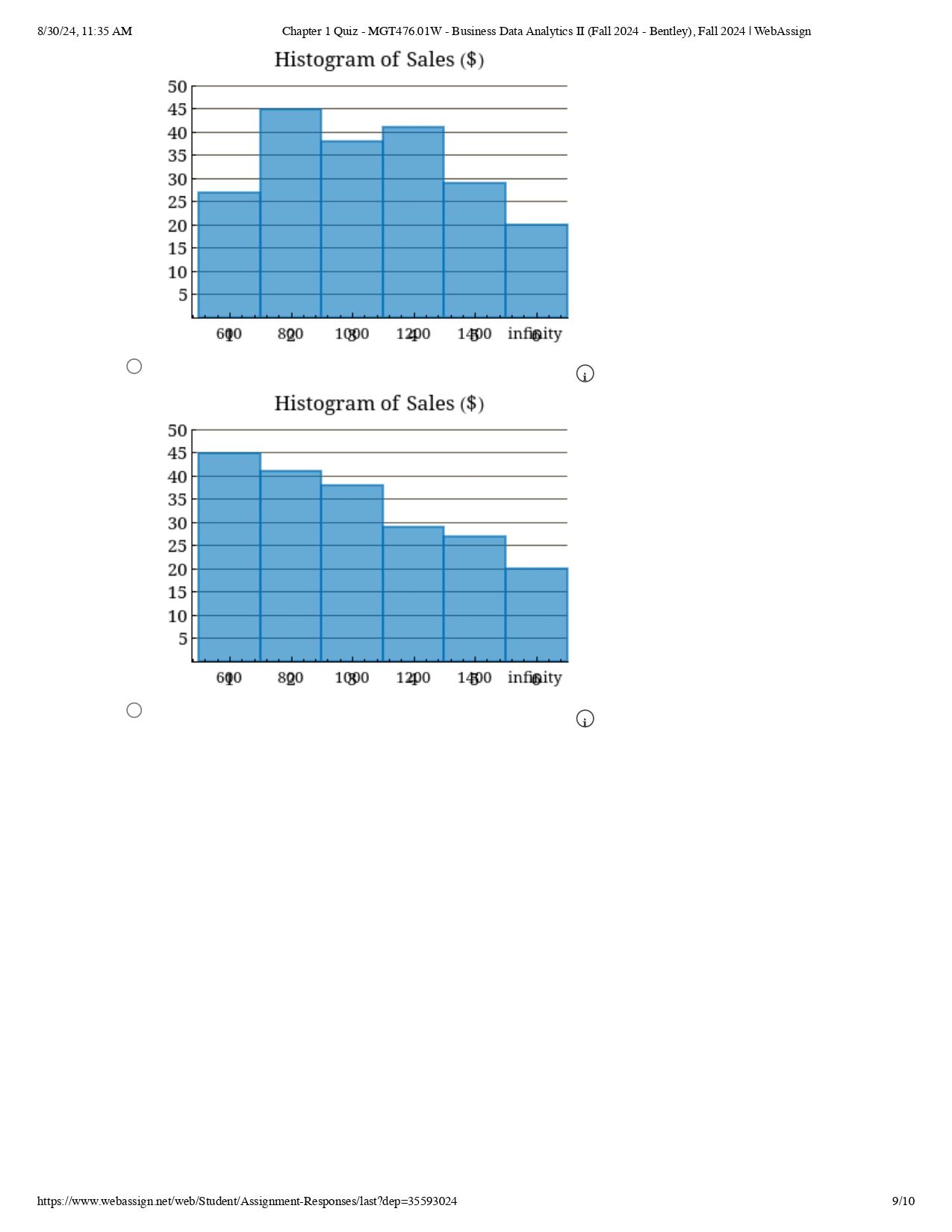
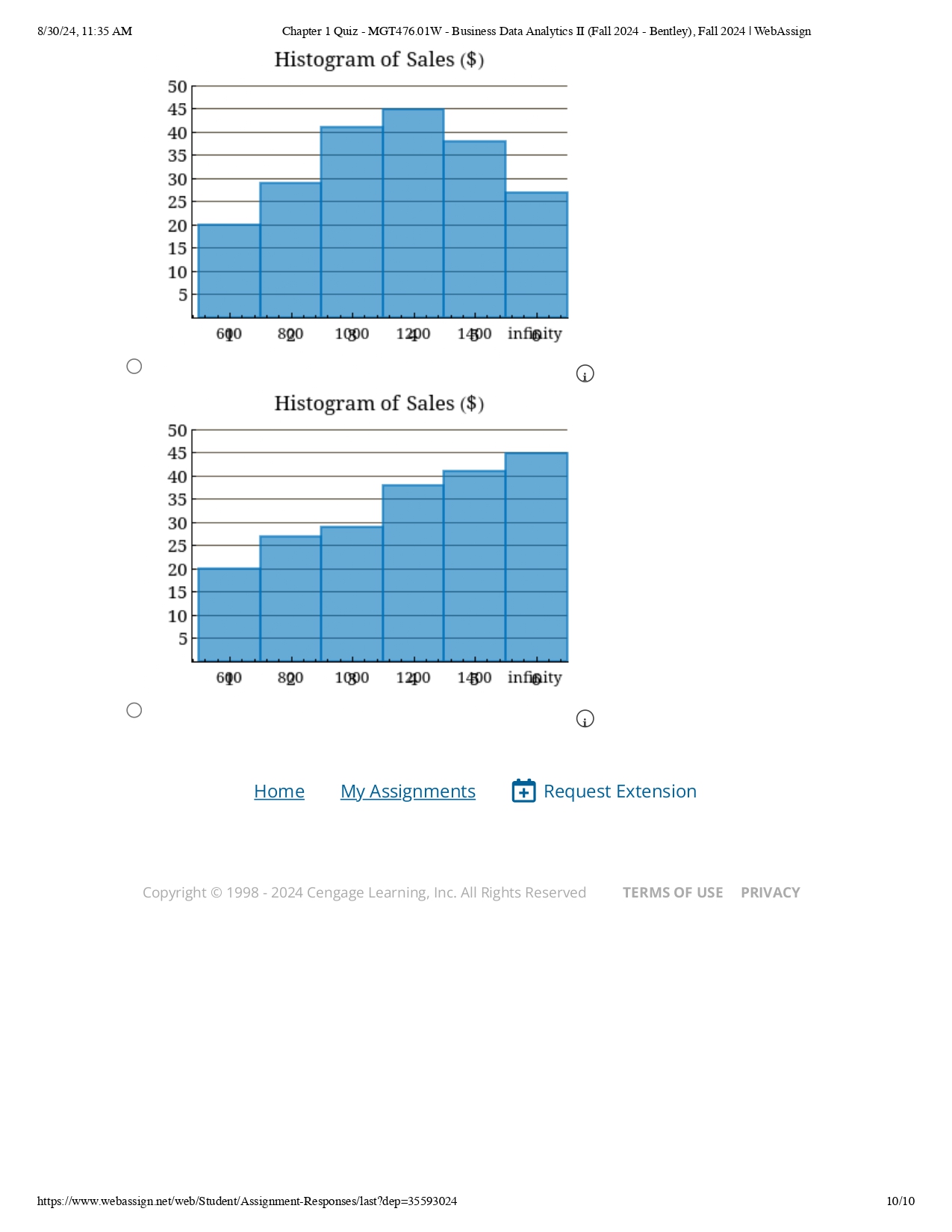
\f\f\f\f\fCompany List Sorted Customer List Sorted Company Selection Customer Selection Sum of Sales Count of Records Company Upper Bin Frequency 600 800 1000 1200 1400 infinity Total Count Histogram of Sales (S) 0 1000 1200 1400 infinity Customer Sales ($) 8/30/24,11:35 AM Chapter 1 Quiz - MGT476.01W - Business Data Analytics IT (Fall 2024 - Bentley), Fall 2024 | WebAssign 1. [-/100 Points] DETAILS MY NOTES CAMMBAS A.E.010. ASK YOUR TEACHER Microsoft Excel file: Introduction NOTE: When this problem was authored, Dynamic Array Functions were still very new to Excel. They are currently available in Excel Online as well as up to date desktop versions of Office 365 for Windows and Mac. This problem utilizes the most up to date Excel to ensure these functions are available. In past versions of Excel, the program had what were called "array functions." The easiest way to understand what these functions did is to picture them as one input cell that generated output that spanned (or "spilled into) multiple cells. While powerful, they were difficult to use and required specialized keystrokes to implement. To make array functions easier to use, Microsoft recently created Dynamic Array Functions in Excel which eliminated the cumbersome implementation of the older array functions. Dynamic Array Functions can be extremely useful in business applications. Additionally, when combined, they can create flexible dynamic tables and dashboards that allow a user to get insights from data quickly. The most important word to consider is "dynamic" in that the results of these functions can change depending on other data in the spreadsheet. Let's use this graded tutorial and the accompanying spreadsheet to see how they work. The data has been collected in the Microsoft Excel file. Open the spreadsheet and perform the required analysis to answer the questions below. The UNIQUE function You can find more information about the UNIQUE function at Office Support. Oftentimes we have a long list of repeating data; company names, customer names, states, email addresses, etc. and we would like a simple list of all the unique items in the data. Luckily, Microsoft created a new dynamic array function named UNIQUE that can do that. Tip: If you want to reference an individual column in a data table the syntax is: TableName[ColumnName]. For example, to reference the Company column in Tablel it would be Table1l[Company]. In column A, you will find a long list of company names in Tablel. To obtain a list containing each unigue company, navigate to cell E2 and enter =UNIQUE to pull up the UNIQUE function. This function takes three arguments: =UNIQUE(Array,[By_Column],[Occurs_Once]). The first argument, array, is where the data is located, and the last two arguments are TRUE/FALSE. In cell E2, use the UNIQUE function to reference the Company column in Tablel for the first argument (array) and then make the last two arguments both FALSE. Which list below matches the results of the UNIQUE function? https://www webassign net'web/Student/ Assignment-Responses/last7dep=35593024 2/10 8/30/24,11:35 AM Chapter 1 Quiz - MGT476.01W - Business Data Analytics IT (Fall 2024 - Bentley), Fall 2024 | WebAssign O Initech Soylent Corp Soylent Corp Nakatomi Corp Nakatomi Corp Massive Dynamic Stark Industries Stark Industries Massive Dynamic Acme Corporation Acme Corporation Umbrella Corporation Globex Corporation Vehement Capital Partners Umbrella Corporation Globex Corporation Vehement Capital Partners Initech O Initech Globex Corporation Vehement Capital Partners Umbrella Corporation Acme Corporation Stark Industries Massive Dynamic Nakatomi Corp Soylent Corp You now have a list of all the companies in the data table. Another great feature of dynamic array functions is that they will respond to new data. For example, if a new company is added to the Company column, the list in E2 will update to reflect the new company and spill into one additional cell. THE SORT function You can find more information about the SORT function at Office Support. The SORT function can do several things but for this graded tutorial we will keep it simple. It sorts. And by default, it behaves how we would use it most of the time; it sorts data in ascending order. The Company List in column E is not sorted alphabetically and for various reasons we would like it to be. Luckily, we can combine the SORT and UNIQUE functions to achieve this result. First, return to cell E2 and in the formula bar, copy the text (not the equal sign) of the UNIQUE function you created. In cell F2, begin the SORT function and place the entire UNIQUE function you copied inside the sort FUNCTION: =SORT(UNIQUE(...)). Which list below matches the results of the SORT function? https://www webassign net'web/Student/ Assignment-Responses/last7dep=35593024 3/10 8/30/24,11:35 AM Chapter 1 Quiz - MGT476.01W - Business Data Analytics IT (Fall 2024 - Bentley), Fall 2024 | WebAssign O O Vehement Capital Partners Initech Umbrella Corporation Soylent Corp Stark Industries Nakatomi Corp Soylent Corp Stark Industries Nakatomi Corp Massive Dynamic Massive Dynamic Acme Corporation Initech Globex Corporation Globex Corporation Umbrella Corporation Acme Corporation Vehement Capital Partners O Acme Corporation Globex Corporation Initech Massive Dynamic Nakatomi Corp Soylent Corp Stark Industries Umbrella Corporation Vehement Capital Partners By nesting UNIQUE inside of SORT, you have created an alphabetical list of unique items that is also dynamic. Dynamic Array errors Navigate to cell G5 under Customer List Sorted and enter anything: your name, the month you were born, your age, doesn't matter. Now navigate to cell G2 and use everything you learned above about UNIQUE and SORT to create a sorted list of unique customers. What happened? What error did you get? O #SPILL! O #CALC! O #REF! O #DIV/0! O #NUM! The results of dynamic array functions flow down and/or across from the cell in which they originate. All those cells must be empty and there must be enough room for the results to flow fully. If not, you will get the error you see above. Delete the content you placed in cell G5 and the SORT(UNIQUE) function in G2 should now work properly. Which list below matches the results of the combined SORT(UNIQUE) function? https://www webassign net'web/Student/ Assignment-Responses/last7dep=35593024 4/10 8/30/24, 11:35 AM Chapter 1 Quiz - MGT476.01W - Business Data Analytics II (Fall 2024 - Bentley), Fall 2024 | WebAssign Williamson, Sidney Murphy, Addison Pearson, Nicky Carver, Aubrey Murphy, Addison Doyle, Billie Marshall, Sidney Dickerson, Clem Hughes, Jody Hughes, Jody Doyle, Billie Bishop, Nicky Dickerson, Clem Pearson, Nicky Dawson, Sidney Dawson, Sidney Carver, Aubrey Murphy, Addison Bishop, Nicky Williamson, Sidney O Bishop, Nicky Carver, Aubrey Dawson, Sidney Dickerson, Clem Doyle, Billie Hughes, Jody Marshall, Sidney Murphy, Addison Pearson, Nicky Williamson, Sidney Referencing Dynamic Arrays Navigate to cell 124 and enter: =F2#. Notice what happened? Now look at the reference you just entered more carefully. See the pound sign (#) at the end? That is how you reference a dynamic array function to another cell. Before proceeding, delete that test content from cell 124 so it is blank again. Data Validation and Dynamic Arrays A great use of dynamic arrays is to populate a data validation cell in the form of a dropdown list. Navigate to cell J1 then go to the Data tab and click Data Validation. Next set up the Data Validation as shown below and click OK. Note: If you are using Excel Online or Office 365 for Mac the dialog box may look slightly different, but it functions the same way. https://www.webassign.net/web/Student/Assignment-Responses/last?dep=35593024 5/108/30/24,11:35 AM Chapter 1 Quiz - MGT476.01W - Business Data Analytics IT (Fall 2024 - Bentley), Fall 2024 | WebAssign Data Validation ? Settings Input Message Error Alert Validation criteria Allow: List v Ignore blank Data In-cell dropdown between ! Source: =SFS2# Apply these changes to all other cells with the same settings =] X | @ Clear Al Cancel Now when you navigate to cell J1, it should be a data validation dropdown list that is powered by the dynamic array in F2. If a new company were to be added to column A in the table, both the dynamic array in F2 and the data validation dropdown in J1 will automatically update with the new information. Next, using the same procedure as J1, create a data validation dropdown in ]2 for the Customer List. The FILTER function You can find more information about the FILTER function at Office Support. If you were to click the down arrow in the header of a data table column, such as cell B1, you will get a dialog box that looks similar to this: https://www webassign net'web/Student/ Assignment-Responses/last7dep=35593024 6/10 8/30/24,11:35 AM Chapter 1 Quiz - MGT476.01W - Business Data Analytics IT (Fall 2024 - Bentley), Fall 2024 | WebAssign i 2,[, SortAtoZ Z] sotZtoa Sort by Color > Text Filters > Search p (Select All) A i--[ Bishop, Nicky i-[ Carver, Aubrey Dawson, Sidney
Step by Step Solution
There are 3 Steps involved in it

Get step-by-step solutions from verified subject matter experts