







Question: Field Name Data Type Client ID AutoNumber Client Name Short Text Year Number Region Short Text Revenue Number Referred By Short Text Note: For the
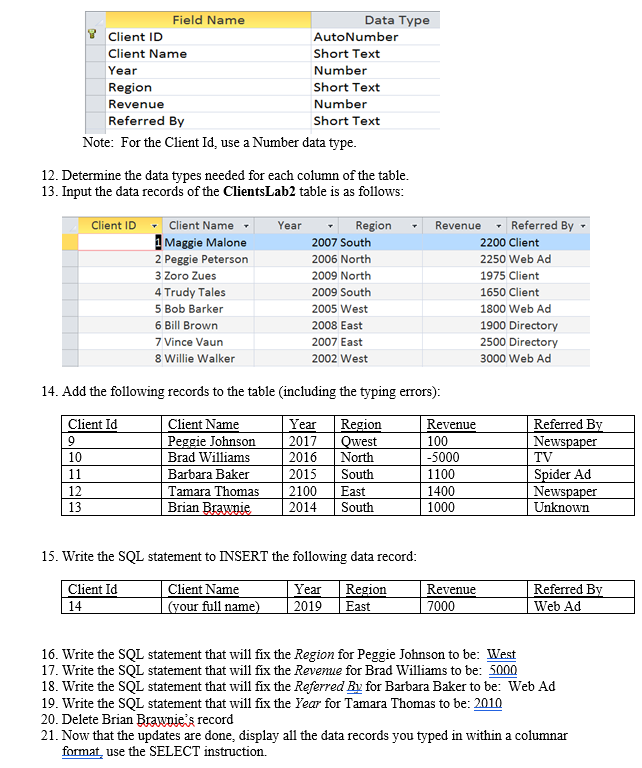
Field Name Data Type Client ID AutoNumber Client Name Short Text Year Number Region Short Text Revenue Number Referred By Short Text Note: For the Client Id, use a Number data type. 12. Determine the data types needed for each column of the table. 13. Input the data records of the ClientsLab2 table is as follows: Client ID Year Client Name 1 Maggie Malone 2 Peggie Peterson 3 Zoro Zues 4 Trudy Tales 5 Bob Barker 6 Bill Brown 7 Vince Vaun 8 Willie Walker Region 2007 South 2006 North 2009 North 2009 South 2005 West 2008 East 2007 East 2002 West Revenue Referred By 2200 Client 2250 Web Ad 1975 Client 1650 Client 1800 Web Ad 1900 Directory 2500 Directory 3000 Web Ad 14. Add the following records to the table (including the typing errors): Client Id 9 10 11 12 13 Client Name Peggie Johnson Brad Williams Barbara Baker Tamara Thomas Brian Brawnie Year 2017 2016 2015 2100 2014 Region Qwest North South East South Revenue 100 -5000 1100 1400 1000 Referred By Newspaper TV Spider Ad Newspaper Unknown 15. Write the SQL statement to INSERT the following data record: Year Client Id 14 Client Name (vour full name) Region East Revenue 7000 Referred By Web Ad 2019 16. Write the SQL statement that will fix the Region for Peggie Johnson to be: West 17. Write the SQL statement that will fix the Revenue for Brad Williams to be: 5000 18. Write the SQL statement that will fix the Referred By for Barbara Baker to be: Web Ad 19. Write the SQL statement that will fix the Year for Tamara Thomas to be: 2010 20. Delete Brian Brawnie's record 21. Now that the updates are done, display all the data records you typed in within a columnar format, use the SELECT instruction
Step by Step Solution
There are 3 Steps involved in it

Get step-by-step solutions from verified subject matter experts
 Study Help